Card 37 of 38· Added after the gap sweep
Relevance tuning — when default ranking is wrong
Scoring profiles and the field types they need, what synonym maps do not apply to, and the two ways to silently kill semantic ranking.
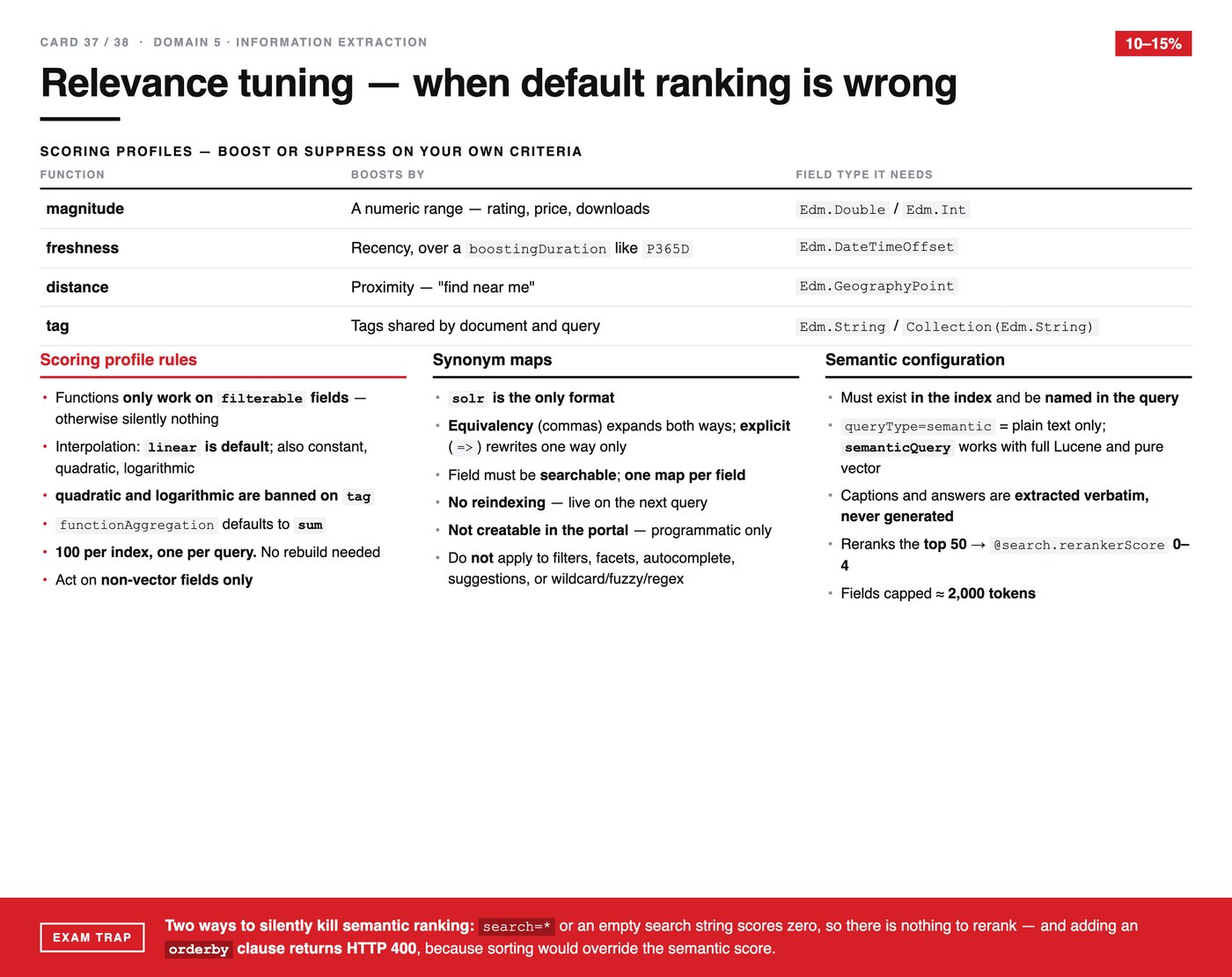
Sometimes the default ranking is simply wrong for your business. A search that returns the most textually relevant document is not always the one that should come first — newer, closer or better-rated may matter more. This card is about the three ways to say so.
Scoring profiles
Four functions, each boosting on different criteria, and each requiring a particular field type.
| Function | Boosts by | The field type it needs |
|---|---|---|
| magnitude | A numeric range — rating, price, downloads | Edm.Double or Edm.Int |
| freshness | Recency, over a boostingDuration such as P365D |
Edm.DateTimeOffset |
| distance | Proximity — "find near me" | Edm.GeographyPoint |
| tag | Tags shared by the document and the query | Edm.String or a collection of them |
The rules that decide questions:
- Functions only work on filterable fields. On a non-filterable field they do nothing, silently — another quiet failure to add to the collection.
- Interpolation defaults to
linear; constant, quadratic and logarithmic are also available. - Quadratic and logarithmic are banned on
tag. functionAggregationdefaults tosum.- 100 per index, one per query. No rebuild needed.
- They act on non-vector fields only.
Synonym maps
solris the only supported format.- Equivalency, written with commas, expands in both directions. Explicit mapping, written with
=>, rewrites one way only. - The field must be searchable, and there is one map per field.
- No reindexing required — a change is live on the next query.
- Not creatable in the portal; programmatic only.
- They do not apply to filters, facets, autocomplete, suggestions, or wildcard, fuzzy and regex queries.
That last exclusion is the one that surprises people. A synonym map improves search and leaves your filters and autocomplete behaving exactly as before.
Semantic configuration
- It must exist in the index and be named in the query. Both, or nothing happens.
queryType=semanticis plain text only;semanticQueryworks with full Lucene syntax and pure vector search.- Captions and answers are extracted verbatim, never generated. This is a genuine distinction from a language model summarising results — nothing is written, only selected.
- It reranks the top 50, producing
@search.rerankerScorefrom 0 to 4. - Fields are capped at roughly 2,000 tokens.
The trap
Two ways to silently kill semantic ranking:
A wildcard search=* or an empty search string scores zero, so there is nothing to rerank. The reranker needs a ranked list to reorder; a query that matches everything equally does not produce one.
Adding an orderby clause returns HTTP 400, because explicit sorting would override the semantic score. That one at least fails loudly.
The first is the more dangerous. You configure semantic ranking correctly, run a wildcard query to see everything, and conclude the feature does nothing.