Card 42 of 44· Added after the August 2026 sweep
The four security control planes
Domain 3. Entra Agent ID, Agent 365, Purview and Defender — each learned by the question it answers, why agent identity stopped being optional in July 2026, and the two things Customer Lockbox quietly does not cover.
The security card earlier in this set is about principle, and principle is what
makes you a good architect. This one is about products, because AB-100 is a
Microsoft exam and people who sat it say this is where it separates from PL-600 —
it expects you to name the actual tooling.
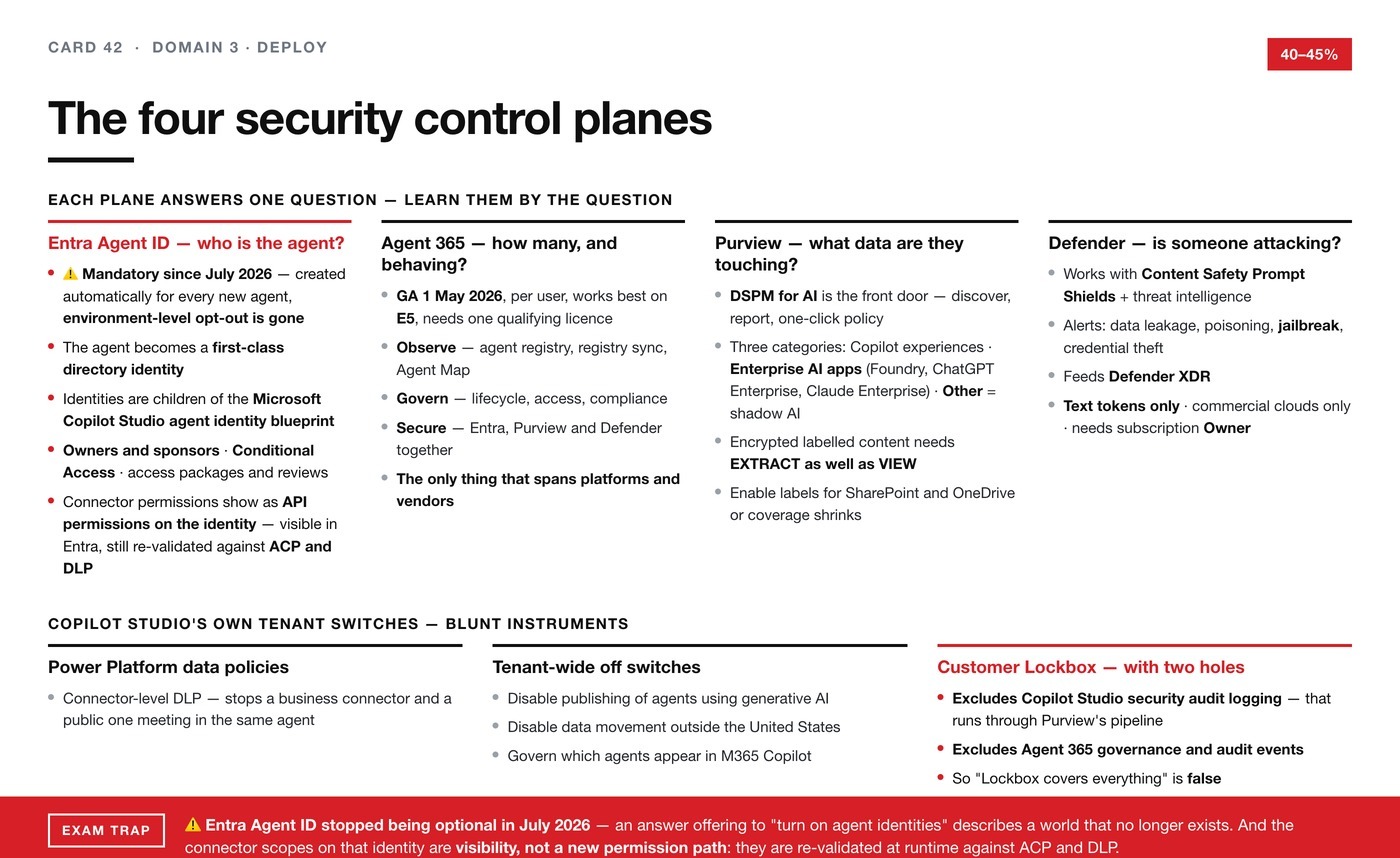
Four control planes. Each answers a different question, and learning them by the
question is what makes them stick.
Entra Agent ID — who is the agent?
Until recently an agent had no identity of its own. It borrowed a user's, or ran
under a service account nobody could name.
Entra Agent ID makes an agent a first-class identity in your directory, and
every identity control you already run then applies to it.
Agent identities, created from an agent identity blueprint — a reusable
template, so ten agents of the same shape are governed identically. Owners and
sponsors — every agent has a named human accountable for it, which is the
control that answers "who owns this thing" eighteen months later. Conditional
Access and ID Protection for agents. ID Governance and access packages —
access reviews and lifecycle. And inheritable permissions, which govern how an
agent's entitlement relates to the user it acts for.
In plain terms: the agent gets a staff pass, an owner, and a leaving process — the
three things you insist on for a human contractor.
Microsoft Agent 365 — how many are there, and are they behaving?
Generally available since 1 May 2026, licensed per user, works best on
E5, and needs at least one qualifying licence in the tenant to switch on.
It is the control plane above everything — Copilot Studio agents, Foundry agents,
partner agents — organised in three verbs. Observe: a single agent
registry in the Microsoft 365 admin center showing every agent, its adoption,
activity and health, plus registry sync and an Agent Map. Govern: lifecycle,
access and compliance, working through the registry, Entra and Purview together.
Secure: Entra for risk-based access, Purview for data risk, Defender for
runtime threat detection.
When a scenario says the organisation has lost track of how many agents exist,
or asks how to govern agents built on more than one platform, this is the answer
and no single-product control is. It is the only thing in the stack designed to
span makers, platforms and vendors.
Microsoft Purview — what data are they touching?
DSPM for AI — Data Security Posture Management for AI — is the front door. It
discovers AI usage across the enterprise, reports on it, and offers one-click
policies built from Purview's existing information-protection controls. If a
scenario asks where to even start, this is it.
Purview groups what it sees into three categories, and the split is worth knowing.
Copilot experiences and agents — M365 Copilot, Copilot Studio, Copilot in
Fabric, Security Copilot. Enterprise AI apps — Microsoft Foundry,
Entra-registered apps, and third-party enterprise tools including ChatGPT
Enterprise and Anthropic Claude (Enterprise). Other AI apps — consumer tools
spotted through browser activity: consumer ChatGPT, Gemini, DeepSeek. That third
one is the shadow-AI category.
Two specifics that are exactly the shape of an exam question. Sensitivity labels
are honoured by AI apps — but when a label applies encryption, the user needs
the EXTRACT usage right as well as VIEW before an AI app will return that
content. VIEW alone is not enough. And you must enable sensitivity labels for
SharePoint and OneDrive; without that, the encrypted files Copilot and agents can
work with are limited to data in use inside Office apps on Windows.
So "users can open the document themselves but Copilot refuses to summarise it" is
not a bug and not a permissions error. It is a label with encryption and a missing
EXTRACT right.
Microsoft Defender for Cloud — is someone attacking them?
Threat protection for AI services detects attacks on generative AI
applications in real time. It works with Azure AI Content Safety Prompt
Shields plus Microsoft threat intelligence, and raises alerts for data
leakage, data poisoning, jailbreak and credential theft. Alerts flow into
Defender XDR, so an AI incident sits alongside the rest of the attack.
Its limits matter as much as its capabilities, and each is a plausible distractor.
Text tokens only — image and audio are not scanned. Supports Azure OpenAI and
Azure AI Model Inference models. Commercial clouds only — not Azure
Government, not 21Vianet, not connected AWS accounts. Enabling it at subscription
level needs the Owner role at subscription scope.
Copilot Studio's own tenant switches
Underneath the four planes there are blunt instruments. Power Platform data
policies are connector-level DLP — they stop a business connector and a public
connector meeting in the same agent. An admin can disable publishing of agents
that use generative AI, tenant-wide. Data movement across geographies can be
disabled for generative AI features outside the United States. And the Microsoft
365 admin center governs which agents appear in Microsoft 365 Copilot.
Customer Lockbox is supported — with two exclusions. Copilot Studio's own
security audit logging runs through the Purview audit pipeline rather than the
Copilot Studio service, and Agent 365 governance and audit events flow through
Agent 365. Neither is covered.
Reach for tenant-wide switches when the risk is category-level. For anything finer
the control belongs at the environment or the agent, and turning off publishing
tenant-wide to solve one team's problem is the wrong answer even when it works.
Exam trap. "Lockbox covers everything" is false, and that is exactly how the
question will be worded.
The one line to carry: Prompt Shields detects the attempt, Defender turns it
into an alert an analyst will actually see — Content Safety on its own protects
the application and gives your security operations centre nothing to work with.
Currency (23 Aug 2026) — this one changes an answer.
Automatic Entra Agent ID creation was a preview feature when this card was written.
It is now mandatory. Microsoft's wording:
"Previously, you could opt out of Entra Agent ID at the environment level.
Starting July 2026, all new agents must have Microsoft Entra Agent IDs, and you
can no longer opt out of automatic agent identity creation."
So the identity plane is no longer something an organisation matures into — it is the
floor. A scenario asking how to make sure every agent has an identity has a shorter
answer than it used to: in Copilot Studio, on the standard harness, they already do.
Three details worth carrying. The blueprint is created for you and has a name —
the Microsoft Copilot Studio agent identity blueprint — and every agent identity is
a child of it. Agents built before the July rollout keep their app registrations
until Microsoft migrates them, and governance works across both meanwhile, so a mixed
estate is not a compliance gap. And deleting an agent deletes its identity, so you are
not left with orphaned principals.
And the part most likely to be the right answer to an access-review question:
connector permissions now appear as API permissions on the agent's Entra Agent ID.
An Entra or Microsoft 365 admin can see what an agent can reach without opening the
Power Platform admin center, and can target those permissions with Conditional Access.
The obvious worry is whether a maker could use those scopes to route around governance.
Microsoft answers it directly — they are "re-validated at runtime against Advanced
Connector Policies (ACP) and DLP, so they can't be used to bypass your governance
policies." Visibility, not a new permission path. An option claiming otherwise is
wrong.
One scoping caveat: this is documented on the standard harness. Do not assume it
reads across unchanged to the GitHub Copilot harness. See card 43.