How to implement Microsoft 365 Copilot in your company — and why most organisations get it wrong
Six stories from the front lines of enterprise AI deployment, covering permissions, sensitivity labels, DLP, identity, monitoring, and phased rollout strategy.
Six stories from the front lines of enterprise AI deployment. Each one shows what happens when you skip a step — and what to do instead.
Emma runs IT for a 2,000-person professional services firm. In January 2025, her CEO walked in with a mandate: "Get us on Copilot by quarter end." Emma spent three weeks provisioning licenses, ran a quick Teams training, and switched it on for 400 users. By March, her phone was ringing. A junior analyst had asked Copilot to summarise "everything about Project Phoenix." It surfaced a board deck, a due diligence report, and a salary spreadsheet — all technically accessible to the analyst under old, unreviewed permissions. The CEO was unhappy. The CFO was livid.
Emma's story is not unusual. It is the most common first chapter in enterprise Copilot deployments in 2025.
Microsoft 365 Copilot is genuinely powerful. But it is not a feature toggle. It is a mirror — it reflects exactly what your data governance looks like, at scale, in seconds. Get the foundations right, and it saves every knowledge worker five to ten hours a month. Skip the foundations, and it surfaces your most sensitive information to the wrong people before you've finished your morning coffee.
Here is what to do, section by section, and why each step matters.
The permissions problem that everyone ignores until it's too late
A meeting room, a Friday afternoon. The Head of HR has just asked Copilot to pull together a summary of "our current compensation structure."
She is not a bad actor. She genuinely wants to prepare for a Monday board presentation. But Copilot, faithfully following her permissions, pulls in a SharePoint folder that was shared with "Everyone except external users" five years ago during a migration that nobody fully reviewed. The summary it returns includes salary bands for the executive team — including hers.
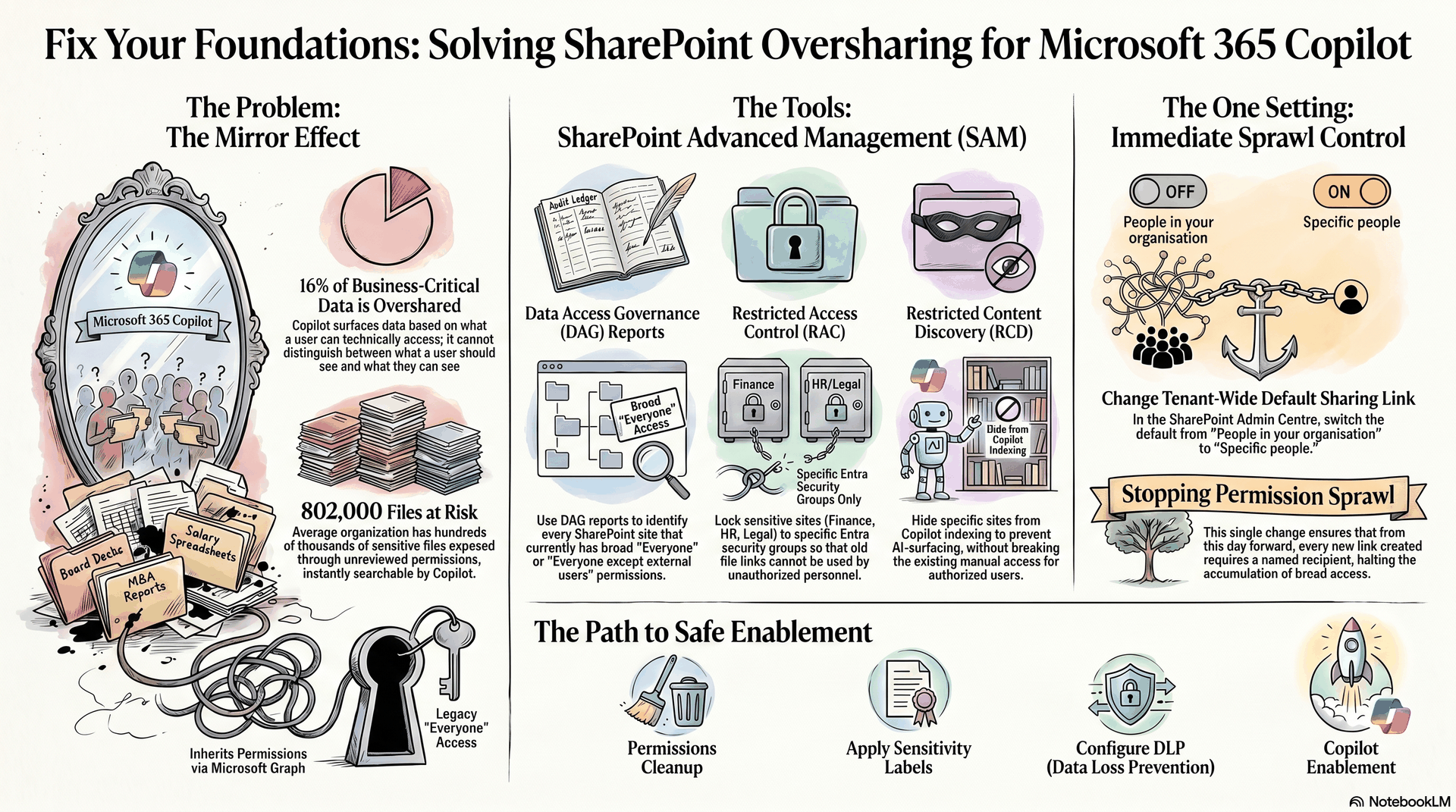
This is the scenario that keeps IT directors awake at night. And according to Concentric AI's 2025 Data Risk Report, 16% of business-critical enterprise data is overshared, with an average of 802,000 files at risk per organisation. Copilot does not create this problem. It exposes it, instantly, at conversational speed.
The fix is not glamorous. It takes four to eight weeks, costs no software, and does not require a new vendor. It requires running Microsoft's Data Access Governance (DAG) reports inside SharePoint Advanced Management (SAM) to surface every site that has broad "Everyone" or "Everyone except external users" permissions. Then you remove them, one site at a time, replacing with specific Entra security groups.
While you are in SAM, enable Restricted Access Control (RAC) on your highest-sensitivity sites — finance, HR, legal, M&A. RAC means that even if someone has an old file link, they cannot access the site unless they belong to a designated group. For sites where you need Copilot to see the data for some users but not surface it across the board, turn on Restricted Content Discovery (RCD) — this hides the site from Copilot indexing without breaking anyone's existing access.
And change one global setting before you do anything else: go to SharePoint Admin Centre and change the default sharing link from "People in your organisation" to "Specific people." This single change means every new link created from that day forward requires the sender to name the recipient. The permission sprawl stops accumulating.
The teaching: "Copilot sees what your users see. Before you enable the AI, fix what your users can see."
Why sensitivity labels are not optional — they are the classification layer the whole system depends on
It is 11pm. A Copilot-generated document lands in a shared Teams channel. It contains a summary of three client contracts. Nobody labelled the source files. The document carries no markings. Three minutes later, it has been forwarded outside the company by someone who did not realise what they were sharing.
Microsoft Purview sensitivity labels exist precisely to prevent this. And in a Copilot deployment, they are not optional hygiene — they are the active enforcement layer.
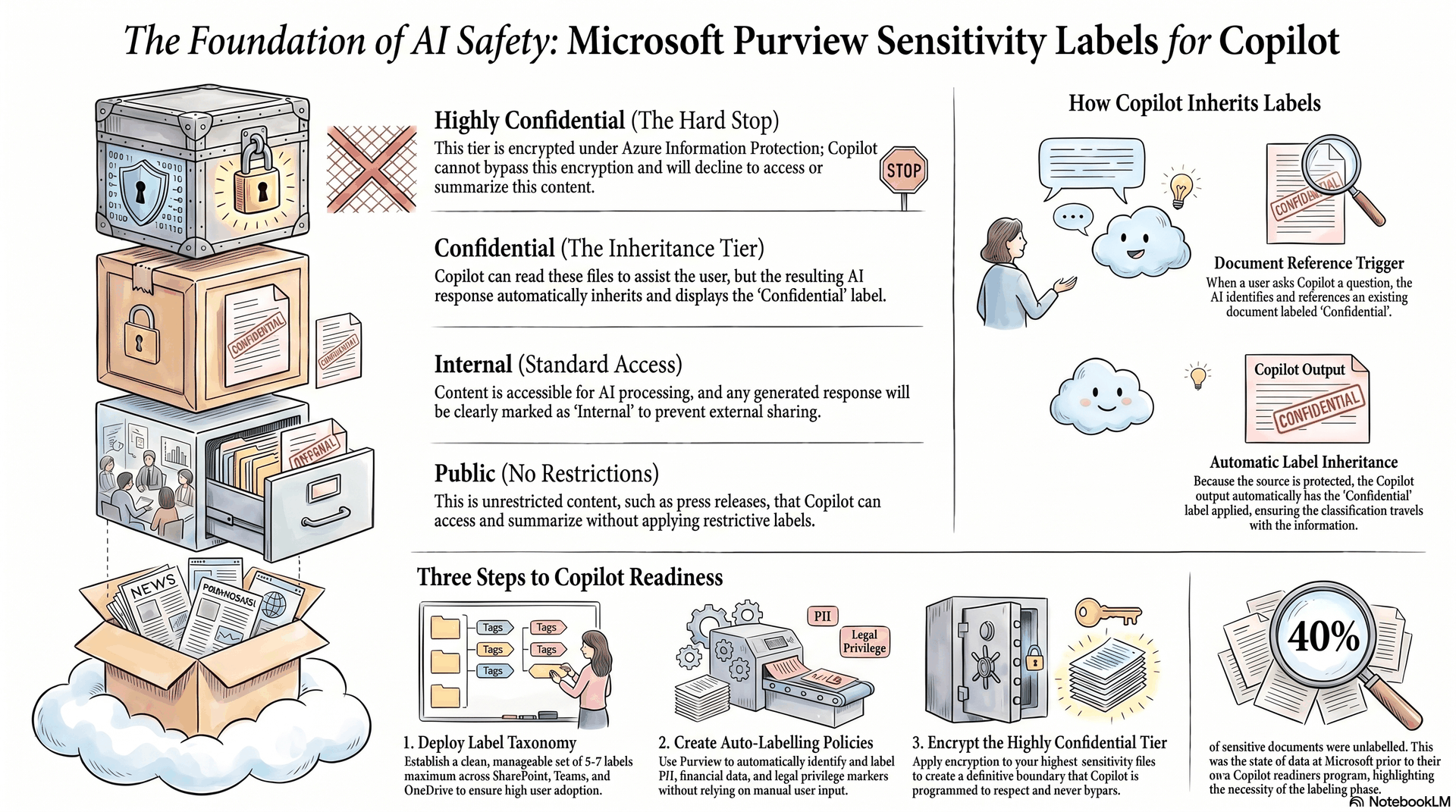
Here is how they work with Copilot: when Copilot generates a response or a document that references files marked with a sensitivity label — say, "Confidential" — the output automatically inherits that label. A user cannot receive an unlabelled summary of labelled content. The classification travels with the information.
But this only works if the labels exist. Most organisations have some labels in place, but the coverage is patchy — a handful of manually labelled documents, nothing auto-labelled. For Copilot readiness, you need three things:
First, deploy a clean label taxonomy across SharePoint, Teams, OneDrive, and Exchange. Five to seven labels is enough — Public, Internal, Confidential, Highly Confidential, and variants by regulatory context if needed. More labels than that, and users ignore them.
Second, create auto-labelling policies in Purview that automatically apply labels based on sensitive information types: UK/EU national insurance numbers, financial account data, legal privilege markers, GDPR-relevant personal data. Anything your data estate contains that you would not want Copilot to surface should have a policy-driven label applied without human intervention.
Third, encrypt the "Highly Confidential" tier. Encrypted content is content that Copilot cannot bypass — if a file is encrypted under Purview's Azure Information Protection (AIP), Copilot will decline to summarise it and will tell the user it cannot access the content. This is your hard stop.
Microsoft found in its own internal deployment that 40% of sensitive documents were unlabelled before the Copilot readiness program began. The labelling phase — not the Copilot enablement — was the longest part of the project.
The teaching: "Labels are not bureaucracy. They are the permission system that Copilot reads at runtime. Without them, Copilot cannot tell the difference between a public press release and your M&A term sheet."
The DLP policies that prevent sensitive data from flowing through AI prompts
A new starter in procurement has just pasted an entire supplier contract — including commercial pricing and penalty clauses — into a Copilot prompt. She is trying to get a quick summary. Copilot obliges.
In a world without DLP policies configured for Copilot, this is fine from a system perspective. The user has access to the contract. Copilot surfaces it. The summary is generated. But if that summary is then pasted into a Teams message, forwarded in an email, or accessed through a plugin by a third-party app — the data has travelled.
Microsoft Purview's Data Loss Prevention engine now has a dedicated policy location: "Microsoft 365 Copilot and Copilot Chat." It became generally available in 2025. Creating a policy here means you can define conditions — sensitivity labels, sensitive information types, keywords — and when a user's Copilot interaction matches that condition, Copilot stops. It does not generate a response for that query. It tells the user the content is restricted.
You need at minimum two DLP policies for Copilot:
The first covers sensitivity labels. Any prompt that involves a file labelled "Highly Confidential" triggers the policy. Copilot declines to process the contents. The citation may still appear — Copilot will acknowledge the file exists — but it will not read or summarise the data.
The second covers sensitive information types. Configure Purview's built-in classifiers to detect financial account numbers, credentials, health information, and any industry-specific patterns your organisation handles. When these appear in a Copilot interaction — either in the prompt the user sends or in the content Copilot is about to return — the policy fires.
One additional control from the Purview stack worth enabling immediately: Communication Compliance with Prompt Shields. This is Microsoft's defence against prompt injection — where malicious content embedded in a document attempts to hijack Copilot's behaviour and extract data. In a world where employees are asking Copilot to summarise web content, external documents, and email attachments, Prompt Shields is not paranoia. It is hygiene.
The teaching: "The question is not whether your users will paste sensitive data into Copilot prompts. They will. The question is whether you have built the guardrails before you find out."
Identity and access — the zero-trust layer that Copilot inherits
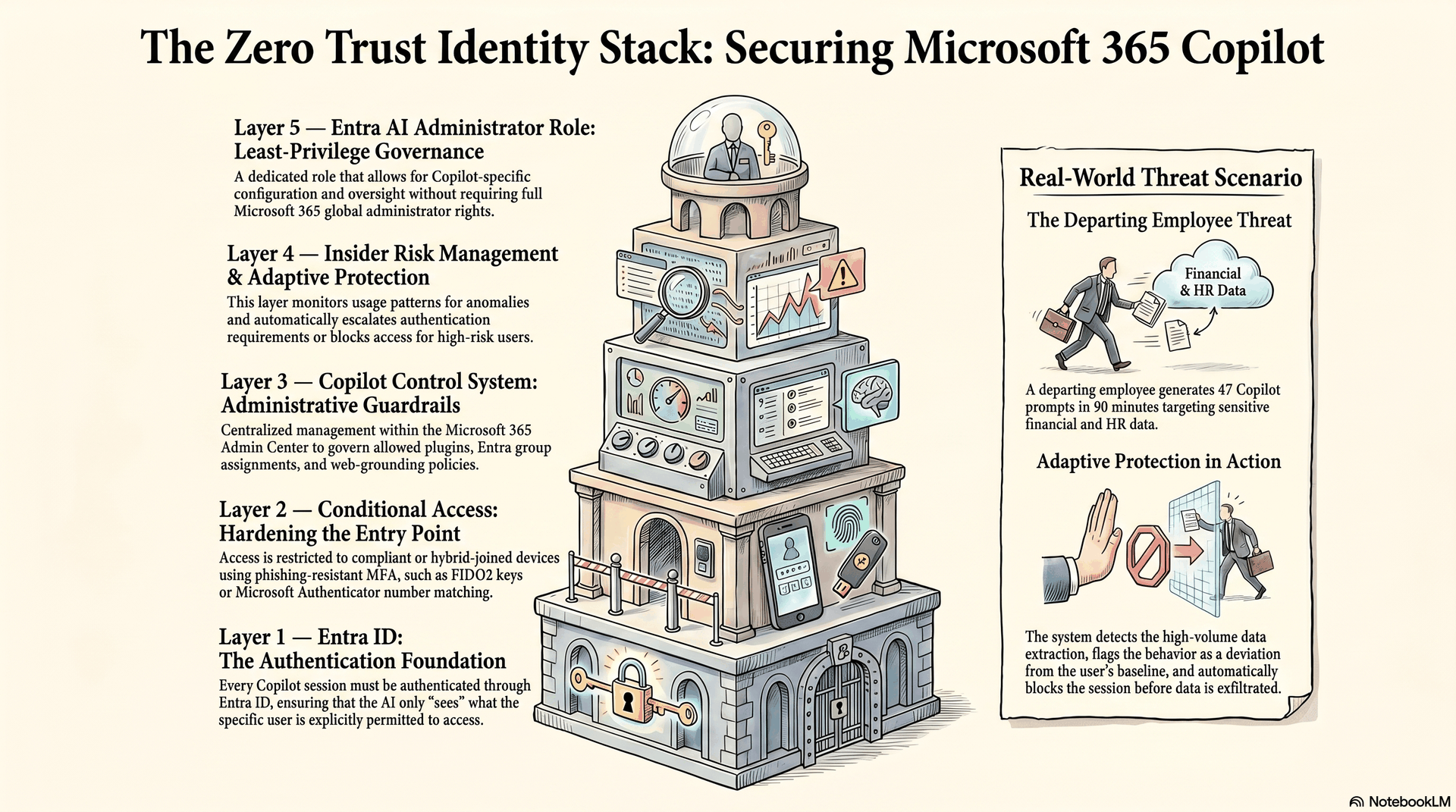
It's 2am. A notification fires in the security team's inbox: an account has been flagged for unusual Copilot activity. In the past 90 minutes, the same user has generated 47 prompts — all requesting summaries of financial projections, client lists, and personnel records. The user is in their notice period.
This scenario — the departing employee data-harvesting via Copilot — is now a documented threat pattern. And it is one that Microsoft's own security team has built tools to address.
Every Copilot interaction runs through Microsoft Entra ID. This means every Copilot access check goes through your Conditional Access policies. If you have not done this already, create a Conditional Access policy that requires a compliant or hybrid-joined device specifically for Copilot app sessions. This ensures that Copilot is not accessible from a personal laptop, a coffee-shop hotspot, or an unmanaged phone.
Layer on phishing-resistant MFA — FIDO2 keys or the Microsoft Authenticator app's number matching. Basic MFA (SMS OTP) is insufficient for AI-powered access to your entire knowledge base.
Then enable Microsoft Purview Insider Risk Management and activate Adaptive Protection. Here is what it does: it monitors Copilot usage patterns. When a user's behaviour deviates significantly from their baseline — bulk data extraction, unusual hours, querying content outside their normal domain — the system raises their risk score. Adaptive Protection then automatically instructs Conditional Access to increase the authentication requirement for that specific user, or to block their Copilot access entirely while the security team reviews.
The Copilot Control System in the Microsoft 365 Admin Centre is where you manage the organisational layer: which Copilot plugins and agents are allowed, which Entra groups can access which capabilities, and what web-grounding policies apply. Do not leave this at defaults. Audit the allowed extensions, disable any you cannot justify, and assign agents to specific security groups rather than the entire tenant.
Assign the Entra AI Administrator role to the individuals responsible for Copilot governance — and only them. This role grants management of Copilot configuration and related AI services without granting full Microsoft 365 admin rights.
The teaching: "Copilot is not an application. It is a key to your knowledge base. Treat it with the same identity controls you would treat admin access to your finance system."
Audit, monitoring, and the governance loop that closes the cycle
Three months after go-live, the CISO asks a simple question: "What has Copilot been doing?" Nobody has an answer.
This is the governance gap that appears in nearly every first-generation Copilot deployment. The rollout happened. The licences went out. But nobody configured the monitoring that tells you whether the investment is working, whether the guardrails are holding, and whether anything unusual is happening.
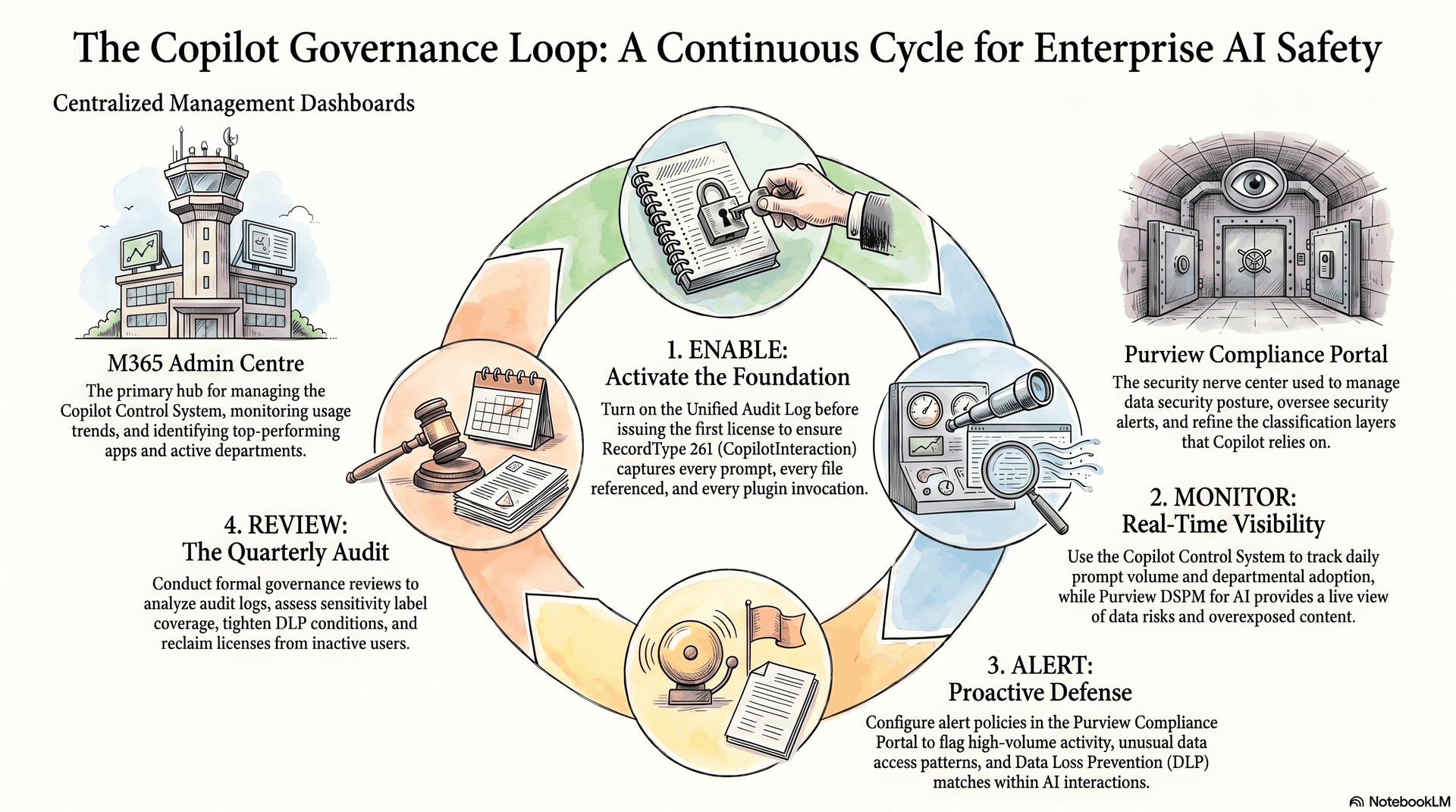
The unified audit log in Microsoft 365 captures every Copilot interaction as a distinct record type: RecordType 261, CopilotInteraction. Every prompt a user sends. Every file Copilot references to build a response. Every plugin invocation. All of it goes into the audit log if you have it enabled — and it is not enabled by default on all tenants. Turn it on before you give out the first Copilot licence.
From the Microsoft 365 Admin Centre, the Copilot Control System's usage dashboard shows you aggregate Copilot activity: how many prompts per day, which apps are seeing the most usage, which departments are adopting and which are dormant. Use this to guide your wave rollout decisions and your licence reclamation policy.
For active security monitoring, set up alert policies in the Purview compliance portal for high-volume Copilot activity, unusual data access patterns, and DLP policy matches in Copilot interactions. The Purview DSPM (Data Security Posture Management) for AI dashboard gives you a real-time view of your AI-related data risk — it proactively surfaces content that is being accessed through Copilot and flags items that appear overexposed.
Run a formal Copilot governance review every quarter. Pull the audit log data. Look at what content is being referenced most frequently. Cross-reference with your sensitivity label coverage reports. Tighten DLP conditions if you are seeing near-misses. Expand auto-labelling if unlabelled sensitive content keeps appearing in Copilot citations.
The loop never closes by itself. You have to build the review cadence into your operating model.
The teaching: "An AI deployment without monitoring is a flight without instruments. You will feel like you are flying until you are not."
The rollout strategy — why phased waves with real gates beat a big-bang launch
A large insurance company gave Copilot to 8,000 users in a single weekend. Three weeks later, they submitted a support ticket to Microsoft: "Copilot is not being used." The adoption rate was 4%.
The problem was not the technology. The problem was that 8,000 people received a tool with no context, no training, and no one around them using it successfully. The tool disappeared into the background noise of their existing Microsoft 365 experience.
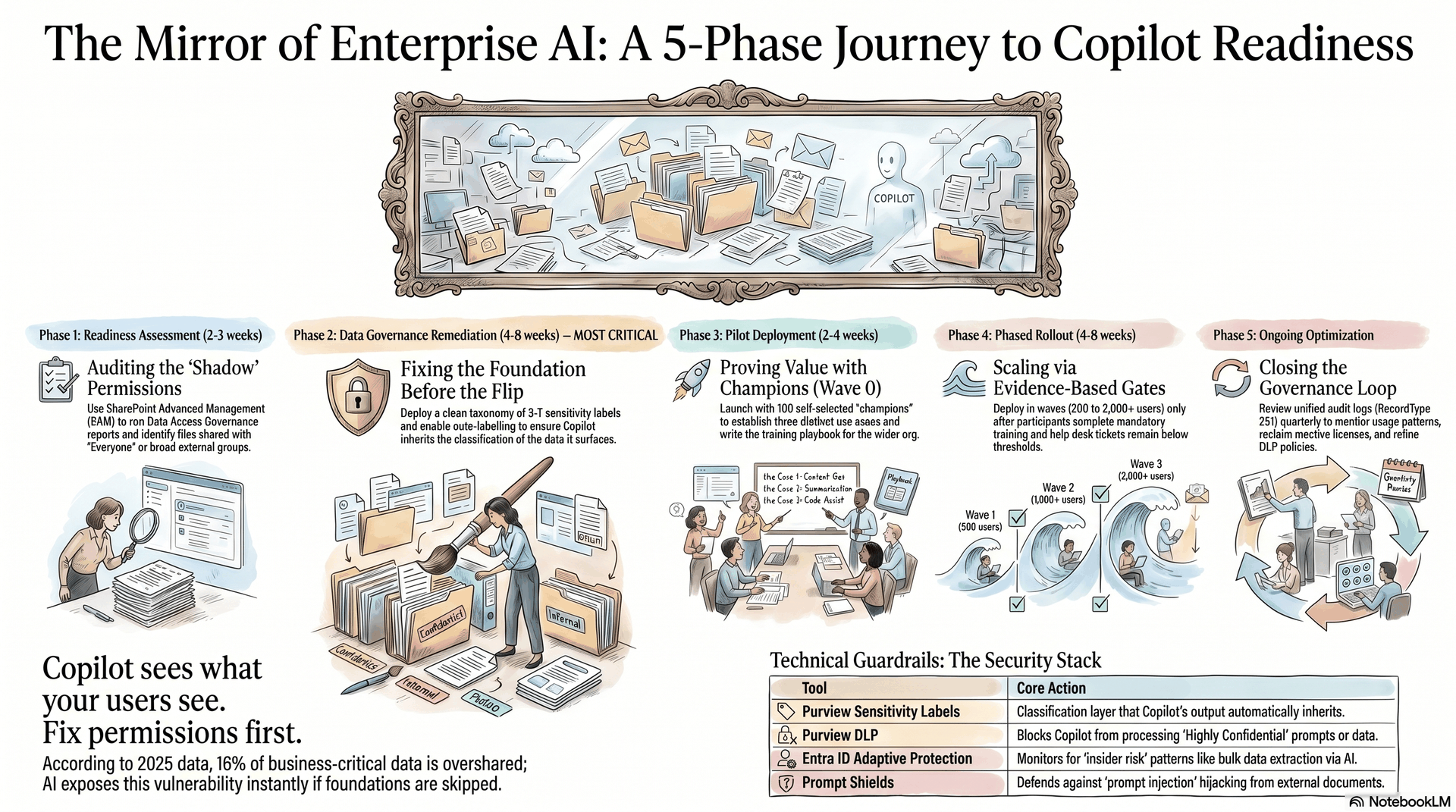
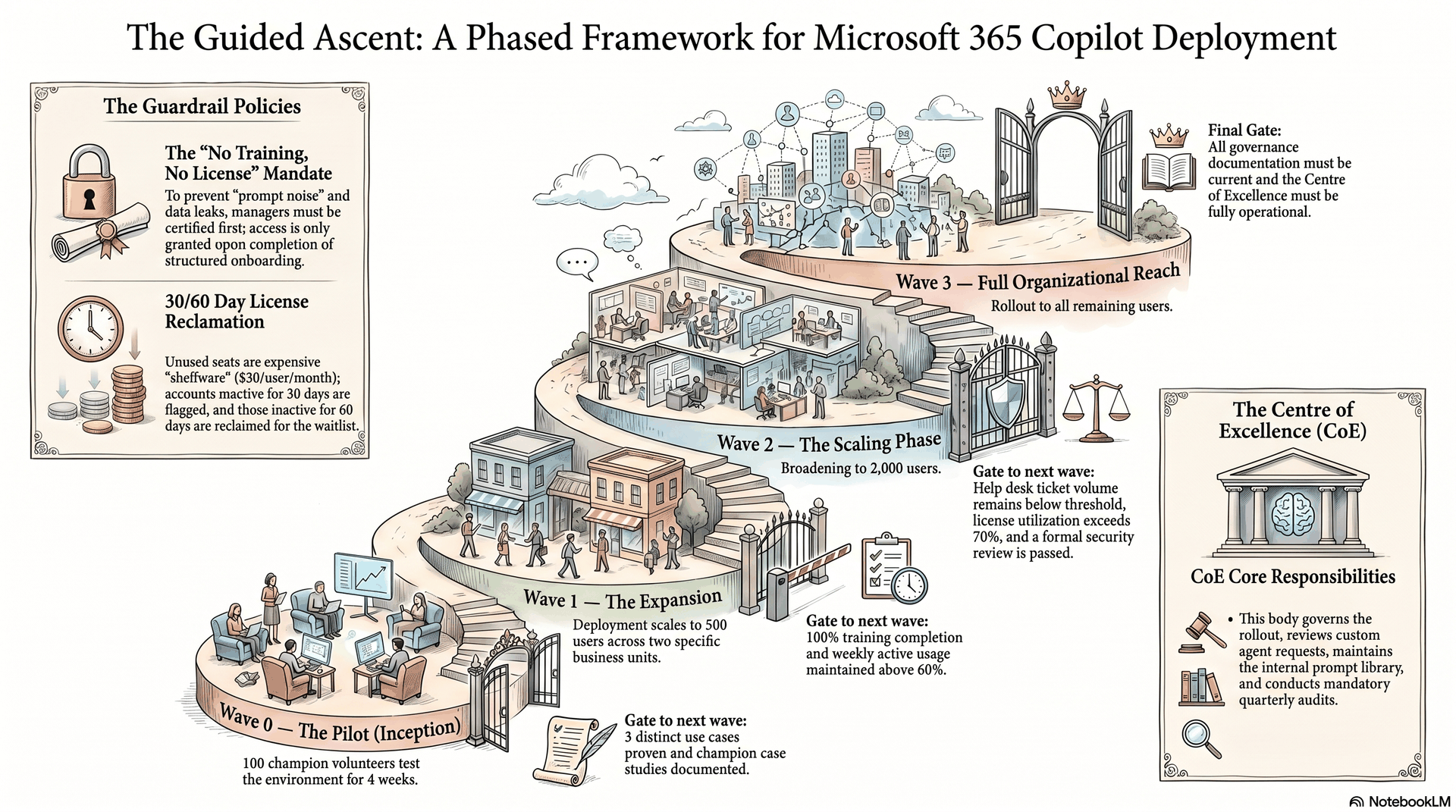
Every successful Copilot deployment runs in structured waves, and the gate between each wave is not a date — it is evidence. Before Wave 1 opens, specific criteria must be met: SharePoint permissions audit complete, sensitivity labels deployed to at least 80% of active content, DLP policies live, foundation training completed by all Wave 1 participants.
A typical wave structure from the Copilot Rollout Blueprint:
- Wave 0 (Pilot): 100 users, self-selected champions, 4 weeks. Goal: prove value in three distinct use cases. Gate: champion-led case studies written.
- Wave 1: 500 users across two business units. Goal: establish training playbook. Gate: training completion 100%, usage above 60% weekly active.
- Wave 2: 2,000 users. Goal: scale what works. Gate: help desk tickets below threshold, licence utilisation above 70%.
- Wave 3: Full org. Gate: security review passed, governance documentation current.
The no-licence-without-training rule is non-negotiable. Managers must complete certification before their teams receive access. This is not bureaucracy for its own sake — users who receive Copilot without context generate far more noise (bad prompts, mis-attributed outputs, confusion about data access) than users who receive it with even four hours of structured onboarding.
Establish a utilisation reclamation policy from day one. Licences inactive for 30 days get flagged. Licences inactive for 60 days get reclaimed and reassigned to someone on the waitlist. At $30 per user per month, unused Copilot seats are among the most expensive shelfware in modern enterprise software.
Build a Centre of Excellence — even a small one. Three people who are responsible for governing Copilot, reviewing new agent requests from business units, publishing a prompt library, and running the quarterly audit cycle. Without someone who owns this, the governance documents written at launch become archaeology within a year.
The teaching: "The technology is ready the day you turn it on. Your organisation is not. The rollout is not about software — it is about the human system that will use the software safely and well."
No comments yet — be the first to add to the discussion. Comments appear after they’re reviewed.
Want more insights?
Subscribe to get the latest articles delivered straight to your inbox.