Copilot Studio stopped asking you to write the plan
On 3 August 2026 Microsoft shipped a new engine underneath Copilot Studio. These are the stories of what it changes, what it quietly costs you, and what to do on Monday if you already have agents...
On 3 August 2026 Microsoft shipped a new engine underneath Copilot Studio. These are the stories of what it changes, what it quietly costs you, and what to do on Monday if you already have agents in production.
I want to start with a scene you might recognise.
Someone on your team spent three weeks building an invoice agent. It works, mostly. There are nineteen topics. There is one instruction box with about four hundred words in it, and a comment at the bottom that says do not remove this line, it breaks the routing. There are eleven tools wired in. When an invoice arrives with a missing purchase order number, the agent apologises and stops, because nobody wrote the branch for that.
Everyone calls it an AI agent. It is really a very expensive flowchart with a language model stapled to the front.
That is the thing Microsoft changed on 3 August. Not the model. The layer underneath it.
The word Microsoft chose tells you what changed
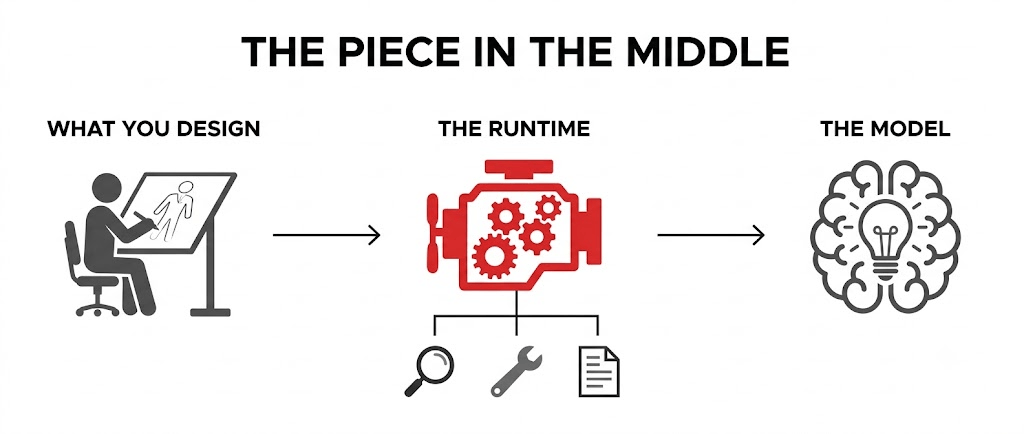
Picture the wiring diagram of your agent, and then rub out everything except the box in the middle that nobody drew.
There has always been a piece of software sitting between the agent you design and the model that does the thinking. It decides when to call the model. It decides what to put in front of the model — which instructions, which knowledge, which conversation history. It reads what comes back and works out whether that was an answer or an instruction to go and call a tool. Then it does it again.
Microsoft has now given that piece a name. It calls it the harness — a runtime that sits between your design and the model. And once you name a thing, you can ship different versions of it. Copilot Studio now has three, and the one you pick decides both what your agent can do and how you get billed.
The three are the standard harness (the classic one, topics and rules), the Copilot chat harness (for extending Microsoft 365 Copilot Chat with your own knowledge), and the new GitHub Copilot harness, which went generally available on 3 August after roughly two months in preview.
The teaching: "For two years everyone argued about which model was best. The model was never the bottleneck. The thing that decides when to call it was."
What you were actually fighting before
Nineteen topics. Four hundred words of instructions. Eleven tools. One prayer.
The Copilot Studio Customer Advisory Team — Microsoft's own field engineers — put it more bluntly than the marketing did. Writing about the migration, they said an agent "shouldn't be one instruction blob with 43 tools and a prayer."
That line landed for me because I have seen exactly that agent. Probably you have too.
The standard harness does one job and does it dependably: it follows the paths you built. You write the topics. You write the branches. You write the fallback. When a request lands inside a path you anticipated, the experience is consistent and predictable, and that is genuinely valuable — a help desk agent that answers the same question the same way every time is a good agent.
The trouble starts at the edges. Real business processes are mostly edges. An invoice with two purchase orders. A supplier who changed their name. A PDF that scanned badly. Under the standard harness, every one of those is a branch somebody has to imagine in advance and then build. Miss one and the agent stops and apologises.
So makers did the only thing available. They pushed more and more intent into the instruction box, hoping the model would improvise the bits they had not built. Sometimes it did. That is the "prayer" part.
The teaching: "A rules engine fails safely at the edge of what you imagined. The problem is that a business process is almost entirely edges."
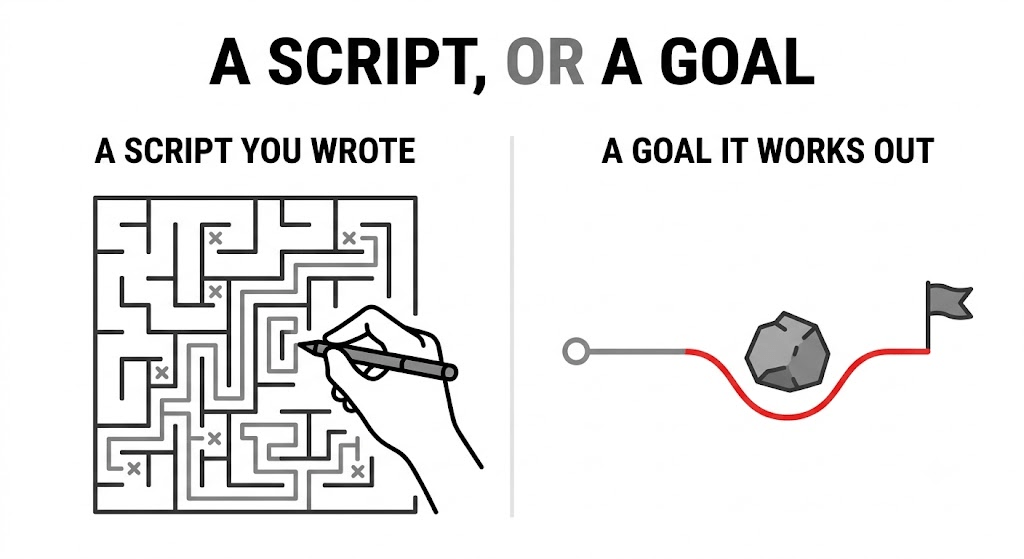
The new one takes a goal, not a script
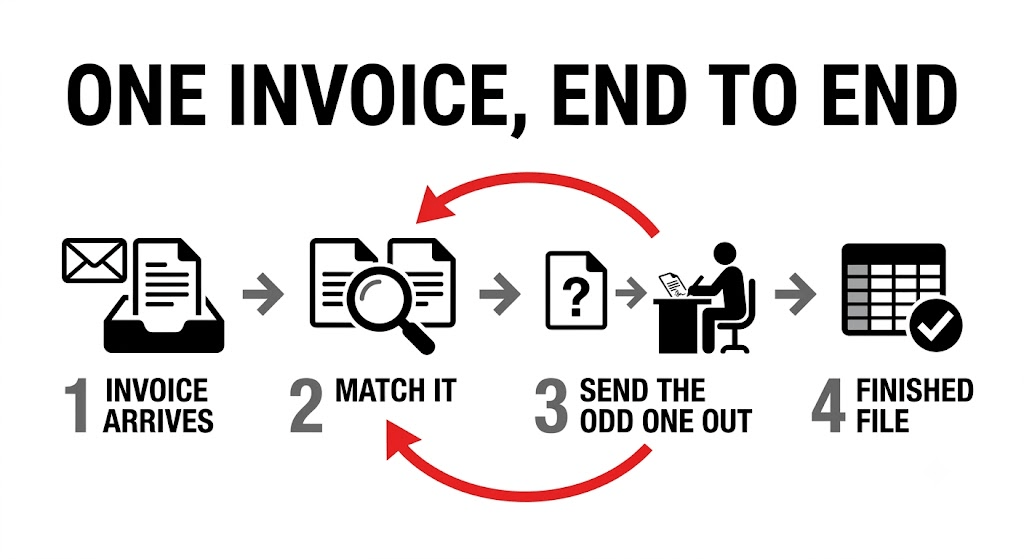
The same invoice lands. This time nobody wrote the branch.
Under the GitHub Copilot harness the agent is given the goal rather than the route. Microsoft's own worked example in the documentation is accounts payable: read the invoices, match them to purchase orders, route the exceptions for approval. The harness breaks that into steps itself, calls whatever it needs across connectors, knowledge sources, MCP servers and other connected agents, and — this is the part that matters most — when a step fails it retries and looks for another way through, rather than stopping.
Three other things come with it, and they are not cosmetic.
It handles files natively. It creates and edits Word, Excel, PowerPoint and PDF documents, and reasons over them. That turns a whole class of work from "impossible without a developer" into "configure it". A monthly reconciliation that ends in a real spreadsheet is now a thing an agent can finish, not just describe.
It runs each task in a sandbox — an isolated, walled-off compute environment — governed by Copilot Studio. That matters because an agent that writes files and runs multi-step work needs somewhere to do it that is not your tenant's living room.
And it runs on frontier reasoning models. Microsoft names Opus 5, GPT-5.6 Sol and Fable 5 in the announcement. The documentation adds a detail worth catching: Claude Sonnet 5 is listed as available only in agents powered by this harness. The model list has started to fork by harness.
Microsoft says its own testing showed gains over the standard harness in multi-tool use, file analysis, code analysis and knowledge quality. Read that as a claim by the vendor, not an independent benchmark — but the four categories they chose tell you honestly where they think the difference is.
The teaching: "The old harness could only do what you had already imagined. The new one can do what you asked for."
Two agents, side by side
Two teams, same invoice problem, different runtime.
Here is the comparison as Microsoft's own documentation draws it, which is the version worth trusting over any blog summary — including this one.
| GitHub Copilot harness | Standard harness | Copilot chat harness | |
|---|---|---|---|
| Best for | Complex, multi-step business processes | Rule-based agents, structured conversations | Extending M365 Copilot Chat with your knowledge |
| How it works | Reasons through a goal on its own, step by step | Follows the topics and rules you define | Connects enterprise knowledge to Copilot Chat |
| When something breaks | Retries, finds another path | Follows the paths you built | Not a focus |
| Files | Creates, edits and reasons over Word, Excel, PowerPoint, PDF | Not a focus | Not a focus |
| Skills and memory | Yes | Not a focus | Not a focus |
| Publishing | Internal teams or external customers | Internal teams or external customers | Internal teams |
| Billing | Copilot Credits, usage-based | Existing Copilot Studio licensing | Consumption, or included in M365 Copilot licences |
Notice what the middle column is not. It is not deprecated. Microsoft has been explicit that agents on the standard harness stay fully supported, and there are no retirement dates announced. If you have a help desk agent that answers the same forty questions consistently, the new harness is not an upgrade for it. It is a more expensive way to get the same answer.
The teaching: "Three harnesses is not three tiers of quality. It is three different shapes of problem, and picking the wrong one costs you money in one direction or reliability in the other."
Six components instead of one prompt
The moment the four-hundred-word instruction box gets taken apart.
This is the change that will alter how you actually work, and it gets much less attention than the model names.
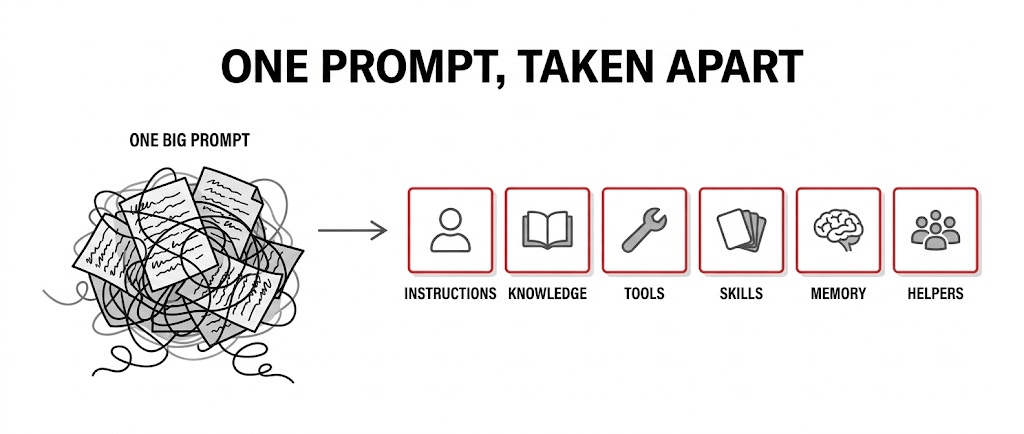
An agent on the new harness is not one prompt. It is six named components, each with a job:
Instructions — who the agent is, its tone, its scope, its limits. Behaviour that always applies.
Knowledge — the sources it can look things up in.
Tools — the actions it can take, via connectors, APIs and MCP servers.
Skills — reusable, self-contained capabilities. A skill is a name, a description, and a set of instructions written in Markdown. The runtime activates one when a request matches its description. Think of them as modes the agent can switch into.
Memory — what it remembers about a user between conversations.
Connected agents — specialists it can hand work to.
The Customer Advisory Team gave the rule for using them, and it is the best single sentence in all of the documentation: every behaviour belongs in the smallest component that makes it reliable and inspectable.
Skills deserve a closer look, because they are portable in a way nothing in Copilot Studio has been before. A skill ships as a SKILL.md file with YAML front matter at the top — a small block of structured metadata carrying the name and description — followed by Markdown instructions. Bundle it with supporting files into a ZIP and you have a skill package you can hand to another team, or another agent, or check into source control. Write your expense policy handling once. Use it in four agents.
Memory has more constraints than the announcement suggests, and they are the good kind. It is per-user and private — the maker cannot see what an agent remembers about an individual. Users can inspect and delete their own memories, either by asking the agent in chat or through a memory portal. If someone does not interact with an agent for 28 days, their memories are deleted. It is switched off in group chats and Teams channels. And turning memory off does not delete what is already stored; it only stops the agent using it. That last one is a detail your privacy review will ask about, so know it before they do.
The teaching: "Splitting one prompt into six components is not tidiness. It is the difference between an agent you can debug and an agent you can only apologise for."
Workflows are the other half, and the boring half is the important one
Everyone reads the agent announcement. Almost nobody reads the workflow one.
Alongside agents, the same harness now powers workflows — Copilot Studio's automation experience, on a redesigned visual canvas with AI actions, agent handoffs and node-level testing.
The line in the documentation that matters is this: workflows are deterministic. They follow a rule-based path, and the same input produces the same output, every time.
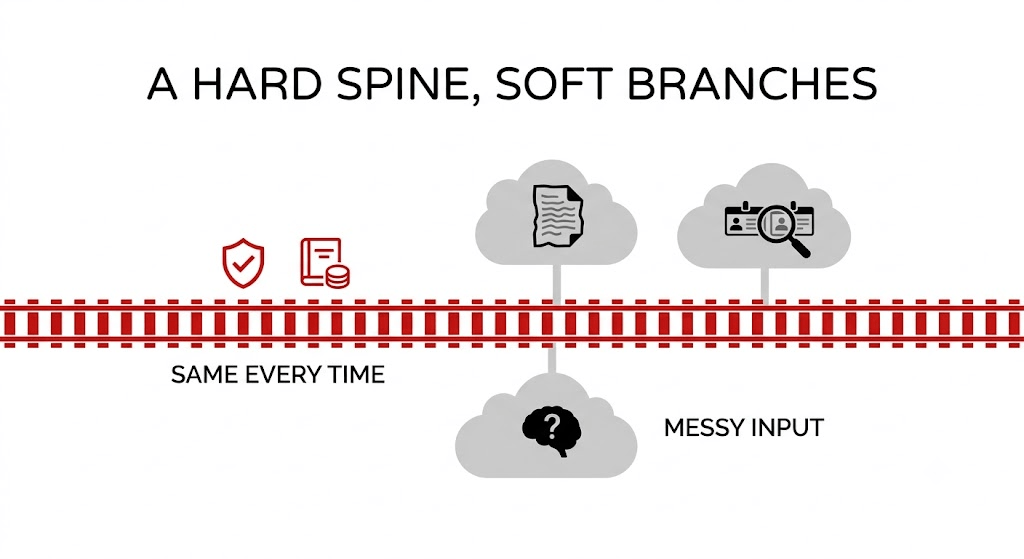
Sit with that next to the agent story for a second. Microsoft has shipped, on the same runtime, one thing that reasons its way to an answer and one thing that does exactly what you told it. And it has made them compose: a workflow can call an agent as a node, and a workflow with the "when an agent calls the flow" trigger can be added to an agent as a tool.
That is the architecture worth stealing, and it is older than AI. Put the deterministic spine where you need an audit trail — the approval, the posting to the ledger, the email that goes to the customer. Put the reasoning where the input is messy — reading the invoice, deciding whether two supplier names are the same company, spotting that something looks wrong.
The failure mode I expect to see all year is teams handing the whole process to the agent because the demo was impressive, and then discovering in month four that they cannot explain to an auditor why it did what it did on 14 March.
The teaching: "Use reasoning where the input is messy. Use a deterministic path where the consequence is real. Most good agent architectures are mostly workflow."
The bill now starts when you start building
This is the paragraph to read twice.
Everything on the GitHub Copilot harness is billed by usage, measured in Copilot Credits. Credits cover the model tokens, the tools including knowledge and MCP calls, and the harness itself.
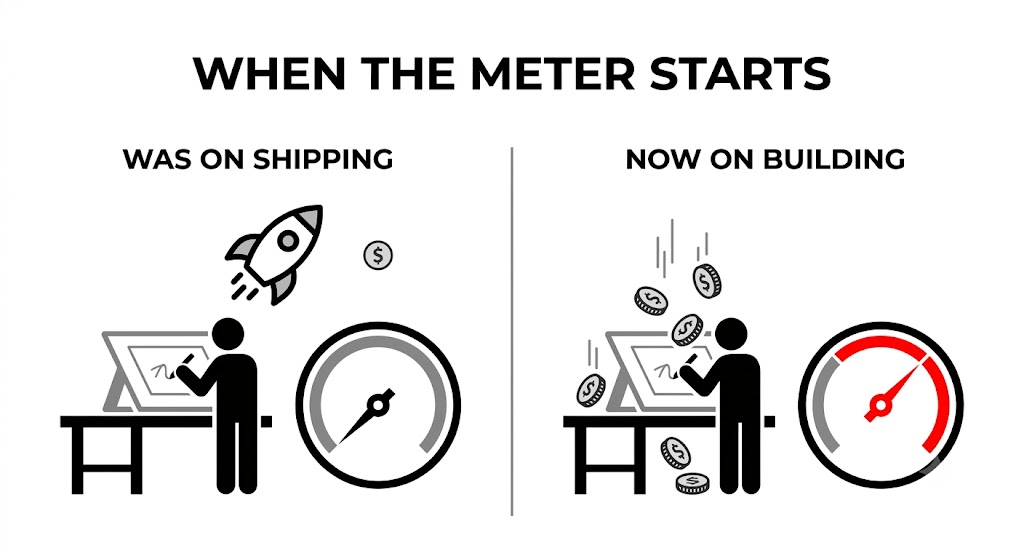
Here is the shift almost everyone will get caught by. Under the standard harness, billing started when you published. Under the new harness, billing starts when you start building. Previewing the agent. Testing it. Generating evaluations. Authoring with natural language. All of it consumes credits. Microsoft states this plainly, and it appears as a standing note on every one of these documentation pages, which tells you they expect people to miss it.
And this applies regardless of Microsoft 365 Copilot licensing. The fair-use inclusion that Microsoft 365 Copilot licence holders enjoy for standard harness and Copilot chat harness agents does not extend to this one.
What happens when the credits run out is specific and worth knowing before it happens to you. Agents stop responding to end users. Makers lose the ability to author with natural language, preview, test, or generate evaluations. Both see the same "you need credits to continue" message. Microsoft allows a grace period of overage before that bites, and you can fix it three ways: reallocate capacity from elsewhere in the tenant, buy more, or attach a pay-as-you-go meter to an Azure subscription so overage bills instead of blocking.
For scale, the older standard-harness rate card is a useful anchor — a classic answer costs 1 credit, a generative answer 2, an agent action 5, tenant graph grounding 10. Enforcement on that model kicks in at 125% of prepaid capacity. The new harness does not publish a flat per-action rate, because there isn't one: cost depends on the model you chose, how much context you loaded, how many tools you wired in, and how long the task ran. Microsoft publishes a task-complexity band chart rather than a number.
Two practical things follow. First, use the Copilot Studio agent usage estimator before you build, not after. Second, the Power Platform admin center lets you set monthly consumption limits per agent — go to Licensing, Copilot Studio, Manage Agents. Set that cap on day one. It is the cheapest governance control in the product and almost nobody turns it on until after the first surprising invoice.
One date from the Message Center notice (MC1446644) that is easy to miss: usage-based billing starts on 3 August 2026, or 1 September 2026 for things you created before GA.
The teaching: "Under the old model, an experiment was free until you shipped it. Under the new one, curiosity has a meter on it."
What to do if you already build agents in Copilot Studio
It's Monday. You have eleven agents in production and a Message Center notice in your inbox.
Here is what I would actually do, in order.
Do nothing to your existing agents. They are unaffected. Microsoft's Message Center notice says so directly, and there is no forced migration and no announced retirement. The single worst response to this announcement is a mass rebuild.
Turn on the cost controls before you turn on the harness. Per-agent monthly consumption limits in the Power Platform admin center. Environment-level credit allocation, so an enthusiastic maker in a sandbox cannot drain the tenant pool. Decide now whether you want pay-as-you-go attached, because that choice is the difference between "the agent stopped" and "the bill grew" — and which of those you prefer is a business decision, not an IT one.
Sort out the maker story, because there is no per-user switch. The Message Center notice is explicit: there is no separate per-user enablement control for choosing this harness. If a maker can build in an environment, they can build on the new harness and spend credits from the moment they start. Your control point is the environment, the same as it has always been: which security groups can access it, which security roles can create agents there, and where new agents get routed. If you have not already implemented environment-level maker governance, this is the announcement that makes it urgent.
Audit which of your agents are actually rules problems. Go through the list honestly. A policy Q&A agent, a form-router, a ticket-triage agent with six categories — those are rules problems, and they belong on the standard harness where they will be cheaper and more predictable. Only agents that stall on the edge cases are candidates.
Pick one candidate. Not five. Choose a process that today ends with a human doing twenty minutes of reconciliation in Excel. Those are the ones where native file handling changes the economics, and they are easy to measure.
Rebuild it as components, not as a translation. The Customer Advisory Team's warning here is specific and worth repeating: the Copilot Studio plugin can propose an architecture upgrade via a /migrate command, but the output needs human validation. Do not mechanically convert every topic into a skill and every variable into memory. Understand the task, keep the outcomes that already work, and map each responsibility to the smallest component that makes it reliable. Agents cannot be transferred between harnesses in either direction anyway — so this is a rebuild, and you may as well do it properly.
Write the evaluations before you publish. The Evaluate tab lets you build test sets and score responses against expected answers, using model-as-judge graders as well as code-based ones. With a rules engine you could read the branches and know what it would do. You cannot do that with a reasoning agent. Test sets are now the only honest answer to "how do you know it works?" — and they are also the thing that catches a regression when Microsoft upgrades the default model underneath you.
Check the model governance separately. External models from Anthropic, xAI and Mistral need switching on twice: once in the Power Platform admin center for the environment, and again per provider in the Microsoft 365 admin center. Several models are marked cross-geo, meaning data may be processed outside your region. If you work anywhere with data residency obligations, that is a conversation to have before a maker discovers the dropdown, not after.
Budget for the learning, not just the runtime. Building, testing and evaluating all consume credits now. Your first month of experimentation is a real line item. Set the number deliberately and tell your makers what it is, so that "we're out of credits" never arrives as a surprise on a Thursday afternoon.
The teaching: "The migration question is not 'can this agent move to the new harness?' It is 'is this agent failing because it can't reason, or because nobody wrote the branch?' Only the first one is worth the credits."
The part nobody put in the announcement
There is a sentence in the Customer Advisory Team's post that I keep coming back to, because it is really a statement about organisations rather than software: every behaviour belongs in the smallest component that makes it reliable and inspectable.
That is not an AI principle. It is what good engineering has always said, and what good process design said long before that. The reason it shows up now, in a product announcement about a runtime, is that we have finally built something capable enough that sloppiness inside it is expensive rather than merely embarrassing.
The new harness will let a competent team automate work that genuinely could not be automated before. It will also let a rushed team build something that reasons its way to a confidently wrong answer, at a cost per attempt, with no branch you can point at afterwards to explain why.
Same runtime. The difference is entirely in how carefully you took it apart before you put it together.
Sources: the Copilot Studio announcement of 3 August 2026 by Ryan Cunningham; Microsoft Learn documentation on choosing a harness, the GitHub Copilot harness build experience, skills, memory, workflows, usage-based billing, credit enforcement and billing rates; the Copilot Studio Customer Advisory Team's post on the new orchestrator; and Message Center notice MC1446644.
No comments yet — be the first to add to the discussion. Comments appear after they’re reviewed.
Want more insights?
Subscribe to get the latest articles delivered straight to your inbox.