MCP Changes the Game, Power Fx Gets Serious, and the Governance Gap Nobody Talks About
Copilot Studio now speaks MCP, Power Fx is becoming the computational backbone of enterprise agents, and the governance patterns you need before going to production.
Microsoft Copilot Studio has quietly crossed several maturity thresholds in the past few weeks. MCP support is live, agent architecture decisions are getting more nuanced, and the governance story is finally catching up to what enterprises actually need. Here's what matters.
1. MCP Support Arrives — and It's Bigger Than You Think
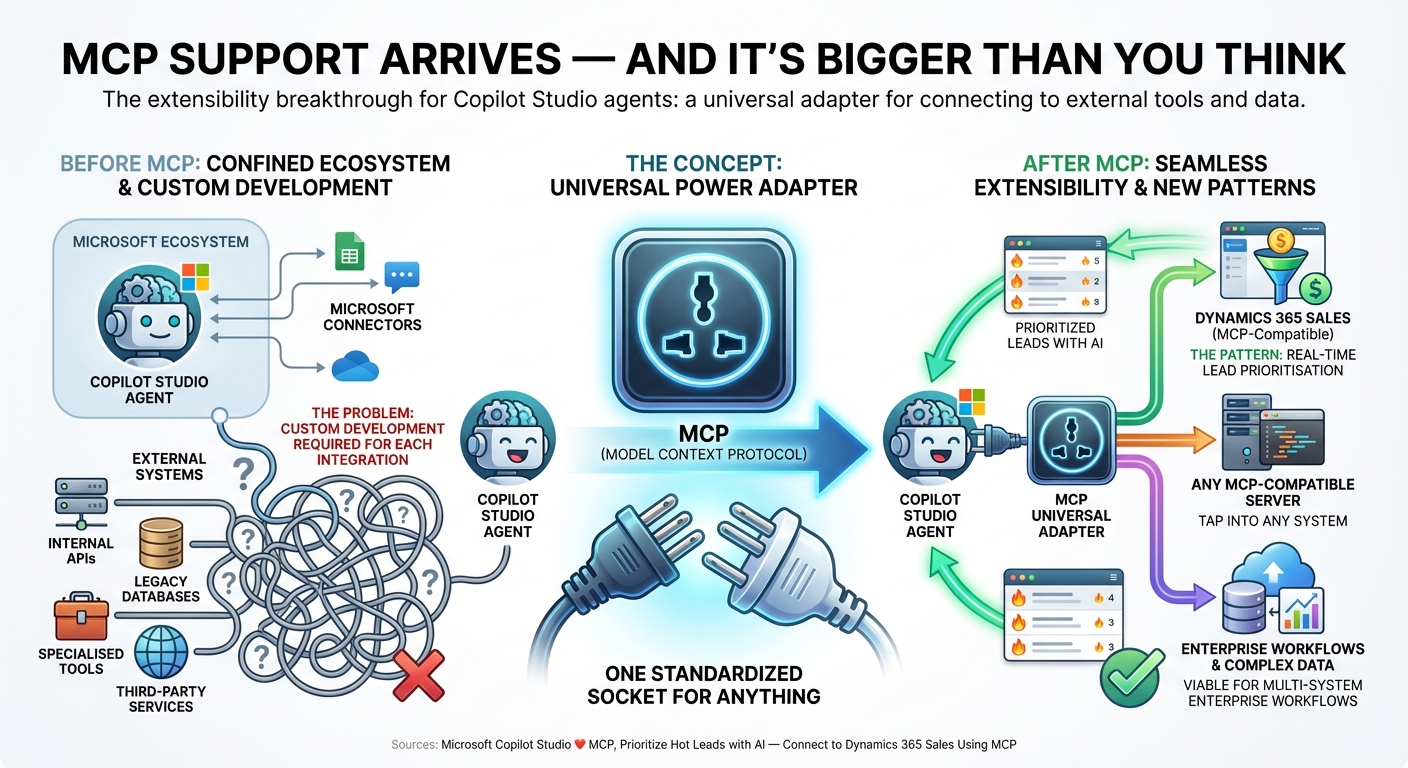
The context: Model Context Protocol (MCP) has been gaining traction as the standard way for AI agents to connect to external tools and data. Until now, Copilot Studio agents were largely confined to Microsoft's own connector ecosystem.
The concept: Think of MCP as a universal power adapter for AI agents. Instead of needing a different plug for every tool your agent wants to use, MCP gives you one standardised socket that works with anything — databases, APIs, custom tools, third-party services.
The problem: Enterprise teams building Copilot Studio agents often need to connect to systems outside Microsoft's ecosystem — internal APIs, legacy databases, specialised tools. The previous connector model required custom development for each integration.
The pattern: With native MCP support, Copilot Studio agents can now tap into any MCP-compatible server. One practitioner has already demonstrated a concrete pattern: connecting to Dynamics 365 Sales via MCP for real-time lead prioritisation. This is the extensibility breakthrough that makes Copilot Studio viable for complex, multi-system enterprise workflows.
Sources: Microsoft Copilot Studio ❤️ MCP, Prioritize Hot Leads with AI — Connect to Dynamics 365 Sales Using MCP
2. Power Fx Is the Computational Backbone You're Probably Underusing
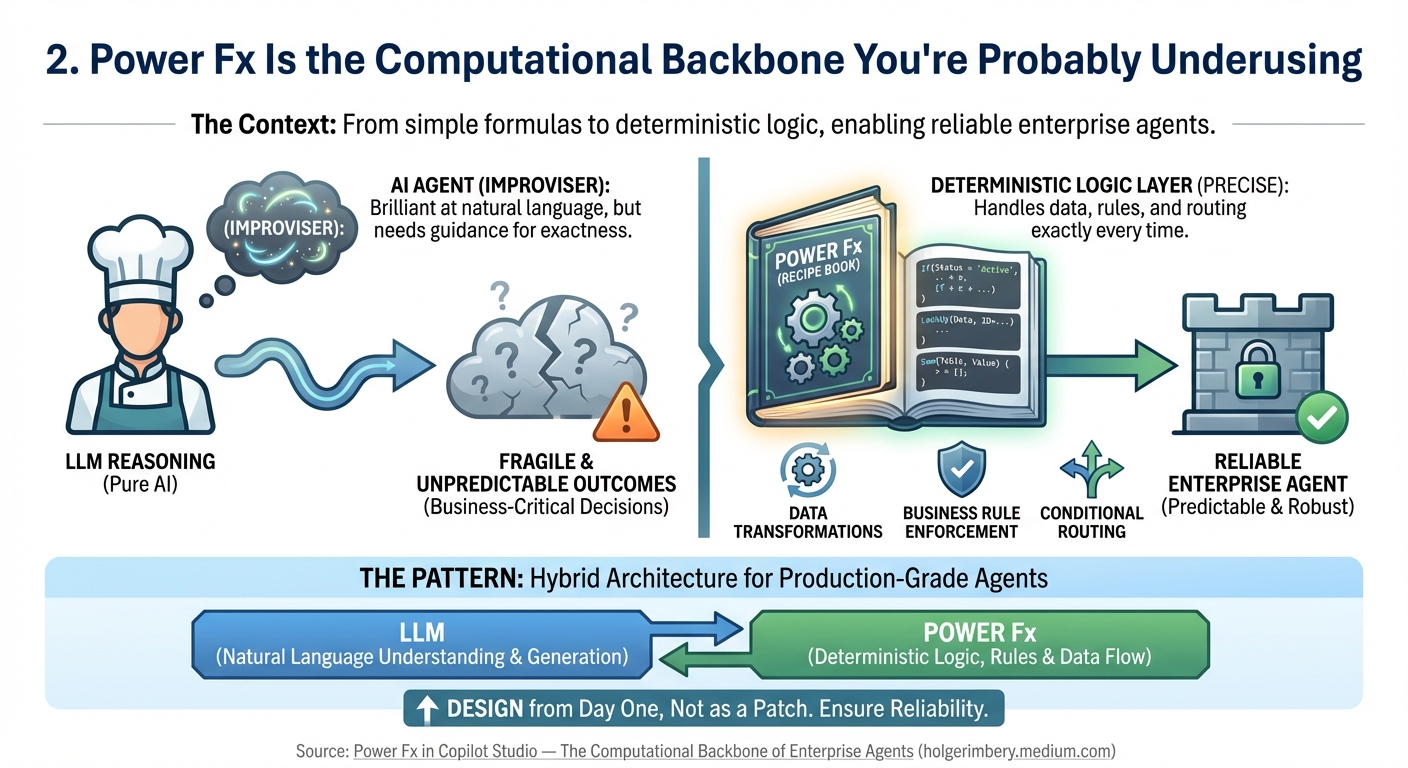
The context: Most teams treat Power Fx as a formula language for simple calculations. In reality, it's becoming the deterministic logic layer that separates reliable enterprise agents from unpredictable prototypes.
The concept: Imagine your AI agent as a chef who's brilliant at improvising but terrible at following recipes exactly. Power Fx is the recipe book — it handles the parts of your agent that must be precise every time: data transformations, business rule enforcement, conditional routing.
The problem: Teams building production agents discover that pure LLM reasoning isn't reliable enough for business-critical decisions. You need deterministic logic alongside the AI — and bolting it on as an afterthought creates fragile architectures.
The pattern: Power Fx in Copilot Studio enables a hybrid architecture: the LLM handles natural language understanding and generation, while Power Fx enforces business rules, transforms data, and routes conversations deterministically. Teams building production-grade agents should be designing Power Fx into their agent architecture from day one, not adding it as a patch.
Source: Power Fx in Copilot Studio — The Computational Backbone of Enterprise Agents
3. Connected Agent or Child Agent? The Architecture Decision That Matters
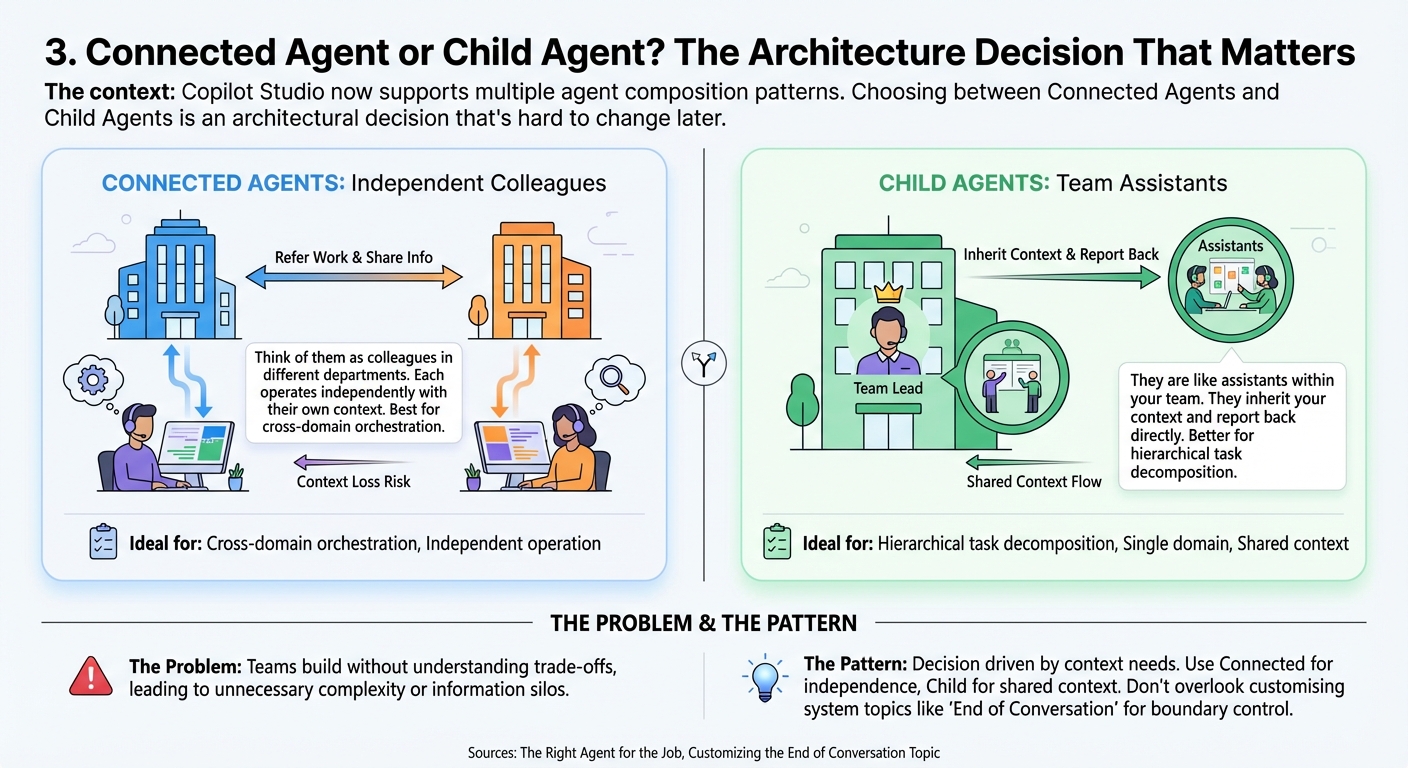
The context: Copilot Studio now supports multiple agent composition patterns. Choosing between Connected Agents and Child Agents is an architectural decision that's hard to change later.
The concept: Think of Connected Agents as colleagues in different departments who can refer work to each other — each operates independently with their own context. Child Agents are more like assistants within your team — they inherit your context and report back directly.
The problem: Teams are building multi-agent systems without understanding the trade-offs. A wrong choice leads to context loss, unnecessary complexity, or agents that can't share information when they need to.
The pattern: Connected Agents work best for cross-domain orchestration where each agent has specialised knowledge and independent operation. Child Agents are better for hierarchical task decomposition within a single domain. The decision should be driven by whether agents need shared context (use Child) or independent operation (use Connected). Meanwhile, customising system topics like End of Conversation gives you control over how agents handle conversation boundaries — a detail that matters more than most teams realise.
Sources: The Right Agent for the Job, Customizing the End of Conversation Topic
4. Validation Is No Longer Optional
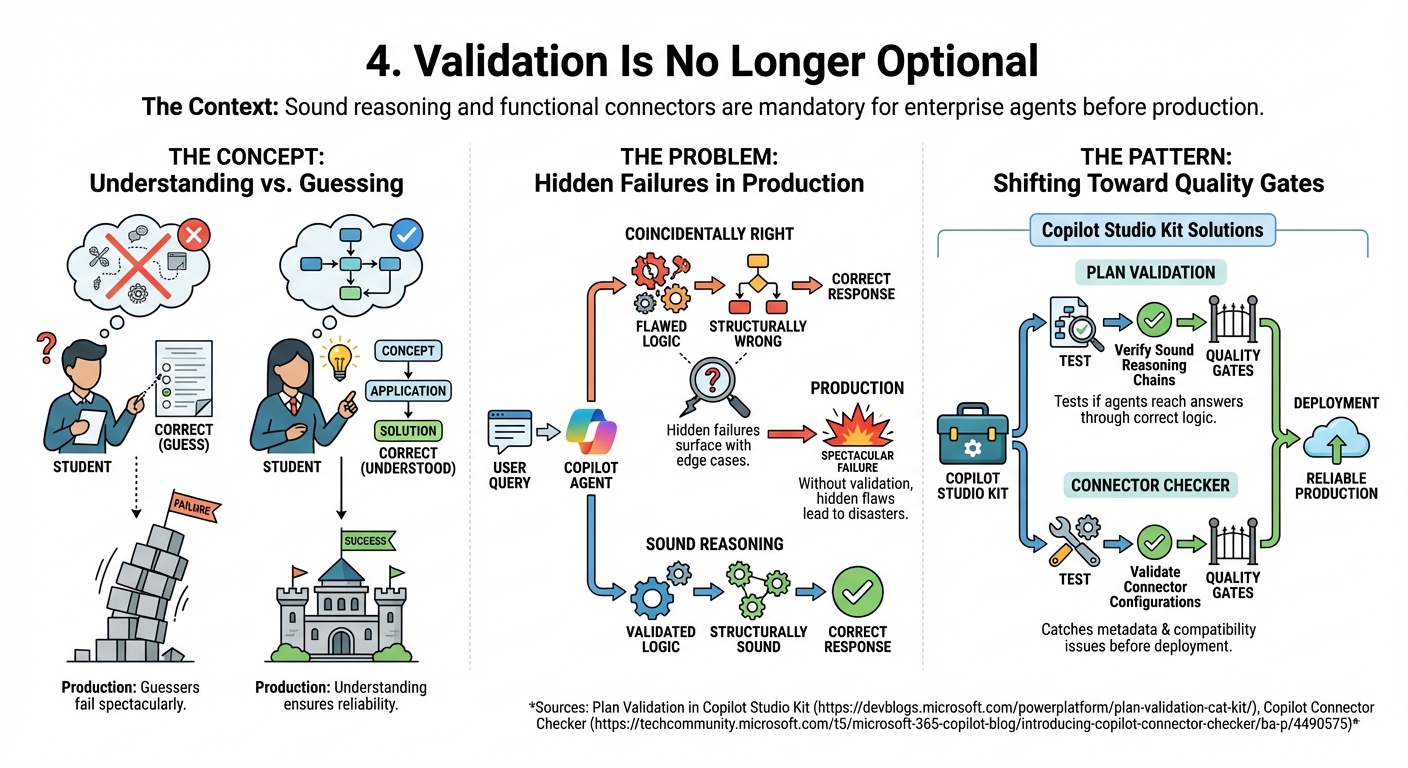
The context: Getting correct answers from an agent isn't enough. Enterprise teams need to verify that the reasoning behind those answers is sound — and that connectors actually work before they hit production.
The concept: It's the difference between a student who gets the right answer on a test because they understood the material, versus one who guessed correctly. In production, the guesser will eventually fail spectacularly.
The problem: Copilot Studio agents can produce correct responses through flawed reasoning — coincidentally right but structurally wrong. Without validation, these hidden failures only surface when edge cases hit production.
The pattern: The Copilot Studio Kit now includes Plan Validation, which tests whether agents reach correct answers through sound reasoning chains. Separately, the new Connector Checker validates connector configurations before deployment — catching metadata issues and compatibility problems early. Both represent a shift toward quality gates in the agent development lifecycle.
Sources: Plan Validation in Copilot Studio Kit, Copilot Connector Checker
5. The Governance Gap: What You Need Before Going to Production
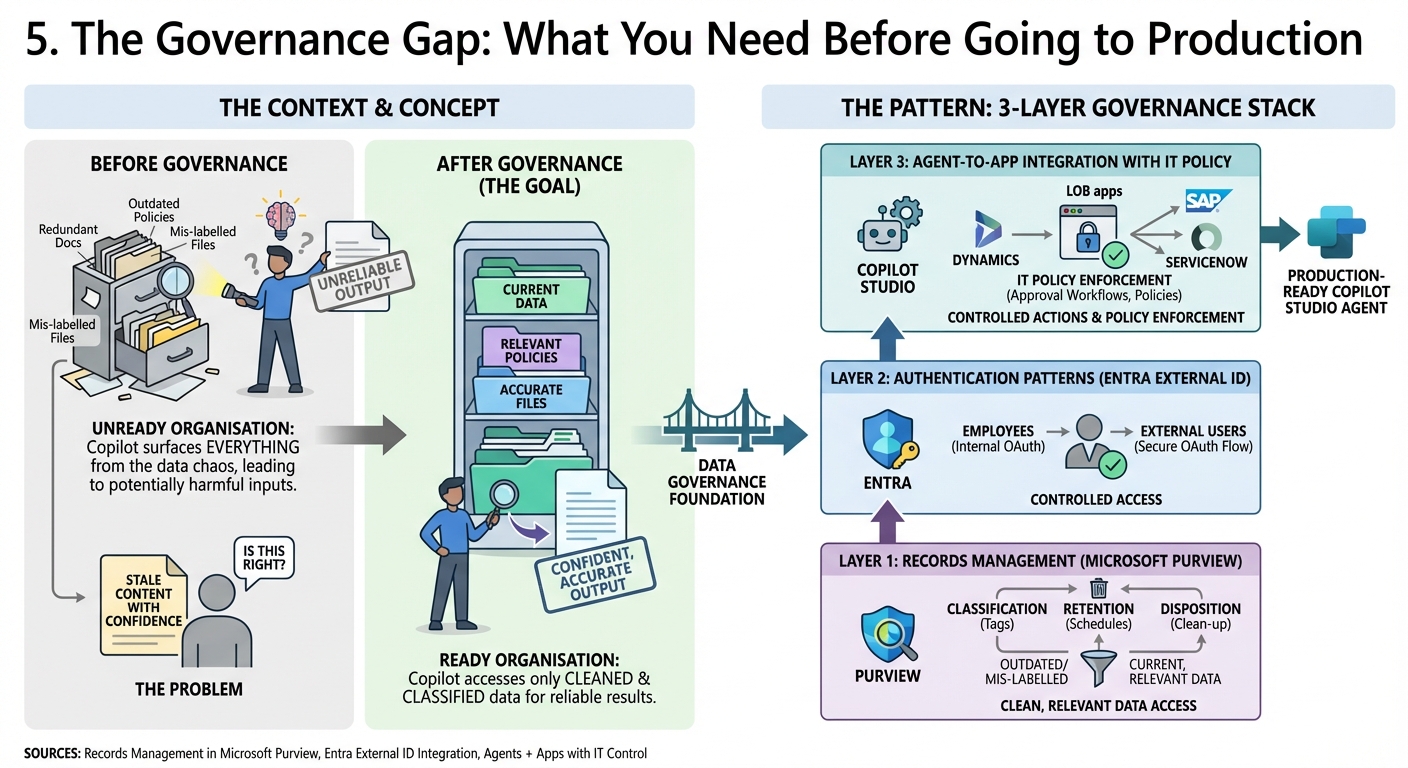
The context: Copilot surfaces everything a user can access. Every redundant document, every outdated policy, every mis-labelled file becomes potential agent input. Most organisations aren't ready for that.
The concept: Imagine hiring a brilliant new employee and giving them access to every filing cabinet in the building — including the ones full of outdated forms and wrong information. They'll work hard, but their output will be unreliable until someone cleans up those cabinets.
The problem: Teams deploying Copilot Studio agents often focus on the agent logic and overlook the data governance foundation. Without proper records management, agents surface stale content with confidence, and users can't tell the difference.
The pattern: The governance stack for production Copilot Studio deployments now has three layers. First, records management in Microsoft Purview — classifying, retaining, and disposing of content so agents only access current, relevant data. Second, authentication patterns — Entra External ID integration lets you control who accesses your agents with proper OAuth flows. Third, the emerging pattern of agent-to-app integration with IT policy enforcement: agents can trigger actions in LOB apps (Dynamics, SAP, ServiceNow) while IT retains control through approval workflows and policies.
Sources: Records Management in Microsoft Purview, Entra External ID Integration, Agents + Apps with IT Control
6. Platform Signals: API-First, GPT-5.3, and Production Monitoring
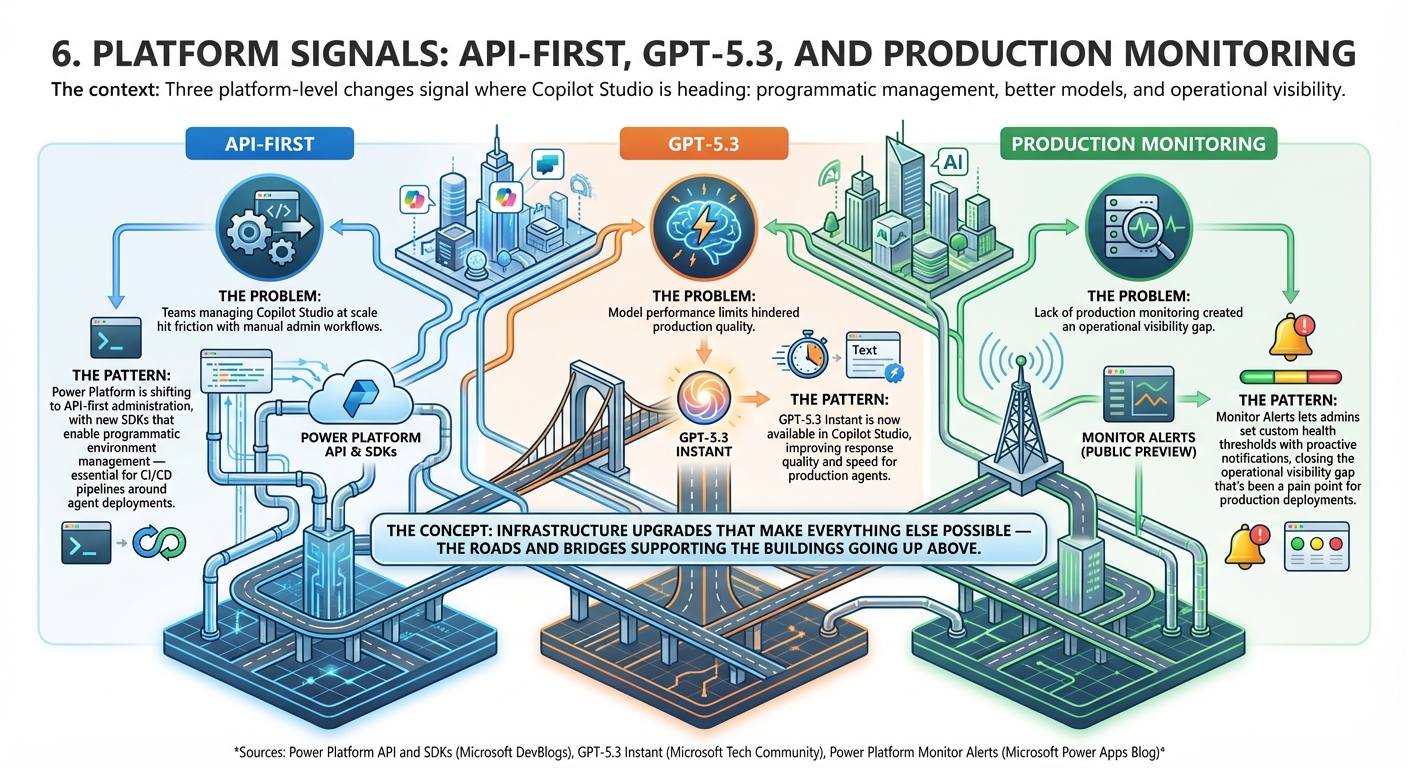
The context: Three platform-level changes signal where Copilot Studio is heading: programmatic management, better models, and operational visibility.
The concept: These are the infrastructure upgrades that make everything else possible — the roads and bridges that support the buildings going up above.
The problem: Teams managing Copilot Studio at scale hit friction with manual admin workflows, model performance limits, and lack of production monitoring.
The pattern: Power Platform is shifting to API-first administration, with new SDKs that enable programmatic environment management — essential for CI/CD pipelines around agent deployments. GPT-5.3 Instant is now available in Copilot Studio, improving response quality and speed for production agents. And Monitor Alerts (public preview) lets admins set custom health thresholds with proactive notifications, closing the operational visibility gap that's been a pain point for production deployments.
Sources: Power Platform API and SDKs, GPT-5.3 Instant, Power Platform Monitor Alerts
The question that matters
MCP, Power Fx, validation tooling, governance patterns, and operational monitoring — these aren't separate features. They're the layers of a production-ready agent platform. The question for enterprise teams: are you building your Copilot Studio agents with all these layers in mind, or are you still treating production deployment as a future problem?
Sources this week: Power Platform Developer Blog, Microsoft 365 Copilot Blog, Holger Imbery, Matt Ruma, Nikki Chapple, Power Automate Blog
No comments yet — be the first to add to the discussion. Comments appear after they’re reviewed.
Want more insights?
Subscribe to get the latest articles delivered straight to your inbox.