Enterprise Agents Are Growing Up: Testing, Security, and Human Oversight
Computer-using agents now ship with secure credential handling and monitoring. MCP opens agents to human-in-the-loop oversight. And the testing gap is finally getting frameworks. This week's sources show Copilot Studio moving from prototype to production discipline.
The pattern across this week's Copilot Studio reading is the same: enterprise teams are past the demo phase and facing production-grade problems. Testing agents before deployment. Securing credentials in UI automation. Governing who agents can act as. The tooling is catching up — but teams that haven't updated their build process are accumulating governance debt.
1. Computer-Using Agents Now Have Security Controls — Use Them
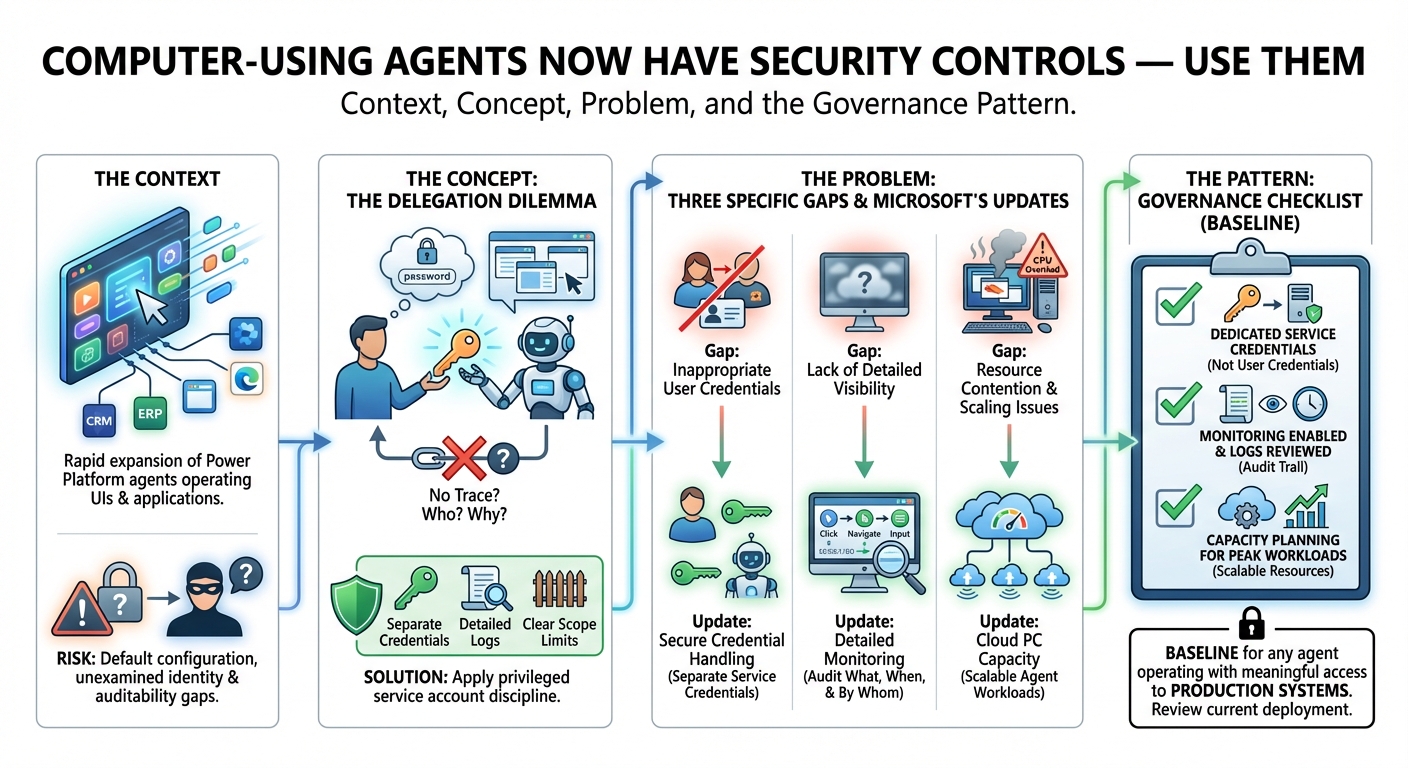
The context: Computer-using agents in Power Platform — agents that can operate a UI, click buttons, and navigate applications on behalf of a user — have been expanding rapidly. The capability is powerful. The default configuration, left unexamined, creates real identity and auditability risks.
The concept: Imagine delegating your computer to a very capable colleague and telling them your password. They can do everything you can — which is exactly the problem. If something goes wrong, you can't tell what they did, why, or with whose credentials. Computer-using agents need the same discipline you'd apply to a privileged service account: separate credentials, detailed logs, and clear scope limits.
The problem: Microsoft's updates address three specific gaps: secure credential handling so agents don't operate under user credentials inappropriately, detailed monitoring so you can audit what the agent did and when, and Cloud PC capacity for scaling agent workloads without creating resource contention. Each of these was a real gap in earlier versions — teams building on this capability should review whether their current deployment addresses all three.
The pattern: The governance checklist for computer-using agents should now include: dedicated service credentials (not user credentials), monitoring enabled and logs reviewed, and capacity planning for peak agent workloads. These aren't advanced configurations — they're the baseline for any agent operating with meaningful access to production systems.
2. Power Apps MCP Brings Human Oversight Into Agent Workflows
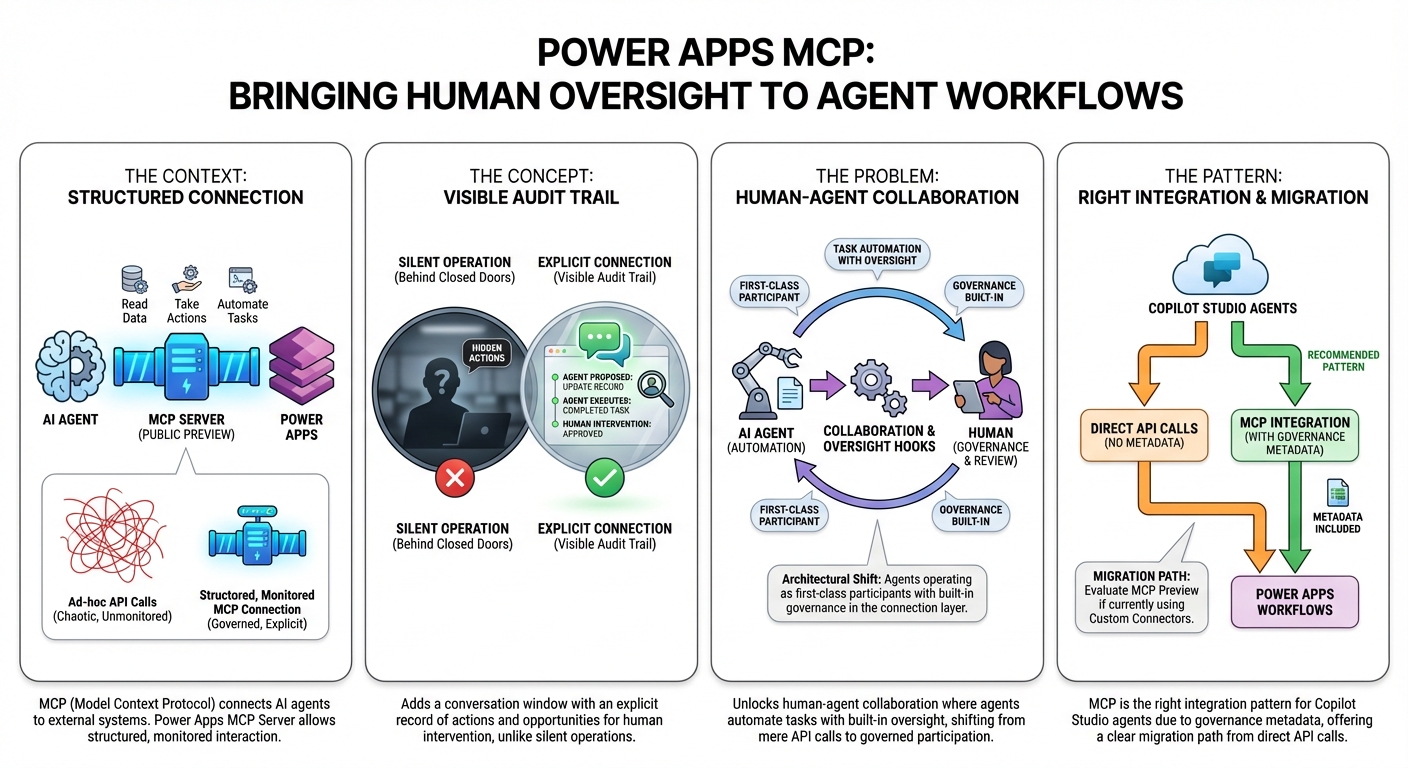
The context: MCP (Model Context Protocol) is the emerging standard for connecting AI agents to external systems and data. The Power Apps MCP Server entering public preview means AI agents can now interact with Power Apps — read data, take actions, automate tasks — with a structured, monitored connection rather than ad-hoc API calls.
The concept: Think of MCP as adding a conversation window between the agent and the application. Instead of the agent just doing things silently in the background, the connection is explicit: here's what the agent wants to do, here's what it actually did, and here's where a human can intervene if needed. It's the difference between an agent that operates behind closed doors and one that operates with a visible audit trail.
The problem: The practical capability unlocked is human-agent collaboration: AI agents that can automate repetitive app tasks with built-in oversight hooks. The architectural shift is significant — agents aren't just calling APIs, they're operating as first-class participants in Power Apps workflows with governance built into the connection layer.
The pattern: For teams building Copilot Studio agents that interact with business applications, MCP is becoming the right integration pattern — not because it's newer, but because it carries governance metadata that direct API calls don't. If your agents are hitting Power Apps via custom connectors today, the MCP preview is worth evaluating as the migration path.
3. The Agent Testing Gap Has Frameworks Now — Three of Them
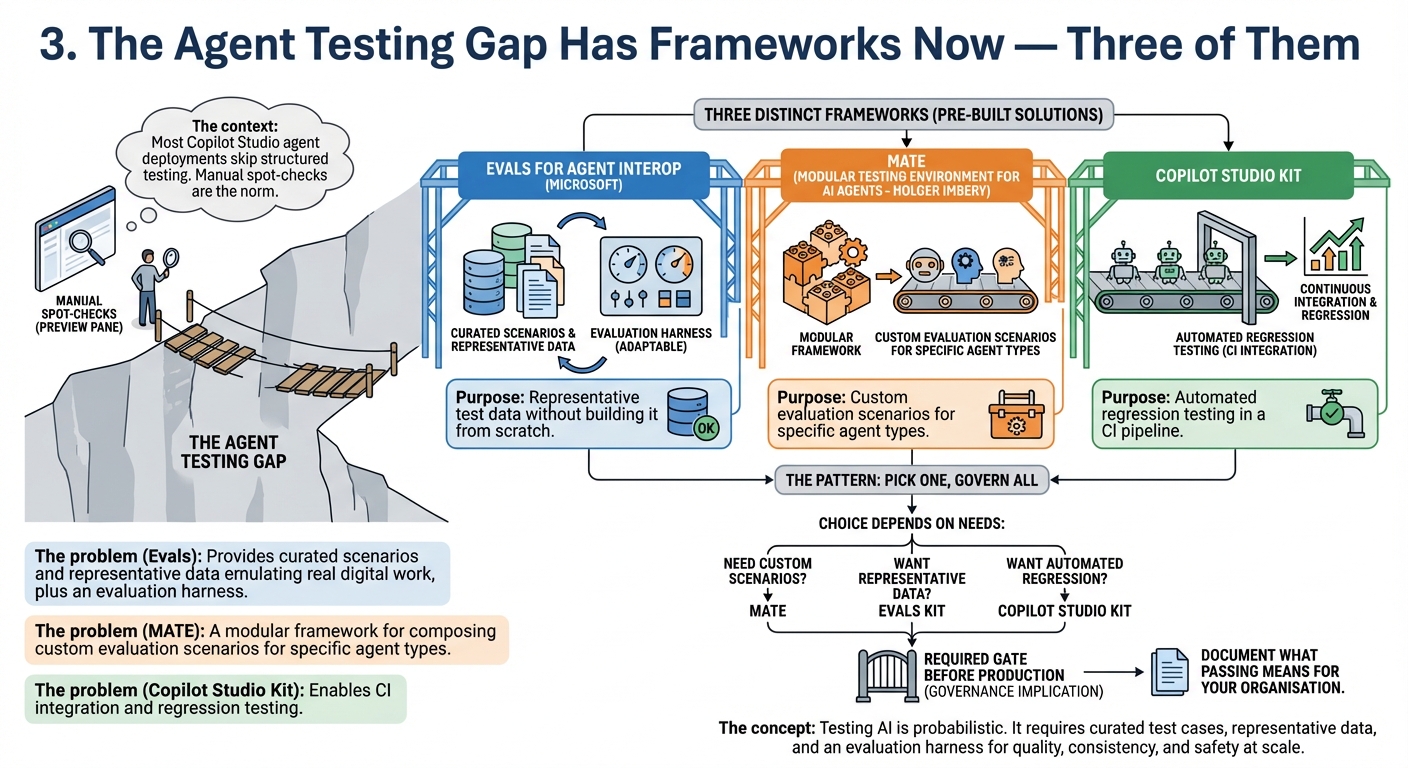
The context: Most Copilot Studio agent deployments skip structured testing. Manual spot-checks in the preview pane are the norm. This week alone produced two new additions to the testing toolkit: Microsoft's Evals for Agent Interop starter kit and Holger Imbery's MATE (Modular Testing Environment for AI Agents).
The concept: Testing an AI agent is different from testing traditional software. The same input doesn't always produce the same output. You're not checking for exact match — you're checking for quality, consistency, and safety across a range of scenarios. That requires curated test cases, representative data, and an evaluation harness that can score responses at scale. Building that from scratch for every agent is why most teams skip it. Pre-built frameworks remove that barrier.
The problem: The Evals for Agent Interop kit provides curated scenarios and representative data emulating real digital work, plus an evaluation harness that organisations can adapt. MATE is a modular framework for composing custom evaluation scenarios for specific agent types. Alongside the Copilot Studio Kit (which enables CI integration and regression testing), there are now three distinct approaches to agent testing — each covering different ground.
The pattern: The right choice depends on where you are: MATE for teams that need custom evaluation scenarios for specific agent types; the Evals kit for teams that want representative test data without building it from scratch; the Copilot Studio Kit for teams that want automated regression testing in a CI pipeline. The governance implication is the same for all three: pick one, make it a required gate before production, and document what passing means for your organisation.
4. What "Frontier Agents" Actually Means Architecturally
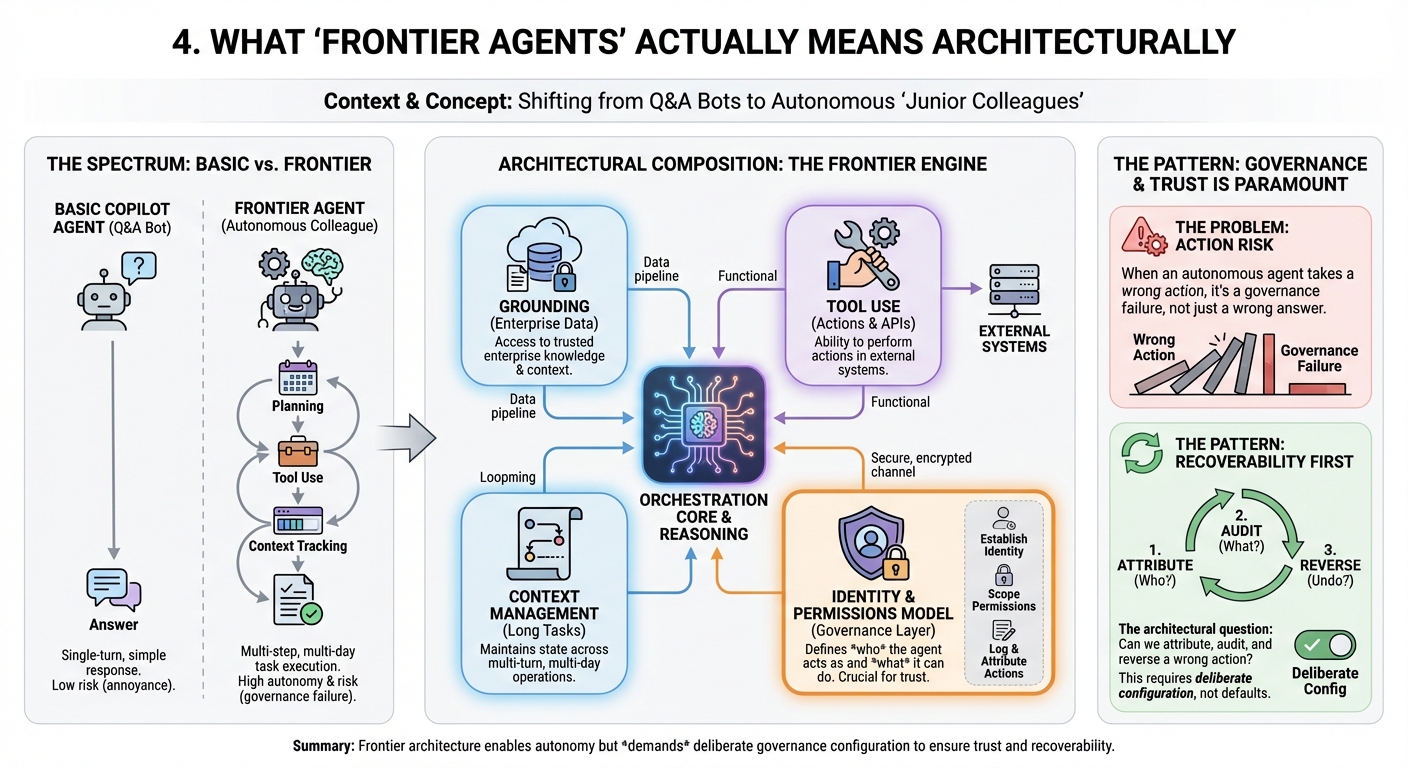
The context: Microsoft's "Frontier Agents" framing describes the most capable end of the Copilot Studio agent spectrum — agents that reason across multiple steps, use tools, maintain context across long tasks, and operate with significant autonomy. Understanding the architecture matters for teams deciding what their agents should and shouldn't be able to do.
The concept: Most Copilot Studio agents are Q&A bots: ask a question, get an answer. Frontier agents are closer to a junior colleague given a multi-day project: figure out the steps, use available tools, track your progress, and come back with results. The architectural difference isn't just capability — it's trust. A Q&A bot that gets something wrong is annoying. An autonomous agent that gets something wrong while taking actions is a governance failure.
The problem: Holger Imbery's technical overview covers how frontier agents are composed: orchestration layers, grounding in enterprise data, tool use patterns, and the identity and permission model that governs what agents can act as. The details that matter for enterprise teams: how agent identity is established, how permissions are scoped, and how actions are logged and attributed.
The pattern: For teams evaluating how far to push Copilot Studio agent autonomy, the architectural question to answer first is: what happens when this agent takes a wrong action, and can we attribute, audit, and reverse it? The frontier agent architecture is designed to support this — but only if the governance layer is configured deliberately, not left at defaults.
The question that matters
The consistent theme across this week's sources is the gap between what Copilot Studio agents can do and what most teams have actually configured to govern them. Computer-using agents without dedicated credentials. Agents deployed without a single structured test. Frontier-class agents operating with default permission scopes. The capability is ahead of the governance — and the frameworks to close that gap now exist. The question is whether your team has made governance configuration a required part of the build process, or an optional afterthought.
Sources this week: Microsoft Power Platform Blog, Microsoft 365 Developer Blog, Holger Imbery
No comments yet — be the first to add to the discussion. Comments appear after they’re reviewed.
Want more insights?
Subscribe to get the latest articles delivered straight to your inbox.