The Threats Your Copilot Deployment Didn't Account For
Malicious browser extensions are harvesting enterprise AI chat histories at scale, threat actors are weaponising AI tools, and sensitivity labels just closed a gap most M365 environments didn't know they had. Plus: why testing your Copilot Studio agents before production isn't optional.
Enterprise Copilot deployments are maturing — and so are the threats they face. This week's sources cover three distinct risk layers: the external threat landscape shifting because of AI, the internal governance gaps that new M365 features are closing, and the testing and validation work that most teams are still skipping entirely.
1. Malicious Browser Extensions Are Harvesting Enterprise AI Chat Histories
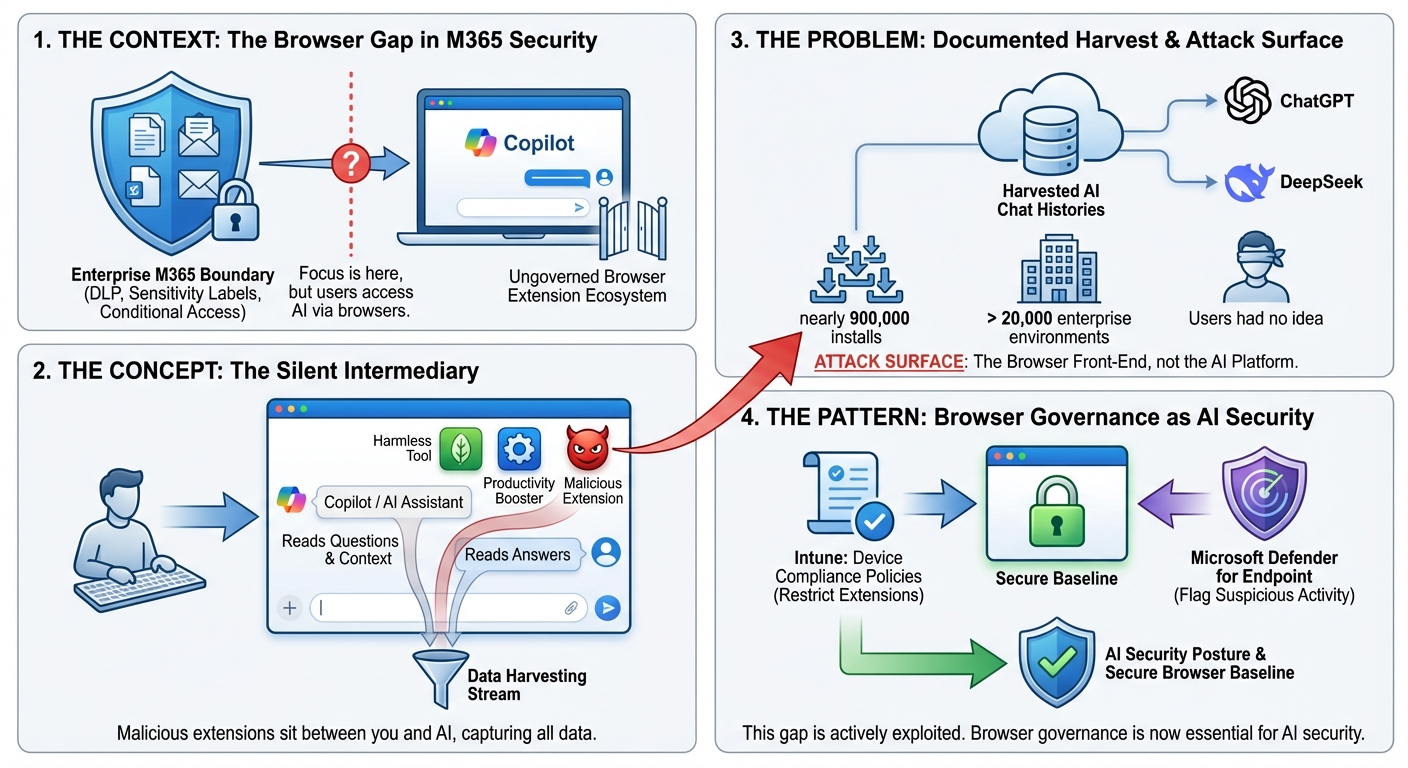
The context: Most enterprise M365 security policies focus on what happens inside the Microsoft 365 boundary — DLP policies, sensitivity labels, conditional access. But Copilot users access AI through browsers, and the browser extension ecosystem is poorly governed in most organisations.
The concept: Think of browser extensions like apps installed on a shared company laptop by someone who never asked IT. Each one can, in principle, read everything you type and everything the page shows you. Most are harmless. But a malicious one can sit silently between you and your AI assistant, reading every question you ask and every answer you receive — including the confidential context you pasted in.
The problem: Microsoft's security researchers documented a campaign where malicious browser extensions harvested LLM chat histories from platforms including ChatGPT and DeepSeek. The extensions had nearly 900,000 installs and were active across more than 20,000 enterprise environments. Users had no idea. The attack surface isn't the AI platform — it's the browser sitting in front of it.
The pattern: For Copilot deployments, the implication is clear: browser extension governance needs to be part of your AI security posture. Intune device compliance policies can restrict which extensions are permitted. Microsoft Defender for Endpoint can flag suspicious extension activity. This isn't a Copilot-specific control — it's a browser security baseline that most organisations don't have, and that gap is now actively being exploited.
2. How Threat Actors Are Actually Using AI — And Why It Matters for Your Defences
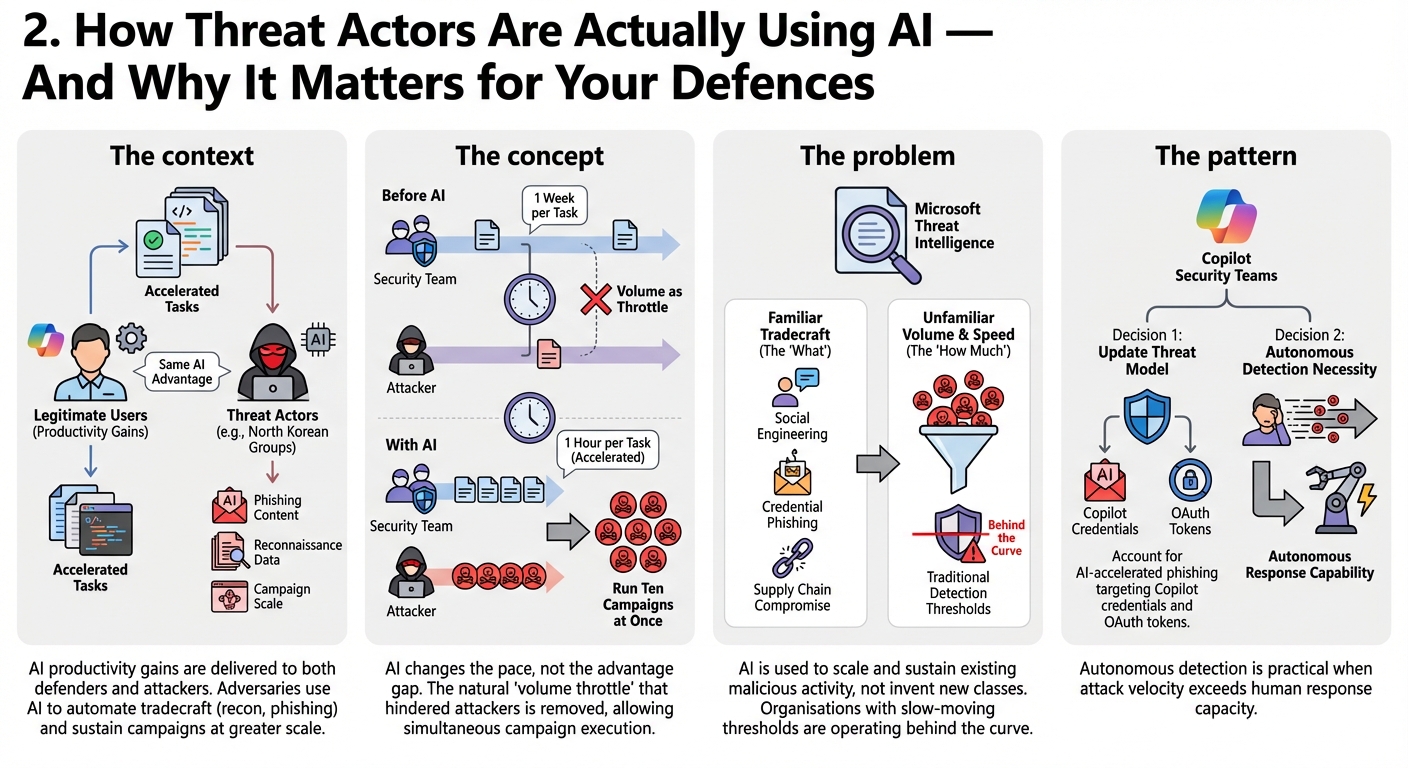
The context: Understanding how adversaries use AI tools matters for Copilot security teams for a specific reason: the same productivity gains that AI delivers for legitimate users, it delivers for attackers too. North Korean threat groups have been documented using AI to accelerate tradecraft — automating reconnaissance, generating phishing content, and sustaining campaigns at greater scale.
The concept: Imagine your security team could suddenly complete in one hour what used to take a week. Now imagine your adversaries got the same upgrade at the same time. AI doesn't change who has the advantage — it changes the pace of everything. Attackers who used to run one campaign at a time can now run ten. Defenders who relied on volume being a natural throttle no longer have that buffer.
The problem: Microsoft's threat intelligence documents this shift concretely: AI is being used to scale and sustain malicious activity, not to invent new attack classes. The tradecraft is familiar — social engineering, credential phishing, supply chain compromise. The volume and speed are not. Organisations that set their detection thresholds for a slower-moving threat landscape are already operating behind the curve.
The pattern: For Copilot security teams, this shapes two decisions. First, the threat model for your Copilot deployment needs to account for AI-accelerated phishing targeting Copilot credentials and OAuth tokens. Second, autonomous detection capability becomes a practical necessity when attack velocity exceeds human response capacity.
3. Sensitivity Labels in OneNote: The Gap You Probably Didn't Know You Had
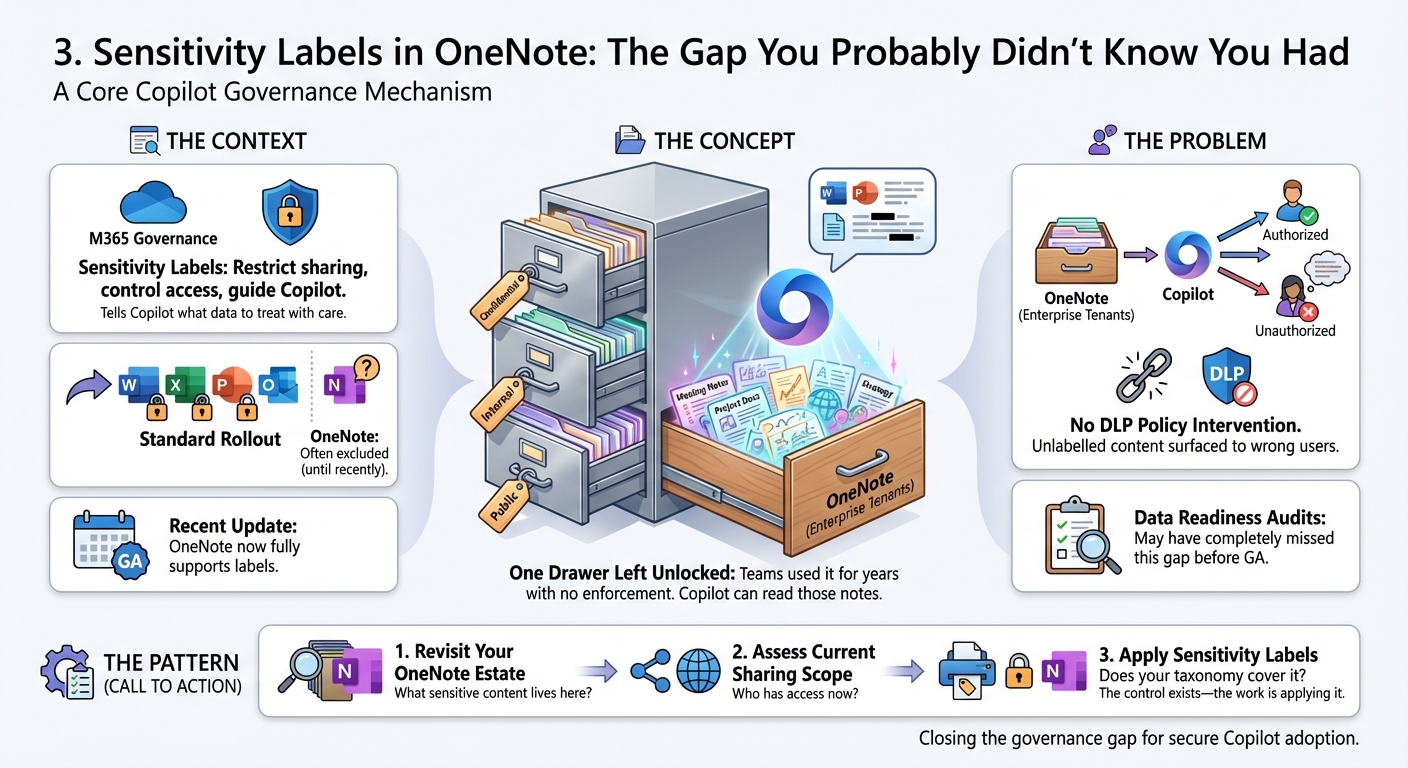
The context: Sensitivity labels are a core mechanism for Copilot governance — they tell Copilot what data to treat with care, restrict sharing, and control what gets surfaced to whom. Most M365 governance projects include a sensitivity label rollout. Most don't include OneNote, because until this week, OneNote didn't fully support them.
The concept: Picture a filing system where every folder has a security tag — Confidential, Internal, Public — except one drawer that was always left unlocked because the lock hadn't been invented yet. That drawer is OneNote in most enterprise tenants. Teams have been using it for meeting notes, project documentation, and strategy discussions for years, with no label enforcement. Copilot can read those notes.
The problem: Sensitivity labels in OneNote reaching General Availability closes a real governance gap. OneNote content has been outside the sensitivity label coverage model — meaning Copilot could surface unlabelled OneNote content to users who shouldn't see it, with no DLP policy able to intervene. Organisations that audited their label coverage before Copilot deployment may have missed this entirely.
The pattern: If you completed a Copilot data readiness audit before this GA announcement, it's worth revisiting your OneNote estate. The questions to answer: what sensitive content lives in OneNote notebooks, what's the current sharing scope, and does your sensitivity label taxonomy cover it? The control now exists — the work is applying it.
4. Two Testing Frameworks for Copilot Studio Agents — And Most Teams Use Neither
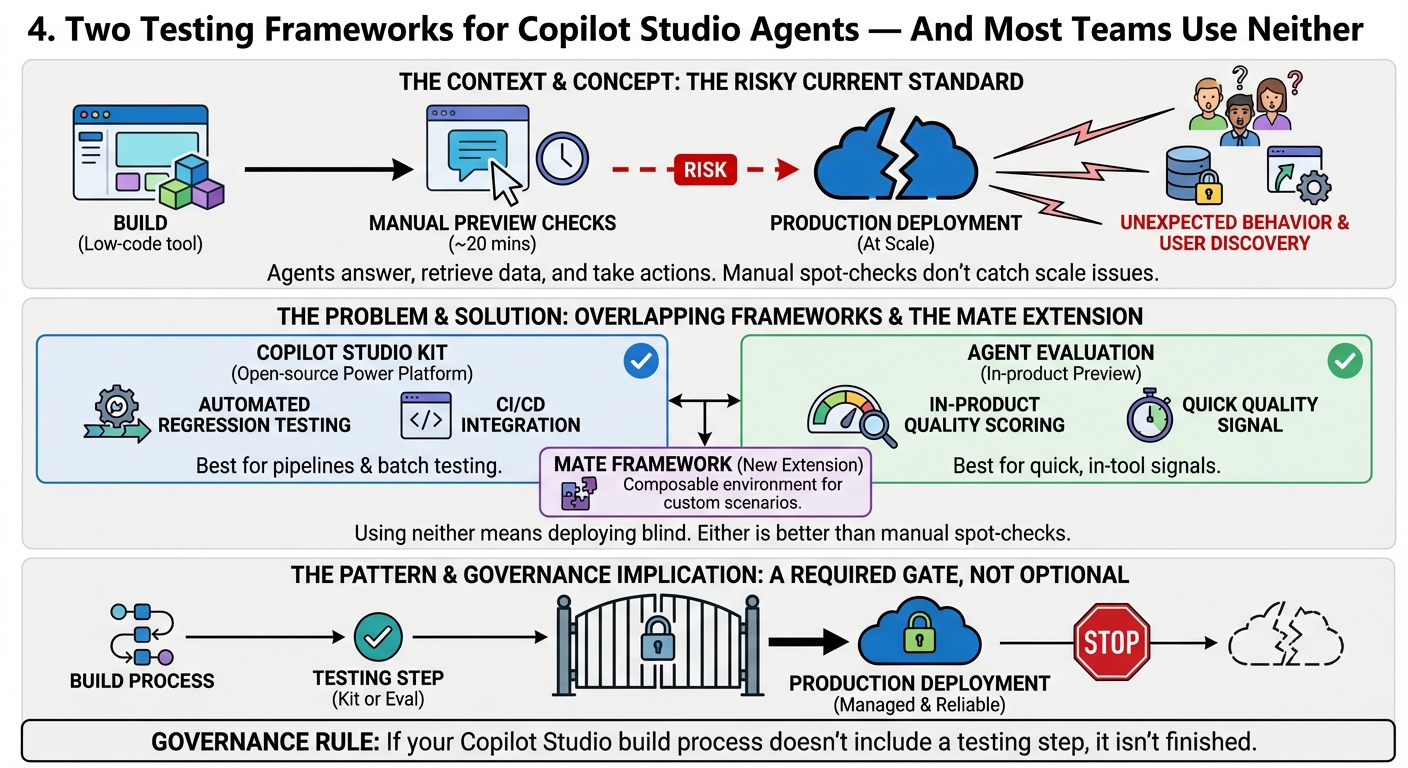
The context: Copilot Studio agents are being deployed to production environments without structured testing. Build in the low-code tool, click through a few manual tests in the preview pane, publish. There are now two dedicated frameworks for testing agents before production, and most teams building agents haven't used either.
The concept: Would you ship enterprise software to your whole organisation after testing it by clicking around for twenty minutes? Probably not. But that's the effective testing standard for most Copilot Studio agent deployments. The agents answer questions on behalf of your organisation, retrieve data, and take actions. If they behave unexpectedly at scale, you find out from users — not from a test run.
The problem: The Copilot Studio Kit (an open-source Power Platform solution from Microsoft) and the newer Agent Evaluation preview overlap but aren't the same. Holger Imbery's comparison documents the practical differences: the Kit enables batch testing and CI integration; Agent Evaluation provides in-product quality scoring. Using neither means deploying agents blind. His new MATE framework — released this week — extends the toolkit further with a composable environment for custom evaluation scenarios.
The pattern: Agent testing should be a required gate before production deployment, not an optional exercise. The Kit works for teams that want automated regression testing in a pipeline. Agent Evaluation works for teams that want a quick quality signal within the build tool. Either is better than manual spot-checks. The governance implication: if your Copilot Studio build process doesn't include a testing step, it isn't finished.
The question that matters
Most Copilot security programmes focus on the M365 boundary: sensitivity labels, DLP policies, conditional access. This week's sources highlight two blind spots that fall outside that boundary — the browser extension layer sitting between users and their AI tools, and the agent testing gap that lets misconfigured agents reach production unchecked. The question for teams who have a Copilot security baseline in place: have you extended your threat model to cover what happens outside the Microsoft 365 perimeter, and have you defined a mandatory testing standard for agents before they go live?
Sources this week: Microsoft Security Blog, Microsoft 365 Admin Blog, Holger Imbery
No comments yet — be the first to add to the discussion. Comments appear after they’re reviewed.
Want more insights?
Subscribe to get the latest articles delivered straight to your inbox.