The Microsoft AI Ecosystem Evolution
Microsoft AI Stack 2025: Complete Guide to Copilot, Azure AI Foundry, and Agent Framework
Executive Summary
Microsoft's AI ecosystem has evolved from fragmented tools into a unified stack serving everyone from office workers to enterprise developers. This comprehensive guide covers the complete Microsoft AI architecture—Microsoft Copilot, Azure AI Foundry, Copilot Studio, and Microsoft Agent Framework—helping you choose the right tools for your use case and budget in 2025.
Key Takeaway: Microsoft consolidated AutoGen and Semantic Kernel into the Microsoft Agent Framework (October 2025), creating a production-ready foundation for multi-agent systems. Both legacy frameworks entered maintenance mode—all new development now centers on Agent Framework.
Understanding the Microsoft AI Stack: The Four-Layer Architecture
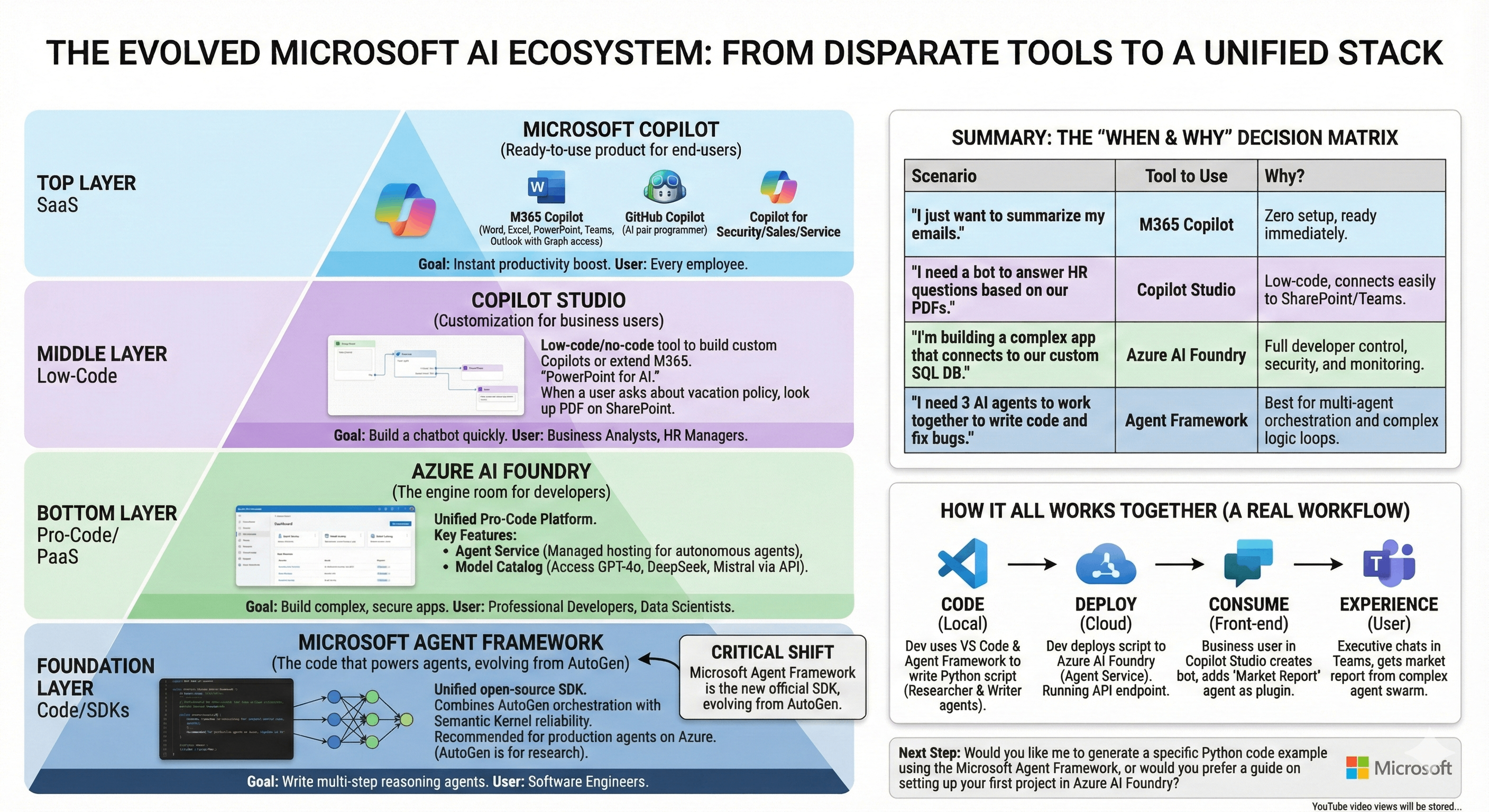
Microsoft's AI infrastructure operates as a pyramid with clear separation of concerns:
Layer 1: SaaS Products (Microsoft Copilot)
Ready-to-use AI across Microsoft 365, GitHub, Security, Sales, and Service applications.
Layer 2: Low-Code Platform (Copilot Studio)
Visual builder for custom chatbots and business process automation without coding.
Layer 3: Pro-Code Platform (Azure AI Foundry)
Full-stack development environment with model catalog, agent hosting, and enterprise controls.
Layer 4: Code Framework (Microsoft Agent Framework)
Open-source SDK replacing AutoGen/Semantic Kernel for production multi-agent orchestration.
Microsoft Copilot: The SaaS Layer
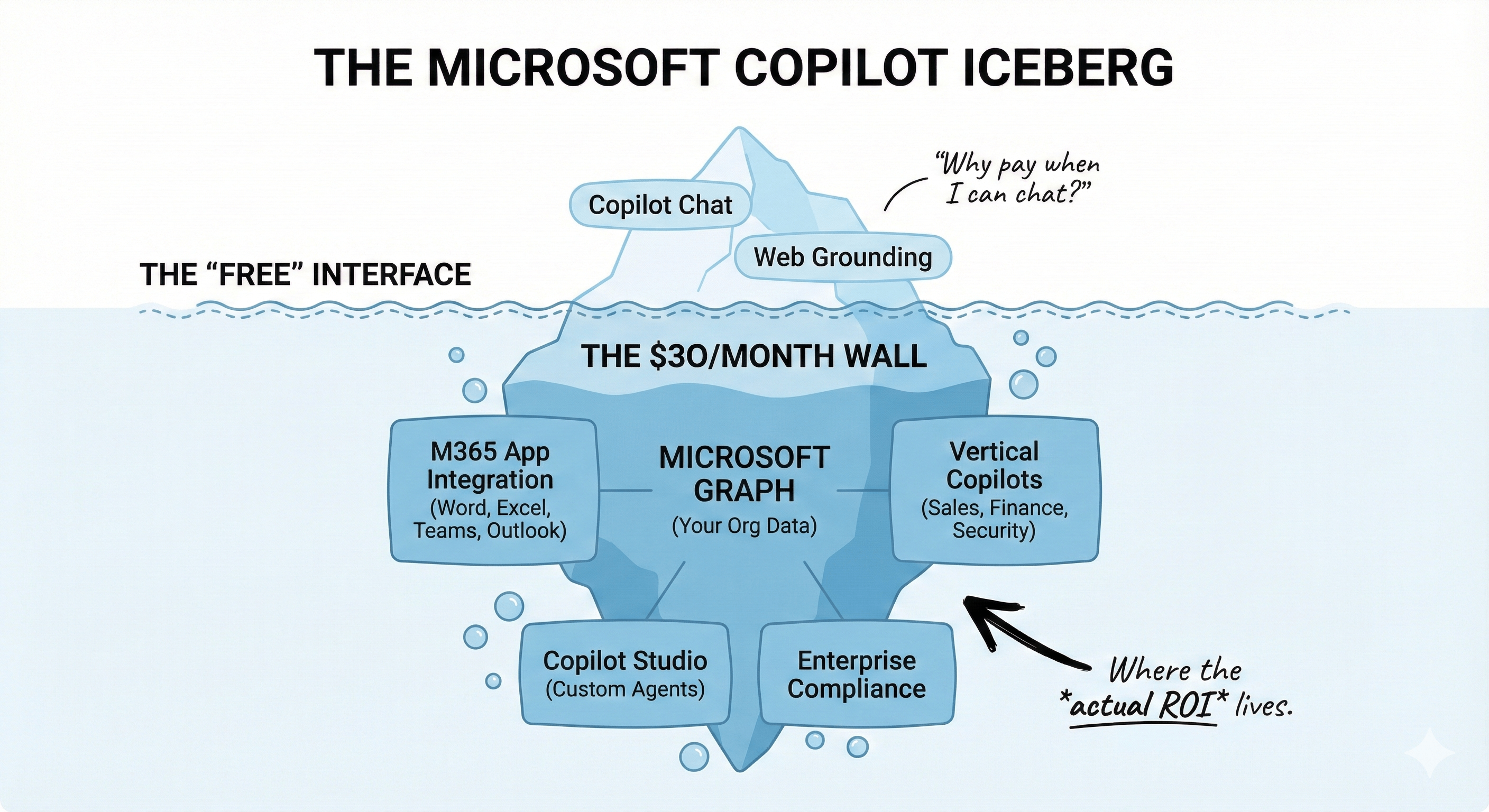
What Is Microsoft Copilot?
Microsoft Copilot is a branded AI assistant embedded across Microsoft's product portfolio. Rather than a single application, it's an umbrella term for AI capabilities integrated into tools you already use.
Primary Variants:
M365 Copilot - Embedded in Word, Excel, PowerPoint, Teams, Outlook with Microsoft Graph access to organizational data. Summarizes emails, drafts documents, analyzes spreadsheets.
GitHub Copilot - AI pair programming assistant for developers. Suggests code completions, generates functions, and integrates with VS Code and JetBrains IDEs.
Vertical Copilots - Specialized versions for Security, Sales, Service, and Finance workflows. Now bundled at no extra cost with M365 Copilot subscriptions (as of late 2025).
Microsoft Copilot Pricing 2025
Copilot Chat: Free for all Microsoft Entra ID users with eligible M365 subscriptions (rolled out mid-August 2025). Includes web grounding, file uploads, Copilot Pages, and baseline IT controls.
Microsoft 365 Copilot: $30/user/month (annual commitment) or $31.50/month (monthly billing). Requires existing M365 Business Standard/Premium or Enterprise E3/E5 license.
UK Pricing: £24.70/user/month (£296.40 annually)
Included with Paid License:
- Deep integration across Word, Excel, PowerPoint, Outlook, Teams
- Microsoft Graph grounding (access to emails, chats, documents, meetings)
- Copilot Studio access for custom agent creation
- Copilot for Sales, Service, and Finance (bundled at no extra cost)
- Enterprise data protection and compliance
When to Use Microsoft Copilot
Ideal For:
- Immediate productivity gains without infrastructure investment
- Email summarization, meeting recaps, document drafting
- Organizations already invested in Microsoft 365 ecosystem
- Teams needing instant AI assistance across daily workflows
Target Users: All employees
Time to Value: Instant (license activation only)
Technical Barrier: None
Copilot Studio: The Customization Layer
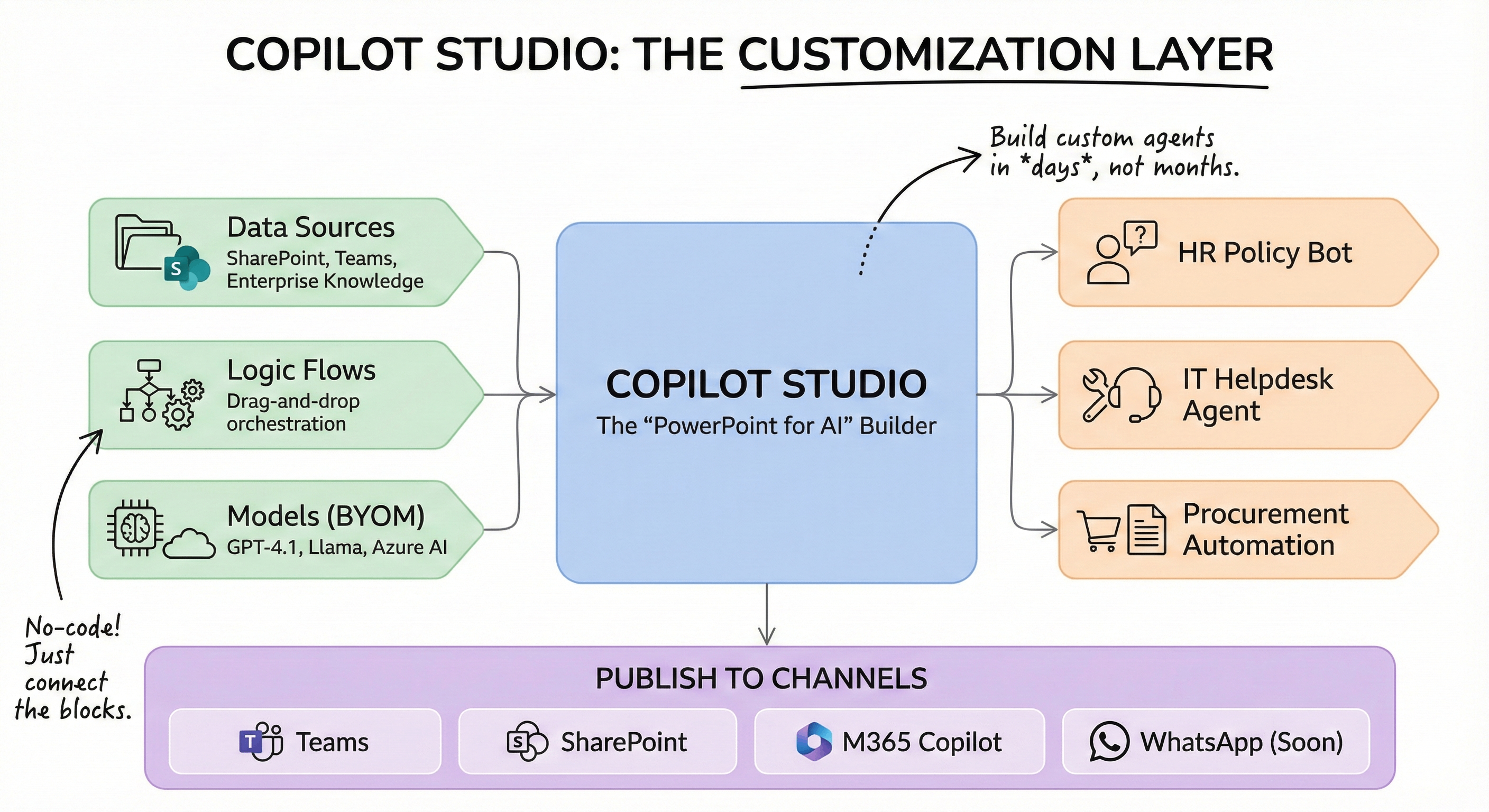
What Is Copilot Studio?
Copilot Studio is Microsoft's low-code/no-code environment for building custom AI agents and extending M365 Copilot functionality. Think "PowerPoint for AI"—drag-and-drop interface for orchestrating data sources, logic flows, and response templates.
Key Capabilities (Build 2025 Updates)
Multi-Agent Orchestration (Public Preview): Deploy connected agents where one agent calls another as a skill. Build complex workflows with specialized agents collaborating on tasks.
Model Context Protocol (MCP) Support (GA): Easier integration with enterprise knowledge systems. Growing connector support, better tool rendering, improved scalability.
Bring Your Own Model: Access 11,000+ models from Azure AI Foundry including GPT-4.1, Llama, DeepSeek, and custom fine-tuned models.
Publishing Channels:
- Microsoft Teams (generally available)
- SharePoint (generally available - one-click deployment)
- WhatsApp (rolling out July 2025)
- M365 Copilot (generally available)
Agent Store: Discover, pin, and deploy Microsoft and third-party agents including reasoning agents like Researcher and Analyst.
Copilot Studio Pricing
Included: Full Copilot Studio access with M365 Copilot subscription ($30/user/month)
Pay-As-You-Go: Message-based billing for users without M365 Copilot licenses. Charges apply when non-licensed users interact with custom agents.
Developer License: Free for development and testing with limited usage—ideal for prototyping.
Session Capacity Units (SCU): $4/SCU/hour provisioned, $6/SCU/hour overage for high-volume scenarios.
When to Use Copilot Studio
Ideal For:
- Department-specific chatbots (HR policies, IT helpdesk, procurement)
- Internal FAQs with SharePoint/Teams data integration
- Rapid deployment without developer resources
- Business process automation with minimal code
Target Users: Business analysts, HR managers, citizen developers
Time to Value: Days to weeks
Technical Barrier: None
Azure AI Foundry: The Developer Platform
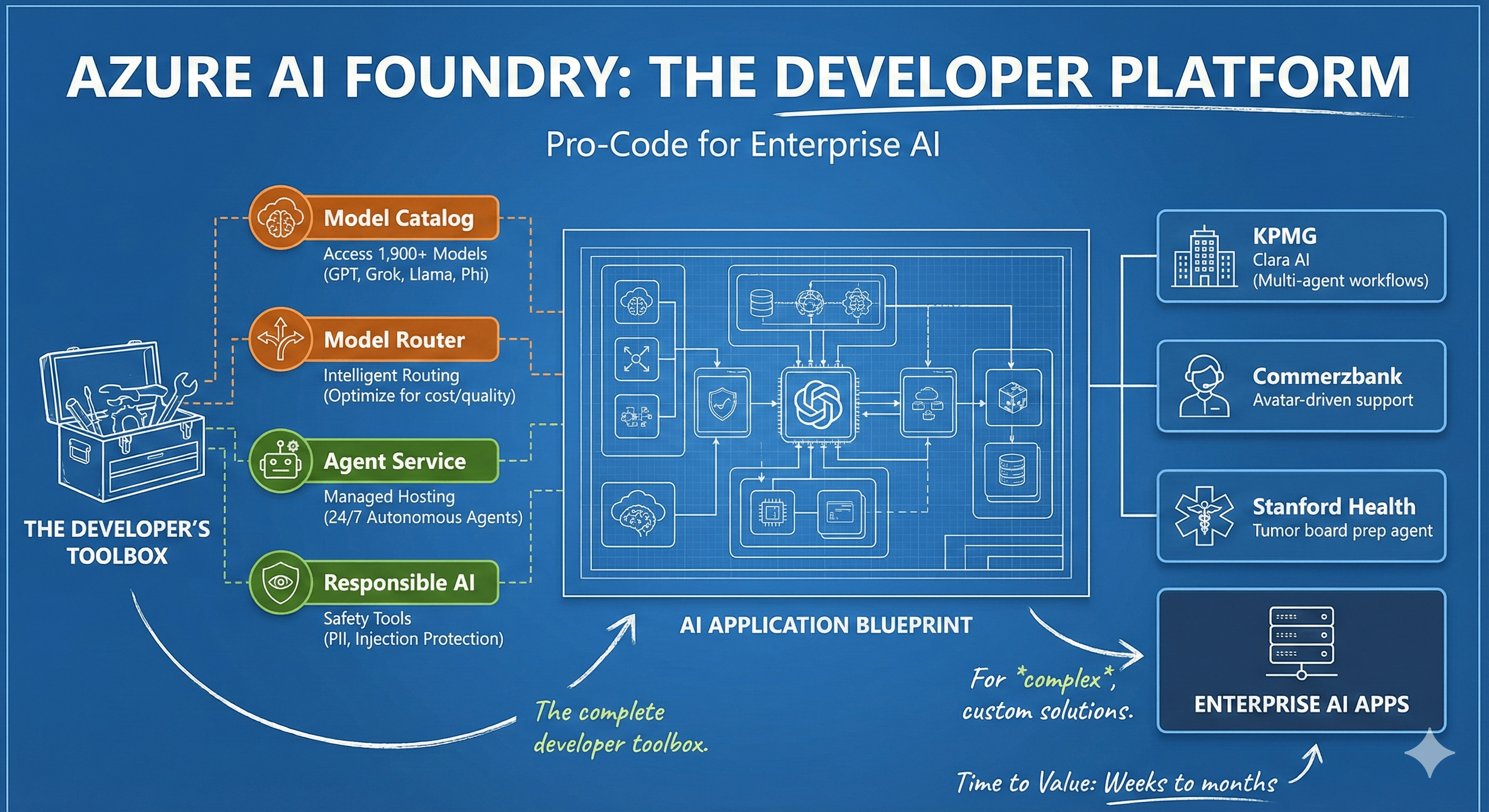
What Is Azure AI Foundry?
Azure AI Foundry (announced Ignite 2024, formerly Azure AI Studio) is Microsoft's unified pro-code platform for building enterprise-grade AI applications. It consolidates model access, safety tools, and agent hosting into a single developer dashboard.
Core Components
Model Catalog: Access 1,900+ models (11,000+ total in full catalog) via unified API:
- OpenAI: GPT-4.1, GPT-4o
- xAI: Grok-3, Grok-3-mini
- Meta: Llama models
- Microsoft: Phi family
- Mistral, DeepSeek, and custom models
Model Router (Preview): Intelligent system automatically selects optimal AI model for each prompt, optimizing for quality, cost, and performance.
Azure AI Foundry Agent Service (GA): Managed hosting for 24/7 autonomous agents with:
- Agent-to-Agent (A2A) communication protocol
- Model Context Protocol (MCP) support
- OpenTelemetry observability
- Microsoft Entra Agent ID for secure identity management
Responsible AI Features (Public Preview):
- Task adherence monitoring
- Prompt shields with spotlighting (injection protection)
- PII detection and management
Windows AI Foundry: Local AI capabilities for Windows 11 and macOS. Supports on-device inference for fast, private development without cloud dependency.
Enterprise Adoption
70,000+ organizations worldwide use Azure AI Foundry, including:
- KPMG: Clara AI audit platform using Agent Framework for multi-agent workflows
- Commerzbank: Avatar-driven customer support with Agent Framework
- Stanford Health Care: Healthcare agent orchestrator for tumor board preparation
- BMW & Fujitsu: Production agent deployments
When to Use Azure AI Foundry
Ideal For:
- Complex applications requiring custom business logic
- Integration with proprietary systems (SQL databases, CRMs, external APIs)
- Organizations needing full parameter control (temperature, grounding, model selection)
- Comprehensive testing pipelines for hallucination prevention
- Security/compliance requiring enterprise-grade controls
Target Users: Software engineers, data scientists, ML engineers
Time to Value: Weeks to months
Control Level: Complete
Microsoft Agent Framework: The Foundation
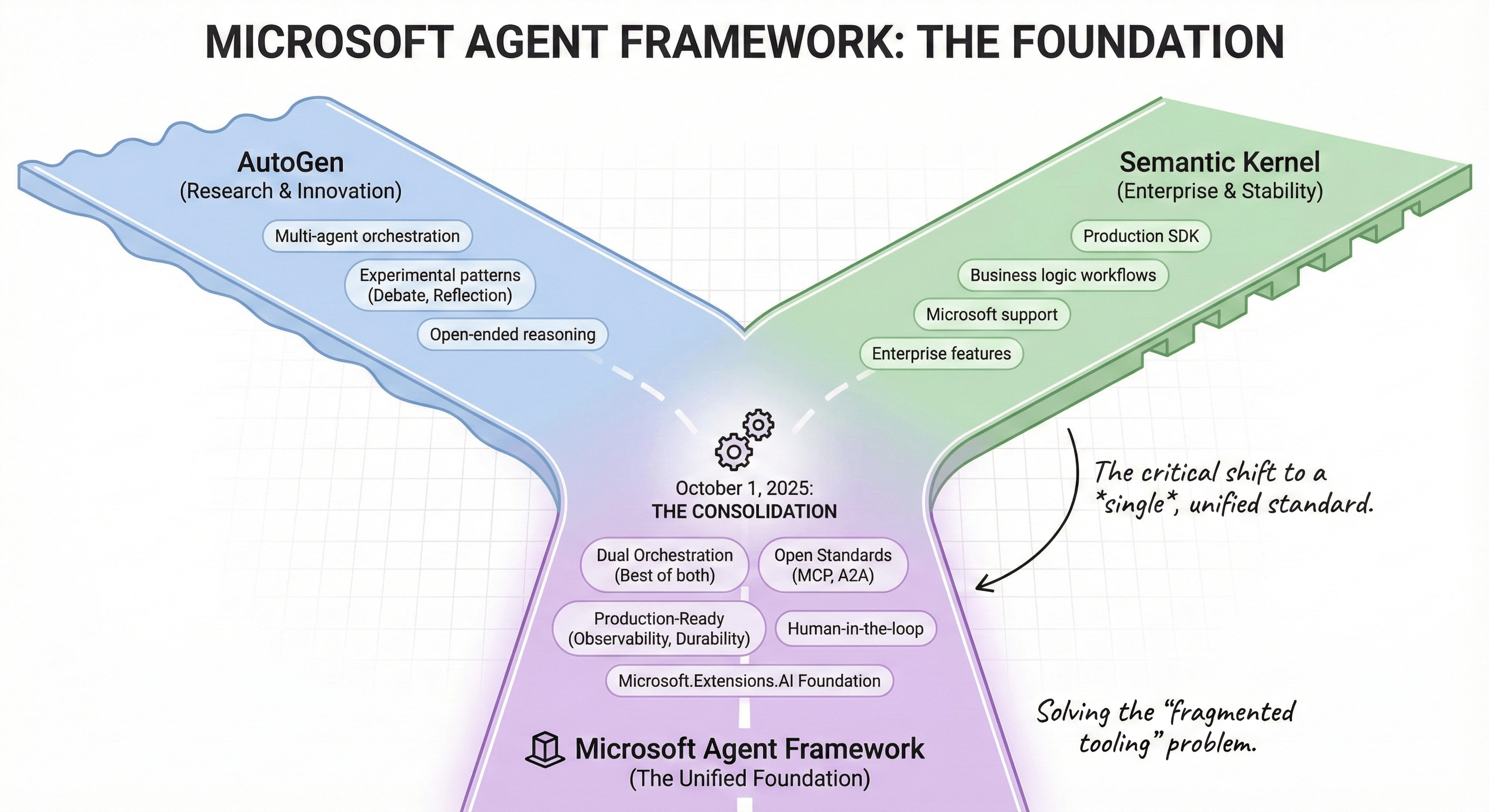
The Critical Shift from AutoGen and Semantic Kernel
October 1, 2025 marked Microsoft's strategic consolidation of agent development tools. The Microsoft Agent Framework unified two previously separate ecosystems:
AutoGen (2023-2025): Research project from Microsoft Research introducing multi-agent orchestration. Pioneered patterns like group chat collaboration, debate, and reflection. Viral adoption for solving problems beyond single-LLM capabilities.
Semantic Kernel (2021-2025): Production-ready SDK for integrating LLMs into applications. Enterprise features, stability, and Microsoft support. Strong .NET/Python/Java support with version 1.0 maturity.
The Consolidation: Both AutoGen and Semantic Kernel entered maintenance mode (bug fixes and security patches only—no new features). All future development centers on Microsoft Agent Framework.
Why Microsoft Built Agent Framework
Developer Feedback: "Why can't we have both—the innovation of AutoGen and the trust and stability of Semantic Kernel—in one unified framework?"
Industry Challenge: 50% of developers lose 10+ hours weekly to fragmented tooling (industry study 2025).
Governance Gap: McKinsey's 2025 Global AI Trust Survey identified lack of governance and risk-management tools as the #1 barrier to AI adoption.
Microsoft Agent Framework Architecture
Dual Orchestration Models:
Agent Orchestration (AutoGen DNA): LLM-driven, dynamic reasoning for open-ended problems. Supports experimental patterns like group chat, debate, reflection.
Workflow Orchestration (Semantic Kernel DNA): Deterministic, business-logic-driven workflows for repeatable enterprise processes.
Core Features:
Open Standards & Interoperability:
- Model Context Protocol (MCP)
- Agent-to-Agent (A2A) messaging
- OpenAPI-first design
- Cross-runtime portability
Production-Ready Infrastructure:
- OpenTelemetry observability
- Microsoft Entra ID authentication
- Long-running durability for stateful tasks
- Human-in-the-loop approval workflows
- Checkpointing and recovery
Pluggable Components:
- Redis, Pinecone memory providers
- Declarative YAML/JSON workflow definitions
- Extensible connector ecosystem
Microsoft.Extensions.AI Foundation: Unified API surface across .NET, creating cohesive developer experience with familiar patterns.
Migration Paths
From Semantic Kernel:
- Replace
Kerneland plugin patterns withAgentandToolabstractions - Move from
Microsoft.SemanticKernel.*toMicrosoft.Extensions.AI.*namespaces - Agents created directly from providers (no Kernel coupling)
- Native thread management with
RunAsync/RunStreamingAsync
From AutoGen:
- Map
AssistantAgenttoChatAgent - Simplified messaging with stronger durability
- Built-in checkpointing
- Enterprise-grade error handling
When to Use Microsoft Agent Framework
Ideal For:
- Multi-step autonomous reasoning workflows
- Systems requiring agent collaboration (code generation + review, research + synthesis)
- Complex decision trees with iteration
- Production deployment to Azure AI Foundry Agent Service
Target Users: Software engineers building agent-based systems
Languages: Python, .NET (C#)
License: Open-source MIT license
Deployment: Azure AI Foundry Agent Service, local containers
Decision Matrix: Choosing the Right Tool
| Your Requirement | Solution | Monthly Cost | Time to Value | Why This Choice |
|---|---|---|---|---|
| Immediate email/document assistance | M365 Copilot | $30/user | Instant | Zero configuration, Graph integration |
| Internal FAQ bot (HR, IT, procurement) | Copilot Studio | Included with M365 Copilot | Days-weeks | No-code, SharePoint/Teams native |
| Custom app with database integration | Azure AI Foundry | Usage-based | Weeks-months | API control, security compliance, model choice |
| Multi-agent autonomous workflows | Agent Framework | Included with Foundry | Weeks-months | Orchestration, iterative reasoning |
| Production agent hosting at scale | Azure AI Foundry Agent Service | Usage-based | Immediate (post-development) | Managed infrastructure, 24/7 uptime, observability |
Complete Integration Workflow: Development to Production
Real-World Example: Market Analysis Agent System
Step 1: Local Development
Engineer uses Microsoft Agent Framework in VS Code (Python or .NET). Creates two collaborating agents:
- Researcher Agent: Gathers market data, competitor analysis, industry trends
- Writer Agent: Synthesizes findings into executive-ready reports
# Microsoft Agent Framework - 20 lines creates functional agent
from agent_framework import ChatAgent, Tool

researcher = ChatAgent(
    name="market_researcher",
    chat_client=client,
    tools=[web_search_tool, database_query_tool]
)

writer = ChatAgent(
    name="report_writer",
    chat_client=client,
    tools=[format_tool, export_tool]
)
Step 2: Cloud Deployment
Code deploys to Azure AI Foundry Agent Service. Becomes managed API endpoint with:
- Authentication (Microsoft Entra ID)
- Logging and monitoring (OpenTelemetry)
- Automatic scaling
- Cost tracking
Step 3: Business Integration
Business analyst uses Copilot Studio (no-code interface):
- Creates Teams bot with visual designer
- Adds deployed agent as plugin
- Configures permissions and triggers
- Tests in sandbox environment
- Publishes to Teams
Step 4: End-User Experience
Executive opens Microsoft Teams, messages custom bot: "Generate Q1 tech sector report with competitor positioning"
Behind the scenes:
- Teams → Copilot Studio → Agent Service API
- Researcher Agent activates: web search, database queries, data aggregation
- Writer Agent receives research: formats analysis, generates insights
- Structured report returned to Teams with charts and executive summary
Data Flow Architecture:
User (Teams UI)
  → Copilot Studio (orchestration)
    → Agent Service API (Azure AI Foundry)
      → Agent Framework (multi-agent workflow)
        → Model Inference (GPT-4.1, custom models)
          → External Tools (databases, APIs, web)
      → Response Pipeline
    → Output Formatting
  → User Interface (Teams message)
Build 2025 Key Announcements
GitHub Copilot Evolution
GitHub Coding Agent: Asynchronous agent integrated into GitHub platform. Spins up secure development environments powered by GitHub Actions. Creates draft pull requests with commit history and session logs.
Key Features:
- Cross-repo awareness for monorepos
- Natural language feedback loop during execution
- Security-aware extensions (custom linters, policy engines)
- Human approval required before CI/CD workflows
Open Source: GitHub Copilot Chat in VS Code now open-source, reinforcing Microsoft's commitment to collaborative AI development.
Connected Agents & Multi-Agent Systems
Agent-to-Agent (A2A) Protocol (Preview): Enables different agents to communicate securely without human intervention. Specialized agents coordinate on multi-task problems:
Example Workflow:
- Sales Agent identifies lead opportunity
- Research Agent gathers prospect data
- Proposal Agent generates customized pitch
- CRM Agent updates systems automatically
Multi-Agent Orchestration (Copilot Studio - Public Preview): Deploy solutions where agents delegate and collaborate across systems, teams, and departments.
Security & Governance
Microsoft Entra Agent ID (Public Preview): Every agent created in Copilot Studio or Azure AI Foundry automatically receives managed identity. Enables:
- Secure agent-to-agent communication
- Audit trails and compliance reporting
- Role-based access control
- Centralized agent lifecycle management
Microsoft Purview Integration: Automatic data security and compliance for all Copilot Studio and Foundry agents.
Technical Comparison: Microsoft Agent Framework vs Alternatives
Microsoft Agent Framework vs LangGraph
| Feature | Microsoft Agent Framework | LangGraph |
|---|---|---|
| Maturity | Public preview (Oct 2025) | Production-ready |
| Orchestration | Agent + Workflow dual models | Graph-based state machines |
| Enterprise Features | Built-in observability, governance | Third-party integrations required |
| Open Standards | MCP, A2A, OpenAPI native | Custom protocols |
| Ecosystem | Azure, M365, GitHub integration | Platform-agnostic |
| Best For | Enterprise interoperability, cross-platform agents | Production agents today |
Strategic Positioning: LangGraph is the proven choice for immediate production needs. Microsoft Agent Framework is the long-term platform for interoperable enterprise agents with native Microsoft ecosystem integration.
Cost Analysis: Total Cost of Ownership
Small Business Scenario (20 employees)
M365 Copilot Only:
- M365 Business Premium: $22/user/month = $440/month
- M365 Copilot: $30/user/month = $600/month
- Total: $1,040/month ($12,480/year)
With Custom Agents (Copilot Studio):
- Base M365 + Copilot: $1,040/month
- Copilot Studio: Included
- Azure consumption (agent hosting): ~$200-500/month
- Total: $1,240-1,540/month ($14,880-18,480/year)
Enterprise Scenario (500 employees, 100 with Copilot)
Licensed Users:
- M365 E5: $57/user/month × 500 = $28,500/month
- M365 Copilot: $30/user/month × 100 = $3,000/month
- Total: $31,500/month ($378,000/year)
Azure AI Foundry (Pro Development):
- Agent Service consumption: ~$2,000-8,000/month
- Model inference (GPT-4.1, custom): ~$1,000-5,000/month
- Storage & networking: ~$500-1,500/month
- Development Infrastructure: $3,500-14,500/month
Total Enterprise TCO: $420,000-582,000/year
Hidden Costs to Consider
- Training & Change Management: $50-200/employee one-time
- Data Governance Setup: $10,000-50,000 one-time
- Custom Development: $150-250/hour for specialists
- Ongoing Optimization: 0.5-1 FTE DevOps/AI engineer
Getting Started: Implementation Roadmap
Phase 1: Immediate Value (Weeks 1-4)
- Enable M365 Copilot for pilot group (10-20% of organization)
- Measure baseline productivity: email time, meeting efficiency, document creation
- Deploy Copilot Chat across organization (free tier)
- Identify use cases for custom agents
Phase 2: Custom Automation (Months 2-3)
- Build first agent in Copilot Studio (HR FAQ, IT helpdesk)
- Deploy to Teams/SharePoint
- Gather user feedback and usage metrics
- Iterate based on data
Phase 3: Advanced Development (Months 4-6)
- Set up Azure AI Foundry environment
- Train development team on Microsoft Agent Framework
- Build complex multi-agent workflow (sales, operations, customer service)
- Deploy to Agent Service with monitoring
Phase 4: Enterprise Scale (Months 6-12)
- Expand Copilot licenses based on ROI data
- Deploy production agents across departments
- Implement governance framework (Entra Agent ID, Purview)
- Establish AI Center of Excellence
Future-Proofing Your Investment
Microsoft's 2025-2026 Roadmap Signals
Open Agentic Web: Microsoft joined MCP Steering Committee (May 2025), contributing authorization specs and registry services. Focus on cross-platform agent collaboration.
Consolidation Complete: AutoGen and Semantic Kernel maintenance mode confirms Microsoft Agent Framework as long-term platform.
Graph Expansion: Graph Connectors becoming Copilot Connectors—unified data access layer across Microsoft and third-party systems.
Local AI Priority: Windows AI Foundry and Copilot+ PC features signal hybrid cloud-edge strategy.
Strategic Recommendations
If Starting Fresh: Use Microsoft Agent Framework from day one. Skip AutoGen/Semantic Kernel entirely.
If Using AutoGen/Semantic Kernel Today: Plan migration by Q2 2026. Prioritize simple agents first, complex workflows second.
If Evaluating Alternatives: Microsoft's ecosystem integration (M365, Azure, GitHub, Power Platform) creates competitive moat for organizations already invested.
If Budget-Constrained: Start with free Copilot Chat + Copilot Studio for quick wins. Add paid Copilot licenses based on measured productivity gains.
Conclusion: The Convergence Strategy
Microsoft's 2025 AI stack represents a calculated consolidation: four clear layers (SaaS, Low-Code, Pro-Code, Framework) with defined use cases, pricing, and migration paths. The October 2025 launch of Microsoft Agent Framework ended ecosystem fragmentation, creating a unified platform from research to production.
For Business Users: M365 Copilot delivers immediate ROI with zero technical overhead.
For Citizen Developers: Copilot Studio enables rapid automation without code.
For Software Engineers: Azure AI Foundry + Agent Framework provides production-grade infrastructure with open standards.
For Enterprises: End-to-end platform with governance, security, and interoperability across 70,000+ organizations worldwide.
The strategic question isn't whether to adopt Microsoft's AI stack—it's which layer matches your current needs and how to scale systematically across the pyramid as capabilities mature.
Additional Resources
Official Documentation:
- Azure AI Foundry Documentation
- Microsoft Agent Framework GitHub
- Copilot Studio Documentation
- M365 Copilot Pricing
Migration Guides:
Community:
Training:
No comments yet — be the first to add to the discussion. Comments appear after they’re reviewed.
Want more insights?
Subscribe to get the latest articles delivered straight to your inbox.