Power BI - AI automation
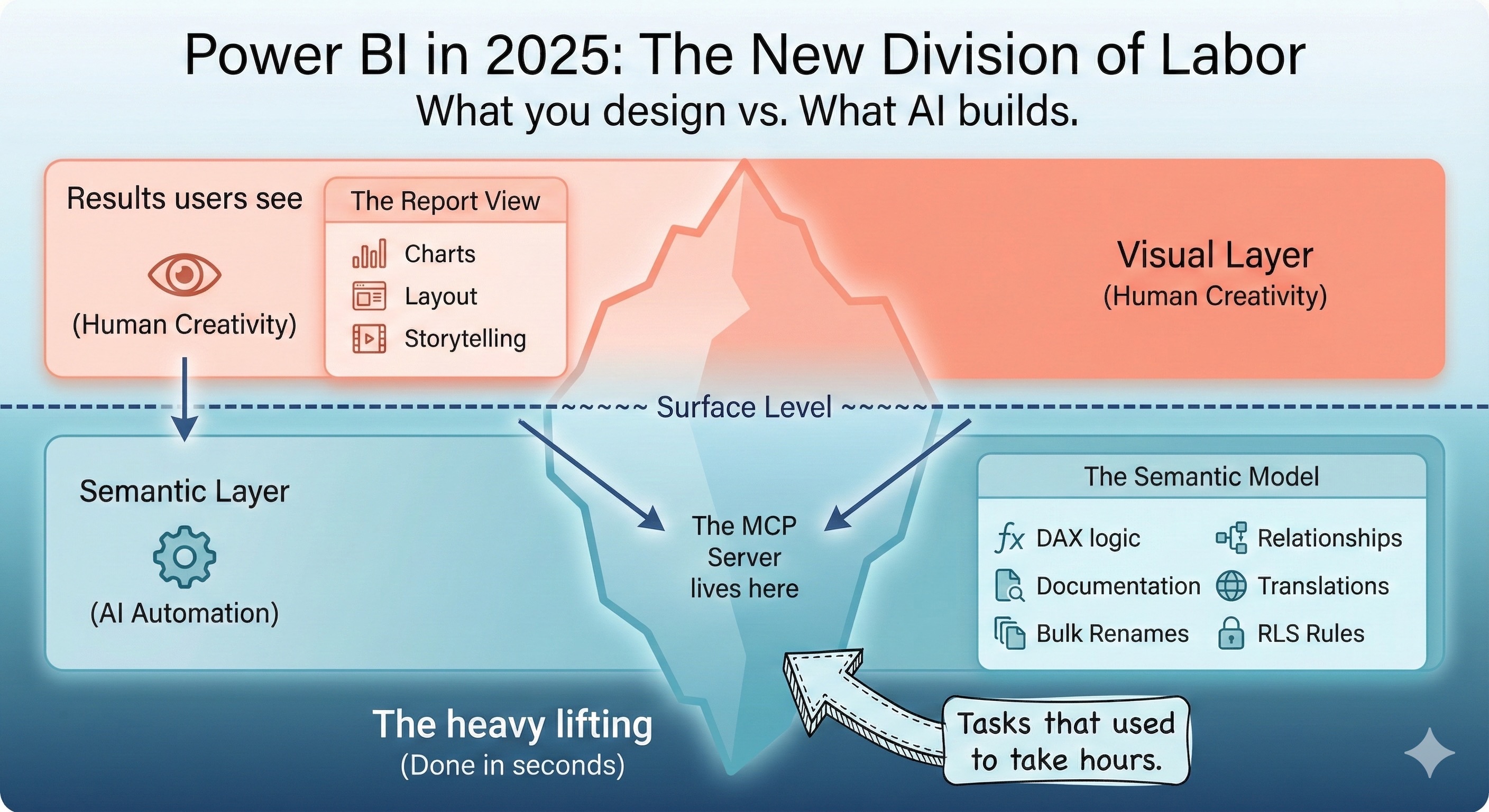
Microsoft released two Power BI MCP (Model Context Protocol) servers in November 2025 at Ignite, fundamentally changing how enterprises build and maintain Power BI semantic models. The Modeling MCP Server automates dashboard development through natural language commands, while the Remote MCP Server enables AI agents to query existing models. This guide covers architecture, capabilities, setup, and enterprise implementation strategies.
Key Takeaway: The Power BI Modeling MCP Server transforms semantic model development from manual point-and-click work into AI-assisted automation. Tasks that took hours—bulk measure creation, model documentation, DAX refactoring—now take seconds through natural language commands.
What Is the Power BI MCP Server?
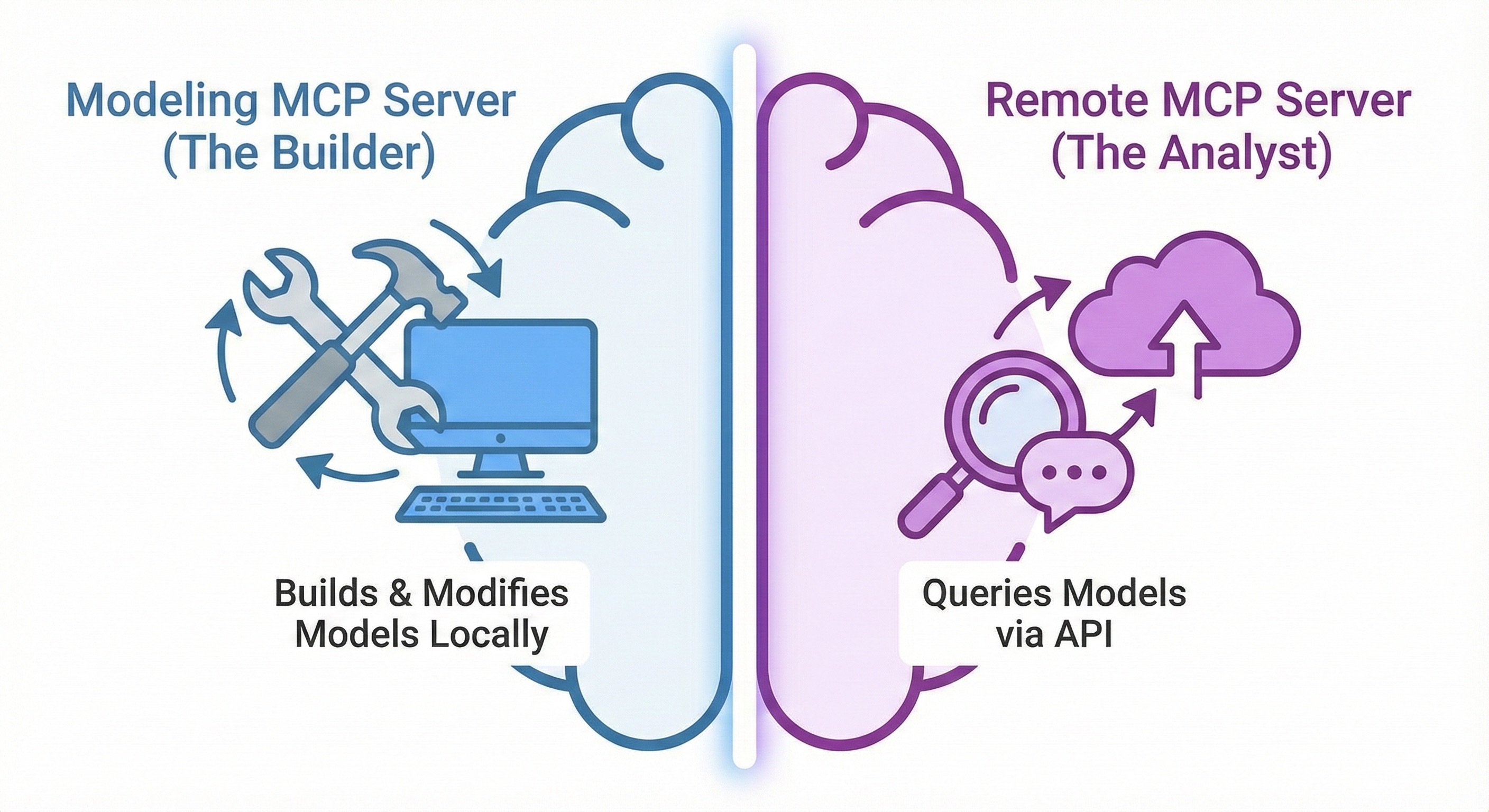
The Model Context Protocol (MCP) is an open standard launched by Anthropic in November 2024 that defines how AI assistants interact with external tools and data sources. Microsoft’s Power BI MCP servers implement this protocol to create direct connections between AI agents (GitHub Copilot, Claude, custom agents) and Power BI semantic models.
Two distinct servers serve different purposes:
| Server | Function | Use Case | Status |
|---|---|---|---|
| Modeling MCP Server | Build/modify semantic models programmatically | Development, automation, bulk operations | Public Preview |
| Remote MCP Server | Query existing models via natural language | Data analysis, ad-hoc insights, chatbots | Public Preview |
The Modeling MCP Server runs locally and provides AI agents with comprehensive semantic modeling capabilities. The Remote MCP Server is a hosted endpoint at https://api.fabric.microsoft.com/v1/mcp/powerbi that generates and executes DAX queries using Copilot’s intelligence.
How the MCP Server Automates Dashboard Building
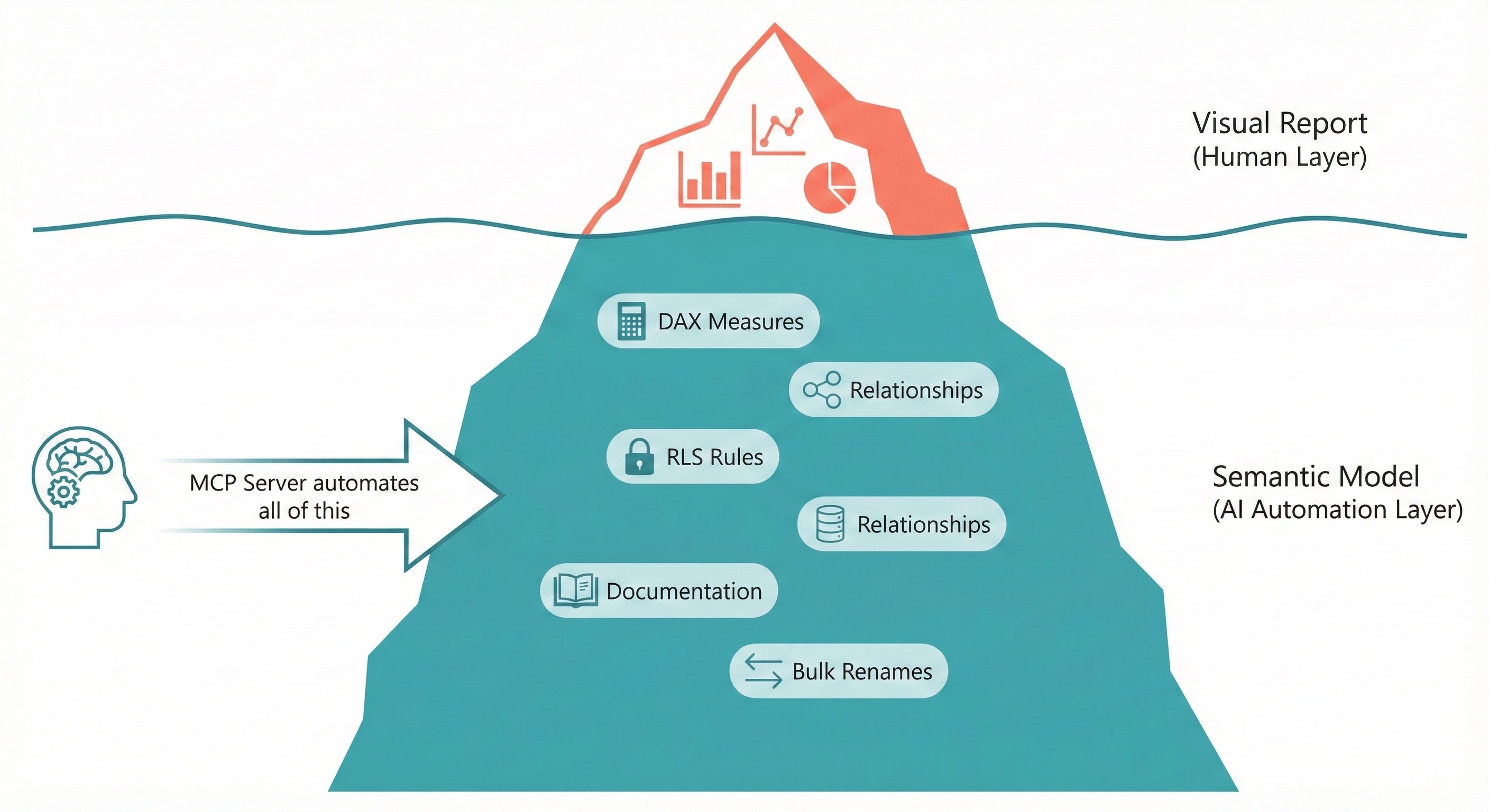
The Power BI Modeling MCP Server doesn’t create reports or visuals—it automates the semantic model layer that underlies all Power BI dashboards. This distinction matters: while you still design the visual report manually, the underlying data model (tables, measures, relationships, calculations) can now be built and maintained through AI agents.
What Gets Automated
Semantic Model Operations:
- Create, update, delete tables, columns, measures, relationships
- Bulk renaming with consistent naming conventions
- Generate DAX measures from natural language descriptions
- Create calculation groups and time intelligence patterns
- Apply row-level security (RLS) rules programmatically
- Generate multi-language translations for international deployments
- Document entire models with descriptions for every object
Development Workflows:
- Import/export TMDL (Tabular Model Definition Language) folders
- Deploy models to Fabric workspaces
- Validate DAX queries before production deployment
- Benchmark queries across model versions
- Refactor existing measures into calculation groups
Architecture: How It Works
┌──────────────────────────────────────────┐
│         AI Assistant                      │
│   (GitHub Copilot / Claude / Custom)      │
└────────────────────┬─────────────────────┘
                     │ MCP Protocol
                     ▼
┌──────────────────────────────────────────┐
│       Power BI Modeling MCP Server        │
│              (Local Process)              │
├──────────────────────────────────────────┤
│  26+ Tools for Semantic Model Operations  │
│  ├── connection_operations               │
│  ├── database_operations                 │
│  ├── table_operations                    │
│  ├── measure_operations                  │
│  ├── relationship_operations             │
│  ├── dax_query_operations                │
│  └── batch_*_operations                  │
└────────────────────┬─────────────────────┘
                     │ TOM API / XMLA
                     ▼
┌──────────────────────────────────────────┐
│          Power BI Semantic Model          │
│  ├── Power BI Desktop (.pbix)            │
│  ├── Fabric Workspace (cloud)            │
│  └── PBIP Project Files (TMDL)           │
└──────────────────────────────────────────┘
The MCP Server uses Microsoft’s Tabular Object Model (TOM) API and XMLA endpoints to execute operations. Credentials are handled through the official Azure Identity SDK—the server never stores tokens directly.
Available Tools and Capabilities
The Modeling MCP Server exposes 26+ tools to AI agents. Here’s the complete tool inventory:
Core Modeling Tools
| Tool | Operations |
|---|---|
connection_operations |
Connect to Power BI Desktop or Fabric workspaces |
database_operations |
Manage semantic models—connect, create, update, list, import/export TMDL, deploy to Fabric |
transaction_operations |
Begin, commit, rollback transactions with full ACID support |
model_operations |
Get model stats, create, update, refresh, rename entire models |
table_operations |
Full CRUD on tables including refresh and rename |
column_operations |
Manage columns with data types, formats, hierarchies |
measure_operations |
Create DAX measures, validate expressions, move between tables |
relationship_operations |
Create/modify relationships, activate/deactivate, find cardinality issues |
dax_query_operations |
Execute, validate, and generate DAX queries |
Advanced Operations
| Tool | Operations |
|---|---|
partition_operations |
Manage table partitions for incremental refresh |
user_hierarchy_operations |
Create drill-down hierarchies, reorder levels |
calculation_group_operations |
Build time intelligence and calculation items |
security_role_operations |
Configure RLS with table permissions |
perspective_operations |
Create filtered views for different user audiences |
named_expression_operations |
Work with Power Query parameters |
function_operations |
Manage DAX user-defined functions (UDFs) |
culture_operations |
Multi-language support with culture management |
object_translation_operations |
Translate model objects across languages |
trace_operations |
Capture and analyze Analysis Services events |
Batch Operations (Scale Automation)
| Tool | Capability |
|---|---|
batch_table_operations |
Create/update/delete/rename multiple tables simultaneously |
batch_column_operations |
Bulk column operations with transaction support |
batch_measure_operations |
Mass measure creation, renaming, movement |
batch_function_operations |
Bulk DAX function management |
batch_perspective_operations |
Bulk perspective member management |
batch_object_translation_operations |
Mass translation across cultures |
Setup and Installation
Requirements
For Local Development (Power BI Desktop):
- Windows 10/11
- Power BI Desktop (any recent version)
- Visual Studio Code
- GitHub Copilot subscription (or other MCP-compatible AI client)
For Fabric Workspaces:
- Power BI Pro license (minimum) OR Fabric F64+ capacity for consumers without Pro
- Tenant admin must enable: “Users can use the Power BI Model Context Protocol server endpoint (preview)”
- XMLA endpoint enabled on workspace
Installation via VS Code Extension (Recommended)
- Install Visual Studio Code
- Install GitHub Copilot and GitHub Copilot Chat extensions
- Install the Power BI Modeling MCP extension from VS Code Marketplace
- Verify installation: Open Copilot Chat → Check that
powerbi-modeling-mcpappears in available tools
Manual Installation (Claude Desktop, Claude Code, Other Clients)
- Download the VS Code extension
.vsixfile - Rename to
.zipand extract to a folder (e.g.,C:\MCPServers\PowerBIModelingMCP) - Run
\extension\server\powerbi-modeling-mcp.exe - Copy the MCP JSON registration from console output
Configuration for Claude Desktop:
{
  "mcpServers": {
    "powerbi-modeling-mcp": {
      "type": "stdio",
      "command": "C:\\MCPServers\\PowerBIModelingMCP\\extension\\server\\powerbi-modeling-mcp.exe",
      "args": ["--start"],
      "env": {}
    }
  }
}
Command Line Options
| Option | Default | Description |
|---|---|---|
--start |
Required | Starts the MCP server |
--readwrite |
Yes | Enables write operations with confirmation prompts |
--readonly |
No | Safe mode—prevents any model modifications |
--skipconfirmation |
No | Auto-approves all write operations (use with backups) |
--compatibility |
PowerBI | Use Full for Analysis Services databases |
Practical Usage Examples
Connecting to Models
Power BI Desktop:
Connect to 'Sales Report' in Power BI Desktop
Fabric Workspace:
Connect to semantic model 'Enterprise Sales' in Fabric Workspace 'Production Analytics'
PBIP Project Files:
Open semantic model from PBIP folder 'C:\Projects\SalesReport\SalesReport.SemanticModel\definition'
Common Automation Scenarios
Bulk Naming Convention Analysis and Rename:
Analyze my model's naming conventions and suggest renames to ensure consistency across all tables and measures.
Automated Documentation:
Add descriptions to all measures, columns, and tables to explain their purpose. For DAX measures, explain the business logic in simple terms.
Model Translation:
Generate French translations for my model including all tables, columns, measures, and hierarchies.
Measure Refactoring:
Refactor measures 'Sales Amount 12M Avg' and 'Sales Amount 6M Avg' into a calculation group with additional variants for 24M and 3M.
Semantic Model Documentation Generation:
Generate a Markdown document with complete professional documentation:
- Mermaid diagram of table relationships
- Each measure with DAX code and business logic description
- Row-level security rules
- Data sources from Power Query code analysis
DAX Query Benchmarking:
Connect to semantic models 'Sales V1' and 'Sales V2'. Benchmark this DAX query against both models:
EVALUATE SUMMARIZECOLUMNS('Date'[Year], "Total Sales", [Total Sales])
Remote MCP Server: Querying Existing Models
The Remote MCP Server serves a different purpose: it enables AI agents to query semantic models using natural language, not modify them. This is ideal for building chatbots, data assistants, and self-service analytics experiences.
Remote Server Tools
| Tool | Function |
|---|---|
get_schema |
Retrieve model structure (tables, columns, measures, relationships) |
generate_dax |
Convert natural language to DAX using Copilot’s engine |
execute_query |
Run DAX queries and return results |
Configuration
{
  "servers": {
    "powerbi-remote": {
      "type": "http",
      "url": "https://api.fabric.microsoft.com/v1/mcp/powerbi"
    }
  }
}
Query Examples
What are the top 10 products by sales this quarter?
→ Remote MCP generates: EVALUATE TOPN(10, Products, [Quarterly Sales], DESC)
Show me revenue trend by month for the last 2 years
→ Remote MCP generates appropriate time intelligence DAX
Licensing and Pricing Requirements
Power BI Licensing (December 2025 Pricing)
| License | Price | MCP Server Access |
|---|---|---|
| Power BI Pro | $14/user/month | Required for publishing to workspaces |
| Premium Per User (PPU) | $22/user/month | Full modeling capabilities |
| Fabric F64+ | ~$8,410/month (West US) | Viewers don’t need Pro license |
| Power BI Desktop | Free | Local development with Modeling MCP |
Key Licensing Notes:
- Modeling MCP Server: No additional license—uses existing Power BI Desktop or workspace permissions
- Remote MCP Server: Consumes Copilot capacity when using DAX generation
- For XMLA endpoint access (Fabric workspaces): Requires Pro license or PPU, or workspace in F64+ capacity
AI Assistant Costs
| Service | Pricing Model |
|---|---|
| GitHub Copilot Business | $19/user/month |
| GitHub Copilot Enterprise | $39/user/month |
| Claude Pro | $20/month |
| Claude Team | $25/user/month |
| Azure OpenAI | Pay-per-token |
Enterprise Implementation Considerations
Security Architecture
The MCP Server follows Microsoft’s security model:
- Authentication: Azure Identity SDK with Entra ID
- Authorization: Inherits user’s Fabric RBAC permissions
- Data Handling: Local execution—model data never leaves your environment
- Token Management: No token storage; refresh handled by Azure Identity
Security Recommendations:
- Enable Entra ID authentication
- Implement network isolation for sensitive models
- Apply least-privilege RBAC roles
- Review audit logs for MCP operations
- Use
--readonlymode for exploration before enabling writes
Governance Framework
| Control | Implementation |
|---|---|
| Change Tracking | Save models as PBIP format; commit TMDL changes to Git |
| Backup Strategy | Version history captures 5 automatic versions per model |
| Approval Workflow | MCP Server supports Elicitation protocol for confirmation prompts |
| Audit Trail | Trace operations capture Analysis Services events |
Performance Considerations
- Context Window Limits: Complex models with hundreds of tables may hit LLM context limits
- Query Execution: DAX complexity directly impacts response time
- Batch Operations: Process in batches of 100-500 objects for optimal performance
- Model Optimization: Query generation quality improves with well-documented, AI-optimized models
When to Use Each MCP Server
Use Modeling MCP Server When:
- Building new semantic models from scratch
- Bulk renaming objects for naming convention compliance
- Generating documentation across entire models
- Creating translations for international deployments
- Refactoring measures into calculation groups
- Applying row-level security rules programmatically
- Benchmarking DAX queries across model versions
Use Remote MCP Server When:
- Building conversational data assistants
- Enabling self-service analytics for business users
- Creating chatbots that answer data questions
- Integrating Power BI insights into custom applications
- Providing natural language querying without DAX knowledge
Don’t Use MCP Servers When:
- Creating report visuals (use Power BI Desktop/Service)
- Modifying report layouts or pages
- Building paginated reports
- Managing data gateway configurations
- Setting up scheduled refreshes
Comparison: MCP Server vs. Alternatives
| Capability | MCP Server | Tabular Editor | Power BI REST API | XMLA Direct |
|---|---|---|---|---|
| Natural Language Input | ✅ | ❌ | ❌ | ❌ |
| Bulk Operations | ✅ | ✅ | Limited | ✅ |
| AI-Generated DAX | ✅ | ❌ | ❌ | ❌ |
| Best Practice Validation | ✅ | ✅ | ❌ | ❌ |
| Version Control Integration | ✅ (TMDL) | ✅ | ❌ | ❌ |
| Cross-Platform (macOS/Linux) | ✅ (TMDL mode) | ✅ | ✅ | Limited |
| Learning Curve | Low | Medium | High | High |
| Automation Potential | Very High | High | High | Medium |
Known Limitations and Workarounds
Current Limitations (Public Preview)
- No Report Modification: MCP Server modifies semantic models only—reports require manual work
- Fabric Workspace Connectivity: Client ID rollout ongoing; may not work in all tenants
- Context Window Constraints: Very large models may exceed LLM context limits
- Complex DAX Generation: Highly nested calculations may not translate perfectly from natural language
Workarounds
| Limitation | Workaround |
|---|---|
| Report visuals | Use standard Power BI Desktop after model is built |
| Large models | Break into smaller batch operations |
| Complex DAX | Provide example patterns; use execute_dax_query for validation |
| Tenant connectivity issues | Use local PBIP/TMDL workflow until rollout completes |
Roadmap and Future Directions
Based on Microsoft’s November 2025 announcements and industry signals:
Expected Near-Term (Q1 2026):
- General Availability release
- Expanded tenant rollout for Fabric connectivity
- Additional built-in prompts and templates
Strategic Direction:
- Integration with Microsoft Copilot Studio for custom agent building
- Deeper Azure AI Foundry integration
- Potential report-layer MCP capabilities (unconfirmed)
- Ecosystem growth with community MCP servers
Getting Started: First Steps
- Install Prerequisites: VS Code, GitHub Copilot, Power BI Desktop
- Add Extension: Install Power BI Modeling MCP from VS Code Marketplace
- Open a Test Model: Start with a non-production .pbix file
- Connect:
Connect to '[filename]' in Power BI Desktop - Try Simple Operations:
List all tables in my modelShow me all measures in the Sales tableAdd a description to the [Total Sales] measure
- Enable Backup: Before write operations, create model copies
- Graduate to PBIP: For version control, save as Power BI Project format
Additional Resources
- Microsoft Official Documentation
- Power BI Modeling MCP GitHub Repository
- VS Code Extension Marketplace
- End-to-End Demo Video
- Model Context Protocol Specification
- TMDL Format Documentation
FAQ
Q: Does the MCP Server create Power BI reports automatically?
A: No. It automates semantic model development (tables, measures, relationships). Visual reports still require manual creation in Power BI Desktop or Service.
Q: Can I use this with Claude instead of GitHub Copilot?
A: Yes. The MCP Server works with any MCP-compatible client including Claude Desktop, Claude Code, and custom implementations.
Q: Is my data sent to external servers?
A: The Modeling MCP Server runs locally—data never leaves your environment. The Remote MCP Server executes queries through Fabric’s authenticated API endpoints.
Q: What happens if the AI makes a mistake?
A: The server supports transaction rollback, confirmation prompts (Elicitation protocol), and Power BI’s version history. Always backup before bulk operations.
Q: Do I need additional licenses for the MCP Server?
A: No additional Power BI licensing. You need an AI assistant subscription (GitHub Copilot, Claude, etc.) and standard Power BI Desktop or workspace access.
No comments yet — be the first to add to the discussion. Comments appear after they’re reviewed.
Want more insights?
Subscribe to get the latest articles delivered straight to your inbox.