Microsoft's AI Agent Decision Tree, Simplified: How to Pick the Right Tool for Your Use Case
Microsoft's Cloud Adoption Framework decision tree answers the question every enterprise architect is asking: should you use a pre-built Copilot agent, build custom in Foundry, use Copilot Studio, or skip agents entirely?
Microsoft's Cloud Adoption Framework now includes a decision tree for AI agents, and it answers the question every enterprise architect is asking: should I use a pre-built Copilot agent, build something custom in Foundry, spin up Copilot Studio, or skip agents entirely? The problem is that the official diagram packs a lot of branching logic into a single flowchart, and teams often stall at the first diamond.
This post breaks down each decision point, explains the reasoning behind it, and gives you a practical framework you can walk through in under ten minutes. Whether you're evaluating your first AI agent use case or rationalising a portfolio of twenty, the logic is the same.
Start with the Business Question: Do You Even Need an Agent?
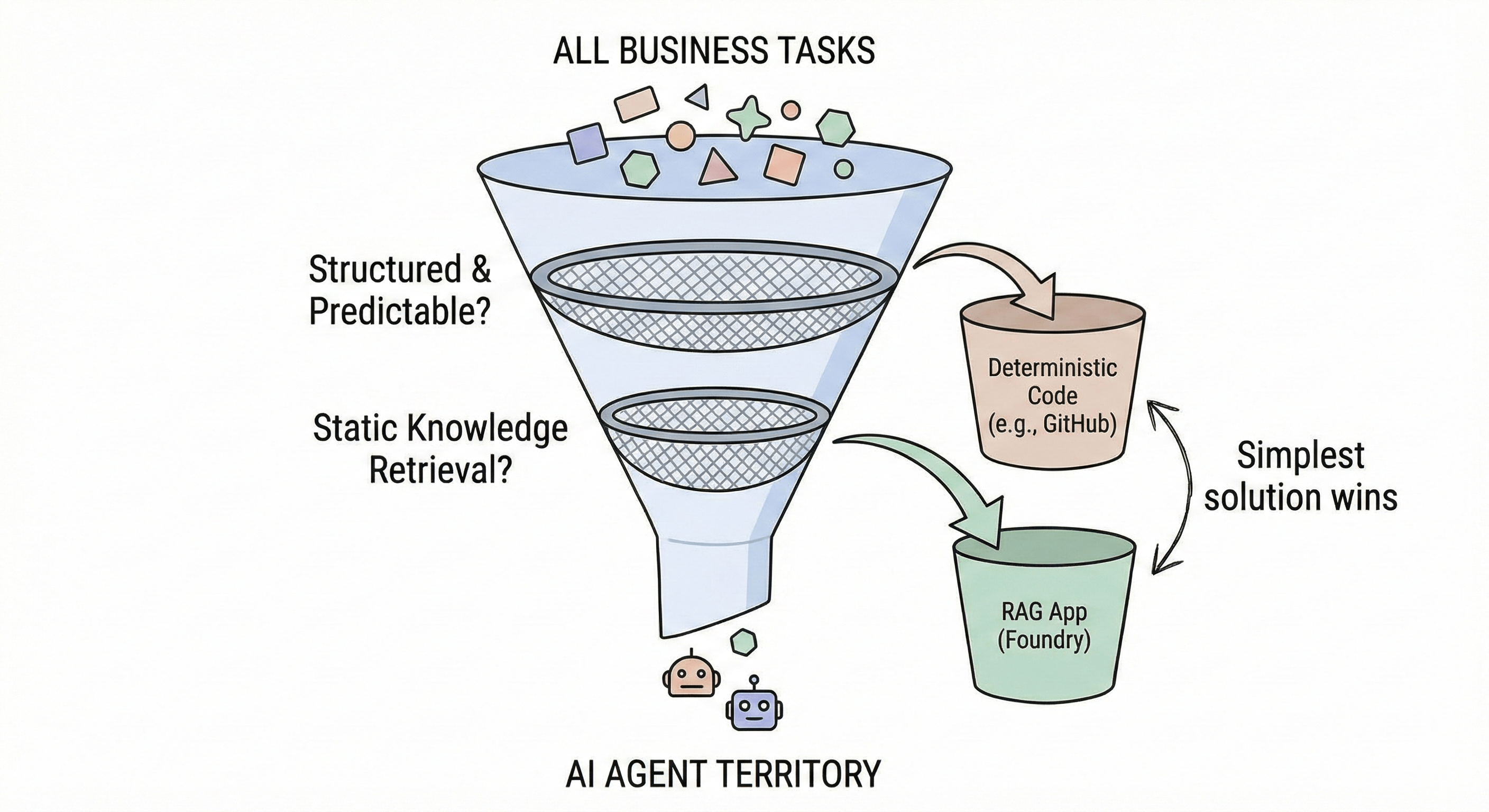
The decision tree begins not with technology selection but with a filter. Microsoft frames it as the "Business Plan" gate: know when not to build AI agents.
The first question is straightforward: Is the task structured and predictable? If a workflow follows a fixed path with well-defined inputs and outputs, and doesn't require reasoning or interpretation, an AI agent is overkill. Deterministic code is faster, cheaper, and more reliable. Microsoft points you toward GitHub for code automation, Microsoft Fabric for data pipelines, AI models in Foundry Tools, and Azure Machine Learning for traditional ML workloads.
If the task isn't purely structured, the second filter asks: Is this just static knowledge retrieval? If you're building a FAQ bot, a document search with generative summaries, or a knowledge base assistant, you don't need agent capabilities. A standard Retrieval-Augmented Generation (RAG) application, built in Microsoft Foundry, will handle single-turn Q&A and content generation from a fixed index without the complexity of tool orchestration and multi-step reasoning.
Only when you answer "No" to both questions does the decision tree move forward into agent territory. This two-question filter alone can save weeks of misallocated development effort.
The SaaS Agent Shortcut: Let Microsoft Handle the Complexity
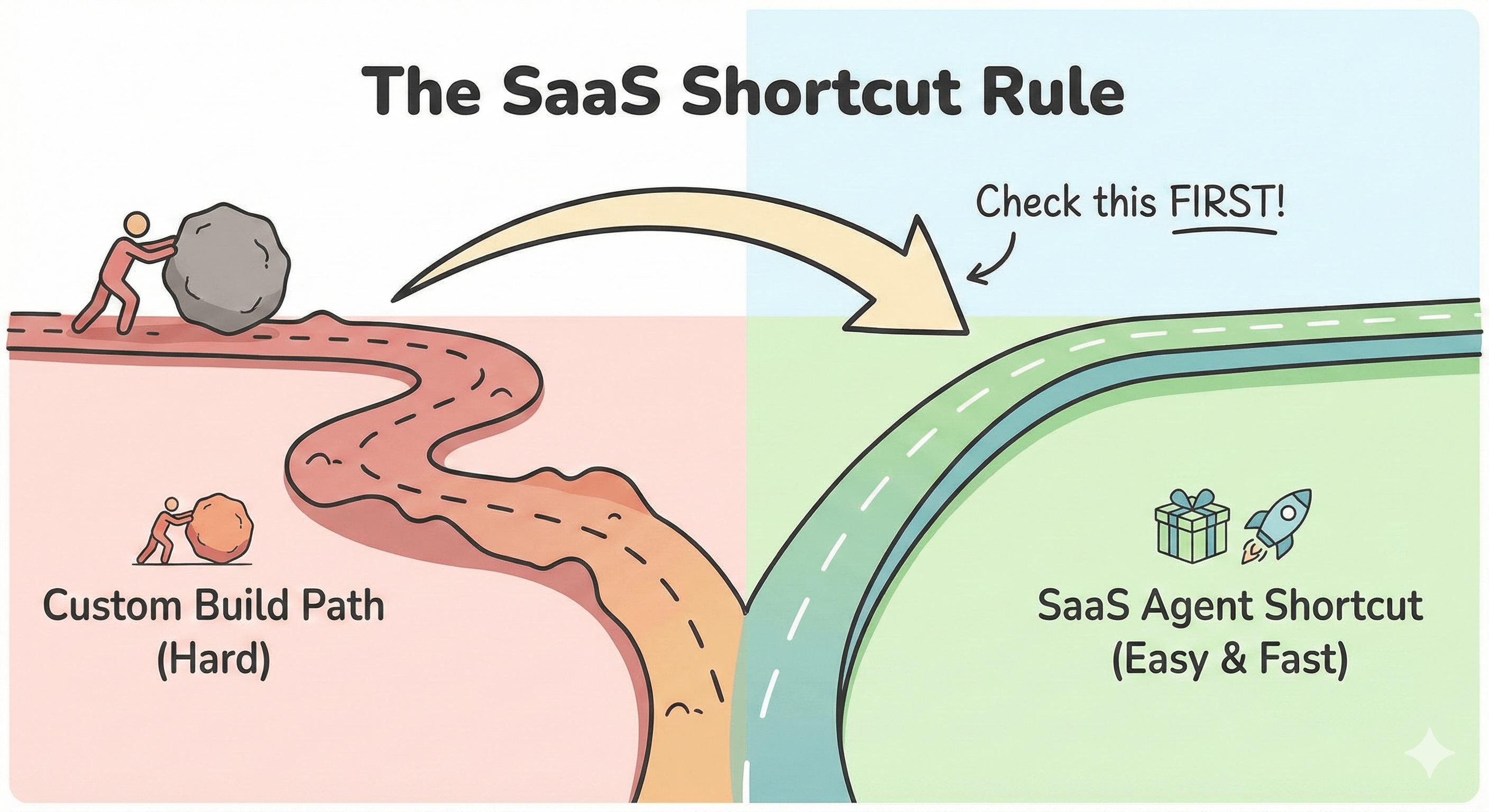
Before you write a single line of code, the next gate asks: Do SaaS agents meet your needs? Microsoft's pre-built agents are designed to handle common enterprise scenarios out of the box, and the list has grown significantly.
Microsoft 365 Copilot agents cover the productivity surface: the App Builder agent handles task automation and data synthesis across M365, the Workflows agent automates multi-step processes, and the Researcher agent synthesises information across your organisation's documents. Beyond M365, you have GitHub Copilot agents for coding tasks, Microsoft Fabric data agents for data analysis, Azure Copilot agents for cloud environment management, Dynamics 365 agents for customer service workflows, and Security Copilot agents for threat detection and response.
The logic here is pragmatic. SaaS agents require minimal customisation, deliver immediate value, and inherit Microsoft's security and compliance posture. If one of these covers 80% of your use case, start there. You can always layer custom capabilities on top later.
Three Paths for Custom Agents: Foundry, Copilot Studio, and Raw Infrastructure
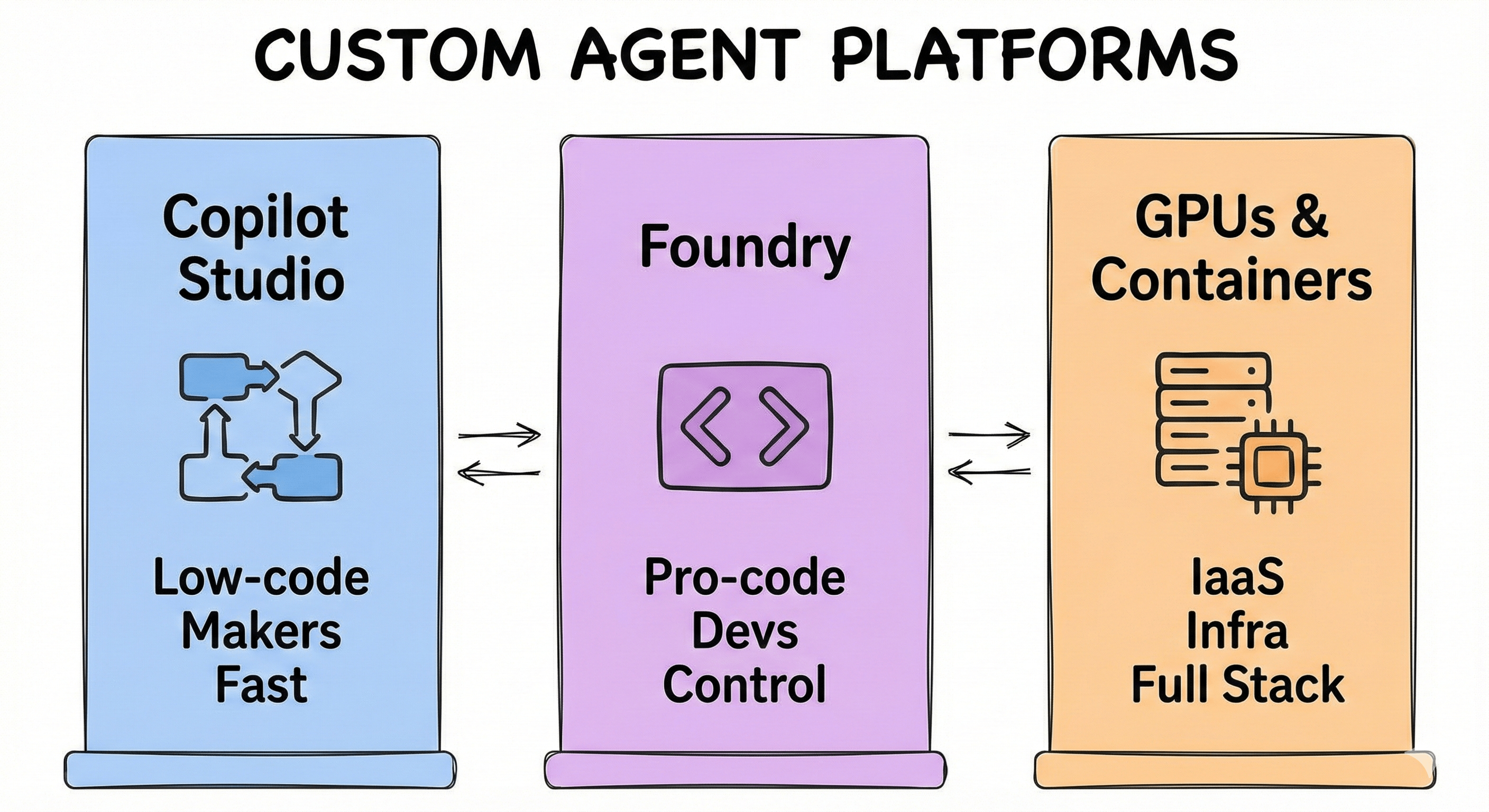
When SaaS agents fall short, you're building custom. Microsoft offers three platforms, each targeting a different team profile and complexity level.
Microsoft Copilot Studio is the low-code, SaaS option built for business teams, pro-makers, and IT admins. Its browser-based visual canvas lets you compose dialog flows and generate answers without extensive coding. It includes pre-built connectors, Azure AI Search integration, and built-in responsible AI features. Best for: fast deployment with moderate customisation, where security and reliability are priorities. Think retrieval agents that search internal knowledge bases and task agents that automate business processes.
Microsoft Foundry is the PaaS option for professional developers who need fine-grained control. It supports declarative agents (prompt-based, behaviour-driven), hosted agents (code-first with managed runtime), and multi-agent workflows with sequential logic, conditional branching, and state management. The model catalogue spans OpenAI, Anthropic, Meta, and Mistral. It supports MCP and OpenAPI for tool integration, and offers both basic (rapid prototyping) and standard (compliance-grade networking) configurations. Best for: strategic transformation use cases requiring deep integration and custom orchestration.
GPUs and Containers represent the IaaS path for organisations needing full stack control. Azure Container Apps handles small language models with serverless GPU, while Azure Kubernetes Service runs large language models on GPU clusters. Best for: custom model configurations, strict data isolation, private networking, and compliance-sensitive environments where you need control over every layer.
These platforms aren't mutually exclusive. The pattern many enterprises land on is a hybrid: developers build specialised tools and agents in Foundry, then makers assemble user-facing experiences in Copilot Studio, with agents collaborating via agent-to-agent patterns.
Single Agent or Multi-Agent: The Architecture Decision
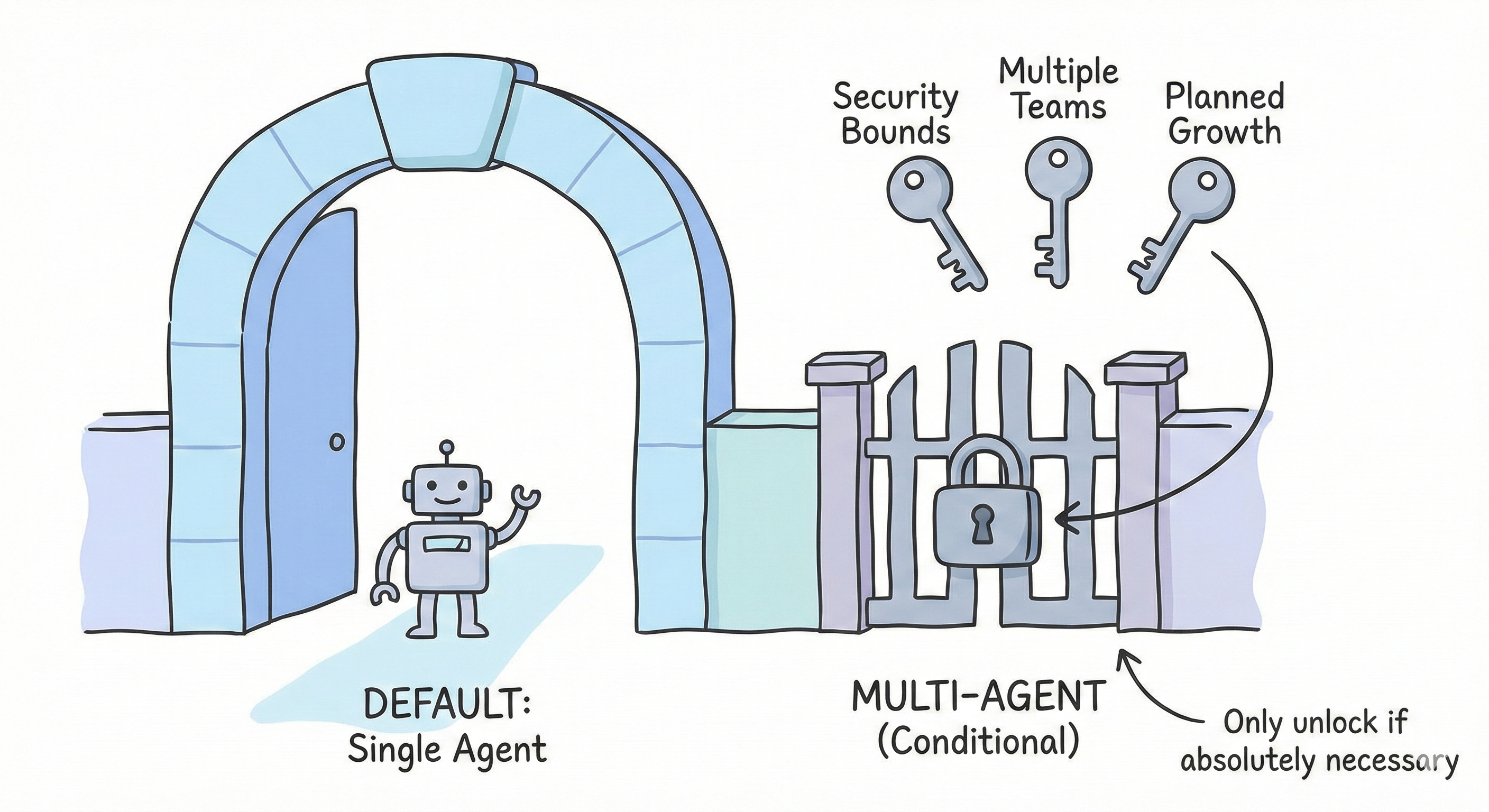
Once you've picked a platform, the decision tree branches into architecture. Microsoft's guidance is clear: start with a single agent by default.
The multi-agent path triggers only when specific criteria mandate separation. Ask three questions:
Are you crossing security and compliance boundaries? If regulations require strict data isolation, or different security classifications need independent processing environments, multi-agent architecture enforces least-privilege design.
Are multiple teams involved? If distinct teams manage separate knowledge areas and need independent development cycles, multi-agent mirrors your organisational structure and simplifies governance.
Is future growth planned? If your solution roadmap spans three to five or more distinct functions, business units, or data sources, separating concerns early prevents massive refactoring later.
A "Yes" to any of these points toward multi-agent, using workflows to implement orchestration patterns like parallel execution, sequential processing, and conditional branching. If all answers are "No," the framework recommends testing a single-agent approach first.
When to Test Single-Agent Before Committing
The decision tree includes a validation step that many teams skip. Even when multi-agent seems appealing, Microsoft recommends prototyping with a single agent first across several scenarios.
Clear roles don't automatically mean multiple agents. A single agent can handle role separation through persona switching, conditional prompting, and context-aware policies. Test role emulation before splitting.
Rapid time-to-market favours single agents. Multi-agent systems add coordination logic and workflow orchestration that slow development. Prove value quickly, then scale the architecture.
Cost constraints push toward single agents. Each additional agent multiplies token usage, API calls, and redundant context processing. Inter-agent communication adds further overhead.
Large data volumes are a retrieval problem, not an architecture problem. Before reaching for multi-agent, optimise chunking, indexing, passage selection, and context reduction. Many scalability issues stem from retrieval design.
High-demand processes need measurement, not assumption. Coordination overhead in multi-agent systems can negate the concurrency benefits. Benchmark under production loads before committing.
The practical recommendation: allocate one to two weeks for a time-boxed experiment. Build short prototypes comparing Copilot Studio against Foundry, measure development speed, functional coverage, and integration complexity, then make a documented decision.
Putting It All Together: Your Ten-Minute Walkthrough
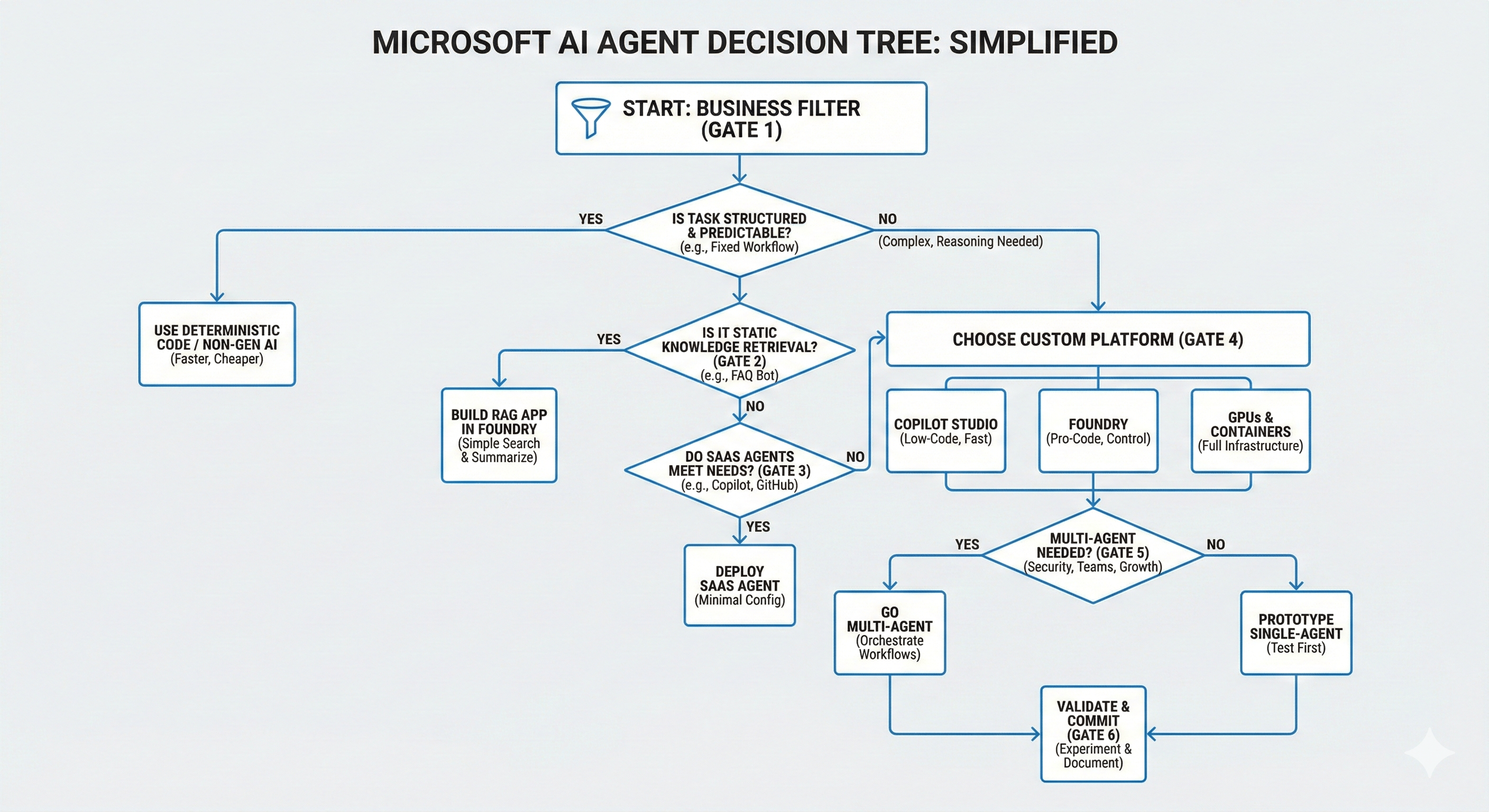
Here is the complete decision sequence as a checklist you can run for any use case:
Gate 1 - Business filter. Is the task structured and predictable? If yes, use deterministic code or nongenerative AI. Stop here.
Gate 2 - RAG filter. Is this static knowledge retrieval without reasoning? If yes, build a RAG app in Foundry. Stop here.
Gate 3 - SaaS check. Does a pre-built Copilot, Fabric, Dynamics, GitHub, or Security agent cover the requirement? If yes, deploy SaaS. Stop here.
Gate 4 - Platform selection. Need low-code speed? Copilot Studio. Need pro-code control? Foundry. Need full infrastructure control? GPUs and containers.
Gate 5 - Architecture decision. Crossing security boundaries, multiple teams, or planned growth? Go multi-agent. Otherwise, prototype single-agent first.
Gate 6 - Validate. Run a one-to-two week experiment. Document findings. Then commit.
Each gate is a potential exit point. The decision tree works because it prevents you from over-engineering: you only move to the next decision when the simpler option genuinely doesn't fit. That's the real insight Microsoft is encoding into this framework, and it's one most organisations would benefit from adopting.
No comments yet — be the first to add to the discussion. Comments appear after they’re reviewed.
Want more insights?
Subscribe to get the latest articles delivered straight to your inbox.