The Complete Guide to Microsoft Agentic AI: From Copilots to Autonomous Agents
Microsoft has moved from AI that answers questions to AI that takes actions. This guide explains what that actually means — how the tools work, how agents connect, what it costs, and how to deploy it without chaos. Written for business leaders and IT teams alike.
What's Actually Changing — And Why It Matters Now
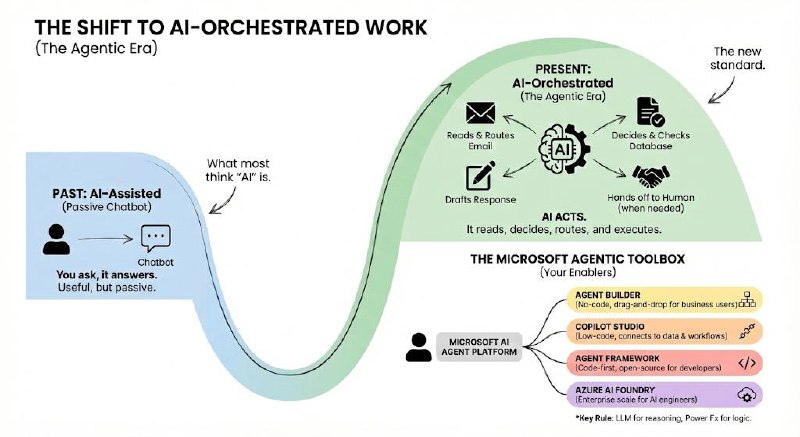
For the past two years, "AI at work" meant a chatbot you could ask questions. You typed a prompt, it gave you an answer. Useful, but fundamentally passive.
Microsoft's 2026 platform is something different. The new generation of AI doesn't just answer — it acts. It reads your emails, decides which department should handle a request, routes the work, checks the database, drafts the response, and hands off to a human only when the situation genuinely needs one.
This shift from AI-assisted to AI-orchestrated is what Microsoft calls the Agentic Era. This guide explains what that means in practice: what the tools are, how they connect, what they cost, and how to roll them out without chaos.
The Microsoft Agentic Toolbox: 4 Things You Need to Know
Microsoft has four main tools in its AI agent platform. The easiest way to think about them is by who builds with each one.
| Tool | What It Does (Plain English) | Who Uses It |
|---|---|---|
| Agent Builder | A simple, no-code interface inside Microsoft 365 for building basic AI assistants. Think drag-and-drop. | Business users, non-technical teams |
| Copilot Studio | A more powerful low-code platform for building agents that connect to your own data, systems, and workflows. | IT pros, power users, consultants |
| Microsoft Agent Framework | The open-source developer SDK (successor to AutoGen and Semantic Kernel) for building sophisticated multi-agent systems in Python or .NET. | Developers, AI engineers |
| Azure AI Foundry | The enterprise "factory" for deploying, fine-tuning, and managing AI models at scale — including third-party models like DeepSeek-R1. | AI/ML engineers, cloud architects |
One key rule: The LLM (the AI brain) handles reasoning and language. Power Fx — Microsoft's formula language — handles the calculations and logic. Keeping these separate makes systems easier to maintain and audit.
How Agents Connect to the World: MCP and A2A
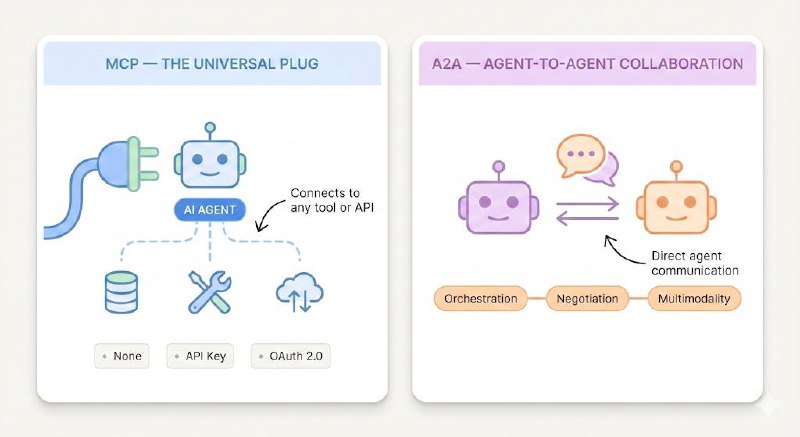
Two new standards govern how agents talk to external tools and to each other. You'll hear these acronyms constantly — here's what they actually mean.
MCP — The Universal Plug for AI
Model Context Protocol (MCP) is an open standard that gives AI agents a consistent way to connect to any external tool, database, or API. Think of it as a USB standard for AI — instead of building a custom integration for every tool, you use one connector format that works everywhere.
MCP doesn't replace your existing APIs. It wraps them in a structure that agents can understand and call automatically, based on context.
Three ways to authenticate an MCP connection:
- None — For internal or public endpoints with no security requirements.
- API Key — Header or query-parameter-based authentication.
- OAuth 2.0 — The most secure option. You configure it via the MCP Onboarding Wizard in Copilot Studio. For manual OAuth setup, you must copy the generated callback URL back into your identity provider (e.g. Entra ID) — a step that's easy to miss.
A2A — How Agents Collaborate with Each Other
Agent-to-Agent (A2A) is a Linux Foundation protocol for direct agent-to-agent communication. Where MCP handles tool connections, A2A handles coordination between agents — including long-running tasks, handoffs, and context sharing.
| Capability | MCP | A2A |
|---|---|---|
| Purpose | Connect AI to tools and databases | Connect AI agents to other AI agents |
| Context | Managed by the host; server responds | Uses a contextId to track state across multiple agents |
| Orchestration | The host decides what tools to call | The invoked agent uses its own reasoning; the caller doesn't need to know how it works |
| Negotiation | Fixed capabilities; updates require client changes | Agents advertise capabilities via "Agent Cards" — dynamic and self-describing |
| Multimodality | Depends on what the host supports | Agents declare supported media types upfront |
How Multi-Agent Systems Are Structured
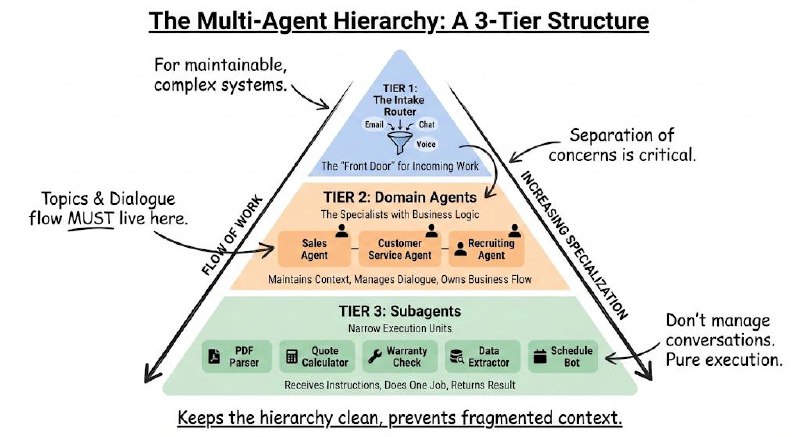
Most enterprise deployments follow a three-tier hierarchy. This isn't just a recommendation — it's the architecture that keeps complex systems maintainable.
The Three Tiers
Tier 1 — The Intake Router
This is the front door. One agent whose only job is to receive incoming work (emails, chat messages, voice calls), figure out what the request is about, extract the key details (a customer ID, a product SKU, a complaint type), and route it to the right team.
It doesn't execute anything itself. Separation of concerns here is critical.
Tier 2 — Domain Agents
These are the specialists. A Sales Agent. A Customer Service Agent. A Recruiting Agent. Each one handles a specific business function, maintains the conversation flow, and keeps track of the customer's context throughout the interaction.
Topics and dialogue flow must live here. This is where the business logic lives.
Tier 3 — Subagents
These are execution units — narrow specialists invoked by a Domain Agent to do one specific thing: parse a PDF, calculate a quote, check a warranty status. They don't manage conversations. They receive instructions, do the work, and return a result.
Why this matters: If you let subagents manage their own topics and dialogue, you'll end up with fragmented context, duplicated logic, and systems that are impossible to debug. Keep the hierarchy clean.
A Real-World Example: The Coffee Company
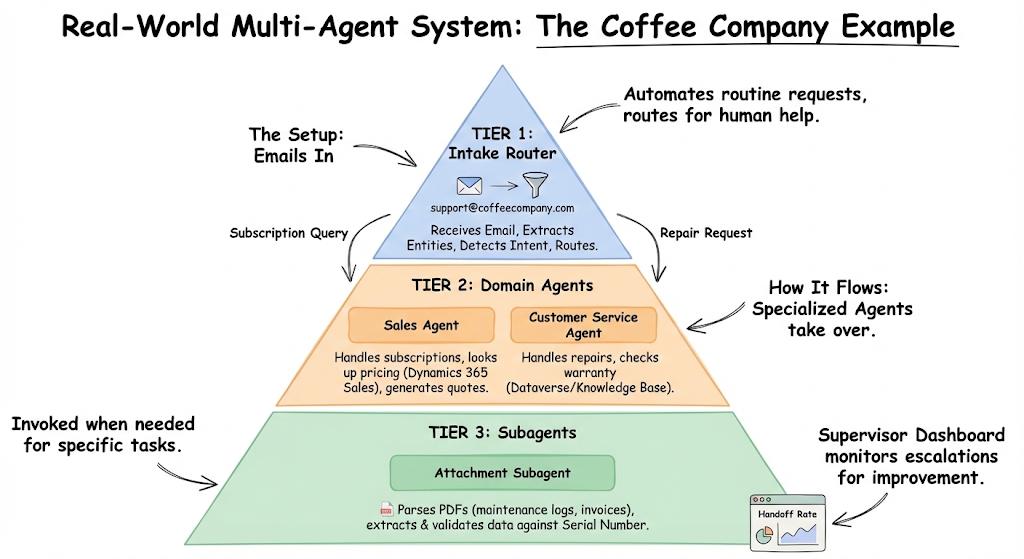
Here's how the three-tier model works for a company that sells coffee subscriptions and maintains espresso machines.
The Setup:
- Customers email support@coffeecompany.com with questions about bean subscriptions or machine repairs.
- The system needs to route, respond, and escalate without human involvement for routine requests.
How It Flows:
Intake Router receives the email, extracts entities (Bean SKU, Machine Serial Number), detects intent (subscription query vs. repair request), and routes to the right domain agent.
Sales Agent handles subscription queries — looks up pricing in Dynamics 365 Sales, generates quotes, and manages the sales context.
Customer Service Agent handles repair requests — checks warranty status against the Knowledge Base and machine records in Dataverse.
Attachment Subagent (invoked by either domain agent when needed) — parses maintenance logs or invoices in PDF format, extracts the relevant data, and validates it against the Dataverse record for that serial number.
Supervisor Dashboard monitors handoff rates — how often did the system escalate to a human? That number tells you where the system needs improvement.
Your Data Foundation: Dataverse and Microsoft Fabric
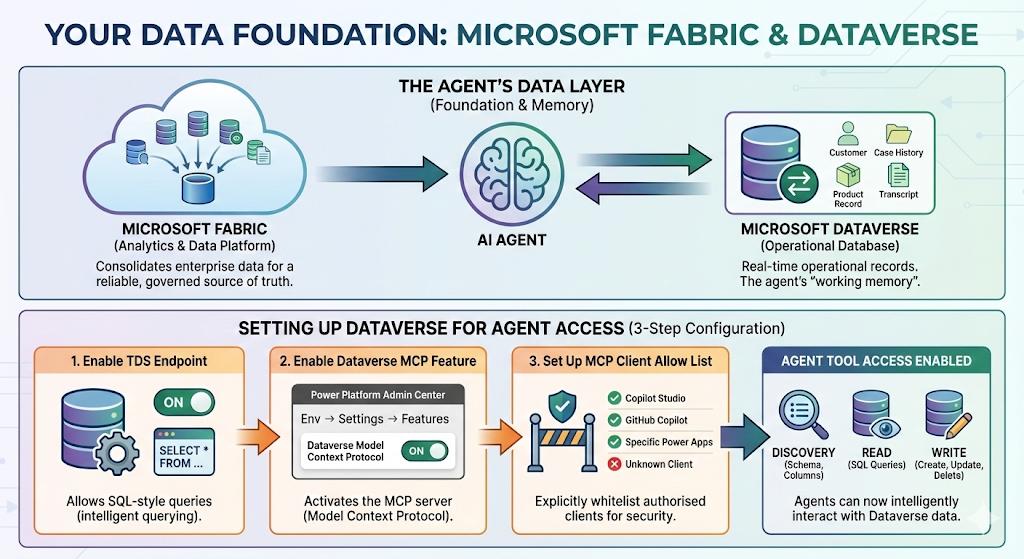
Agents are only as good as the data they can access. Microsoft's data layer for agentic systems is built on two components.
Microsoft Fabric is the analytics and data platform — it's where you consolidate data from across the enterprise so agents have a reliable, governed source of truth to work from.
Microsoft Dataverse is the operational database that lives inside the Power Platform. It's where agents read and write records in real time — customer details, case histories, product records, transcripts. Think of it as the agent's working memory for structured business data.
Setting Up Dataverse for Agent Access
For agents to interact with Dataverse, three configuration steps are required:
Enable the TDS Endpoint — TDS (Tabular Data Stream) is the protocol that lets agents run SQL-style queries against your Dataverse tables. Find this in your environment settings. Without it, agents can only read data — they can't query it intelligently.
Enable the Dataverse MCP Feature — Navigate to Power Platform Admin Center → Environment → Settings → Features. Toggle "Dataverse Model Context Protocol" to On. This is what activates the MCP server for your Dataverse environment.
Set Up the MCP Client Allow List — You have to explicitly whitelist which clients (Copilot Studio, specific Power Apps, GitHub Copilot) are authorised to call your Dataverse MCP server. This is a security control — unlisted clients can't connect.
Once enabled, agents have access to four categories of tools:
- Discovery: List all tables, describe their schema, columns, and relationships.
- Read: Run SQL-backed queries against any table.
- Write: Create, update, or delete records.
Where Your Language Processing Happens: NLU vs NLU+
This is one of the most important decisions for organisations with strict data residency requirements.
| Mode | Where It Runs | When to Use It |
|---|---|---|
| NLU (default) | Inside Copilot Studio's standard cloud infrastructure | Most organisations — fast, simple, cost-effective |
| NLU+ | Inside your Dynamics 365 environment specifically | When regulatory requirements (GDPR, FedRAMP, sector-specific) demand that sensitive data never leave your CRM boundary |
If you're handling sensitive customer information and need to prove data doesn't cross processing boundaries, NLU+ is the right choice. It runs everything inside Dynamics 365 rather than Microsoft's shared Copilot infrastructure.
Security, Governance, and Keeping Agents Under Control
The risk with autonomous AI isn't that it breaks dramatically — it's that it makes small, confident mistakes at scale. Good governance is what prevents that.
What Agents Should Never Do Without a Human
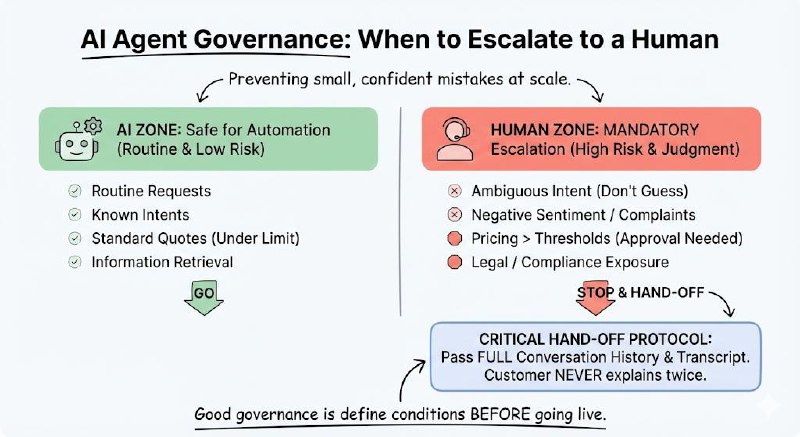
Define your escalation conditions before you go live. The following scenarios should always trigger a hand-off to a human agent:
- Ambiguous intent — If the agent isn't confident about what the user is asking after a set number of attempts, escalate. Don't let it guess.
- Negative sentiment or complaints — Detected frustration or dissatisfaction should always be handled by a person.
- Pricing above thresholds — Set a ceiling. Any discount or quote above a predefined limit requires human approval.
- Legal or compliance exposure — Anything touching sensitive disclosures, regulatory language, or high-risk data.
Critical: When escalating, the agent must pass the full conversation history and the Dataverse transcript to the human. A customer should never have to explain their problem twice.
Governing What Your Agents Know
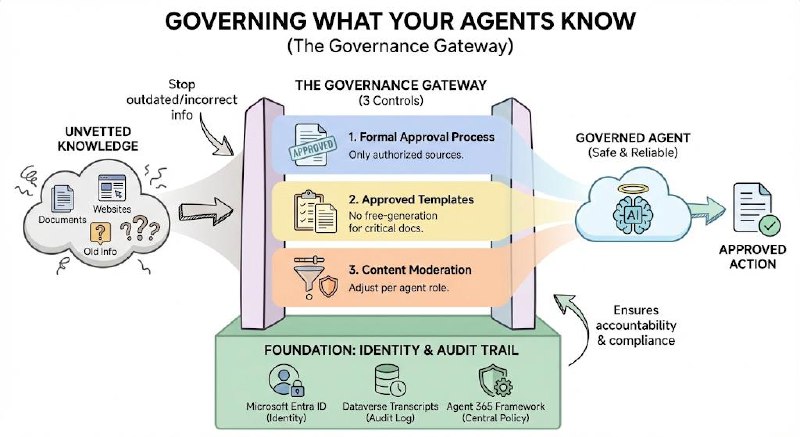
Agents ground their responses in knowledge sources — documents, Knowledge Base articles, websites. Without governance, an agent might ground itself in outdated, incorrect, or inappropriate material.
Three controls to put in place before you go live:
- Formal KB approval process — Every knowledge source an agent uses must be explicitly authorised by an administrator. No unvetted sources.
- Approved response templates — Maintain a library of approved templates for common outputs (quotes, troubleshooting steps, disclaimers). Agents should draw from these, not free-generate critical communications.
- Content moderation settings — Configure moderation thresholds per agent. A customer-facing agent should have tighter controls than an internal tool.
Identity and Audit
- Microsoft Entra ID for all agent identity management — ensuring agents act under a governed identity, not as a generic system account.
- Enable Dataverse Transcripts — Every agent interaction should be logged. This gives you a complete audit trail for compliance, incident investigation, and continuous improvement.
- Agent 365 Framework — Microsoft's control plane standard. Implement this to ensure all agents — regardless of which tool built them — adhere to centralised policy and auditing standards.
What It Costs — And What They Don't Tell You Upfront
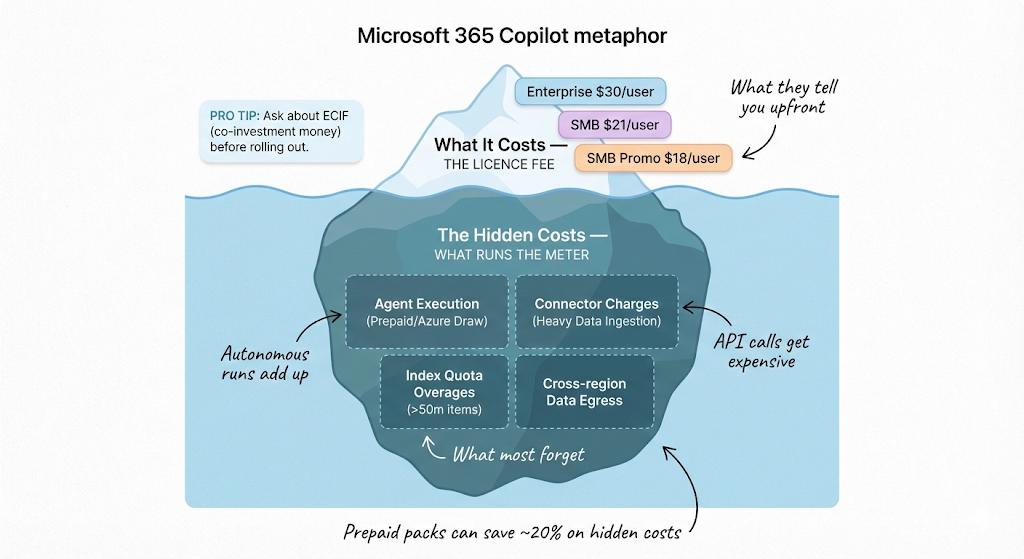
Licence Pricing (2026)
| Tier | Price | Who It's For |
|---|---|---|
| Microsoft 365 Copilot — Enterprise | $30/user/month | Large organisations, paid annually |
| Microsoft 365 Copilot — SMB | $21/user/month | Businesses with fewer than 300 seats |
| SMB Launch Promo | $18/user/month | Available until 31 March 2026 |
Tip: Microsoft offers ECIF (End Customer Investment Funds) — effectively co-investment money for qualifying pilots. Ask your Microsoft account team about this before you commit to a full rollout budget.
The Hidden Costs: What Runs the Meter
The licence fee is just the start. Four areas drive unexpected costs in production:
- Agent execution credits — Autonomous agent runs beyond your reserved capacity draw down prepaid credits or Azure consumption. Budget for this based on estimated volume before go-live.
- Connector charges — Heavy data ingestion from external systems (ERP, CRM, third-party APIs) often triggers metered connector fees.
- Index quota overages — Every tenant gets a 50-million-item index included. Large knowledge bases or high-volume document processing can push you over this quickly.
- Cross-region data egress — If your agents process data in a different Azure region from where it's stored, you pay for the data movement. Optimise data residency settings to avoid this.
Buying prepaid consumption packs in advance saves up to 20% versus pay-as-you-go.
Measuring the Return
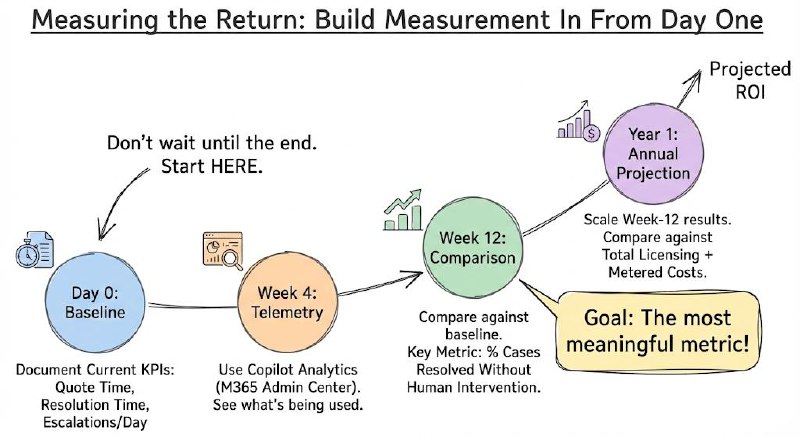
Don't measure ROI at the end. Build measurement in from day one:
- Baseline — Before launch, document your current KPIs: average time to generate a quote, average case resolution time, number of escalations per day.
- Week 4 telemetry — Use Copilot Analytics (enable it in the M365 Admin Center) to see what's actually being used.
- Week 12 comparison — Compare against baseline. The most meaningful metric: percentage of cases resolved without human intervention.
- Annual projection — Scale week-12 results to a full year. Compare against total licensing + metered costs.
How to Roll It Out: A Five-Phase Plan
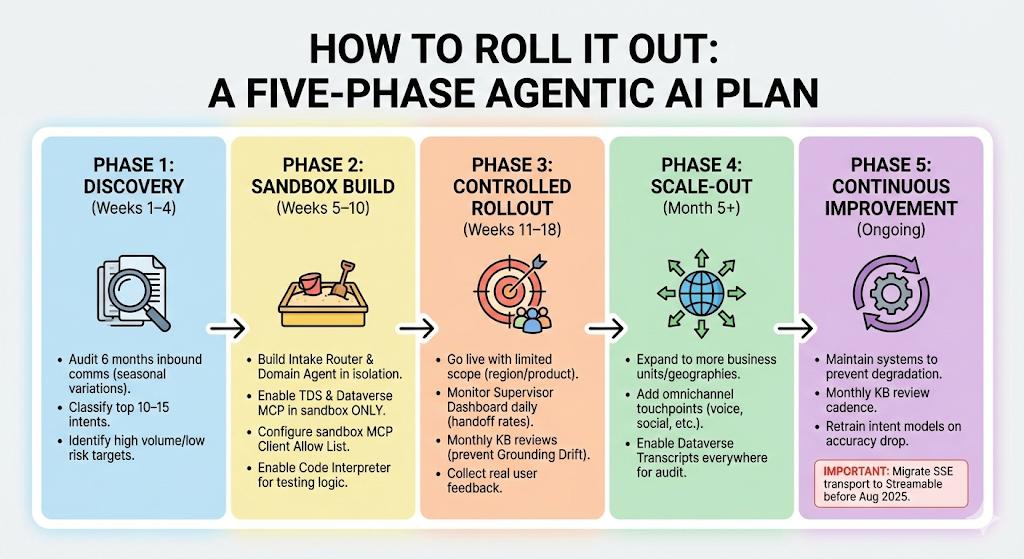
Don't try to deploy everything at once. The organisations that succeed with agentic AI follow a staged approach.
Phase 1 — Discovery (Weeks 1–4)
Before building anything, understand what you're automating.
- Audit at least 6 months of inbound communication (email, chat, support tickets). Seasonal variations in request volume will otherwise catch you off guard.
- Classify the top 10–15 intent types. These become your agent's "topics."
- Identify which intents are high volume and low risk — those are your first automation targets.
Phase 2 — Sandbox Build (Weeks 5–10)
Build in isolation before touching production data.
- Construct your Intake Router and your first Domain Agent in a dedicated sandbox environment.
- Enable the TDS Endpoint and Dataverse MCP in the sandbox — not production.
- Configure the MCP Client Allow List for your sandbox clients only.
- Enable Code Interpreter and Custom Function Calling here — you need these to test logic in isolation.
Phase 3 — Controlled Rollout (Weeks 11–18)
Go live with a limited scope: one region, one product line, or one team.
- Monitor the Supervisor Dashboard daily. Track human handoff rates closely.
- Watch for "Grounding Drift" — knowledge base articles getting stale. Schedule monthly reviews from the start.
- Collect real user feedback. The patterns that emerge here will reshape your topic architecture.
Phase 4 — Scale-Out (Month 5+)
Once Phase 3 metrics are stable — handoff rates declining, resolution times improving — expand.
- Roll out to additional business units and geographies.
- Add omnichannel touchpoints: voice IVR, social media, additional email addresses.
- Enable Dataverse Transcripts across all environments for full auditability.
Phase 5 — Continuous Improvement (Ongoing)
Agentic systems degrade without maintenance.
- Monthly KB review cadence.
- Retrain intent models when classification accuracy drops.
- Important: SSE transport is deprecated after August 2025. If any of your MCP connections use SSE, migrate them to Streamable transport now.
Certifications: What to Get and in What Order
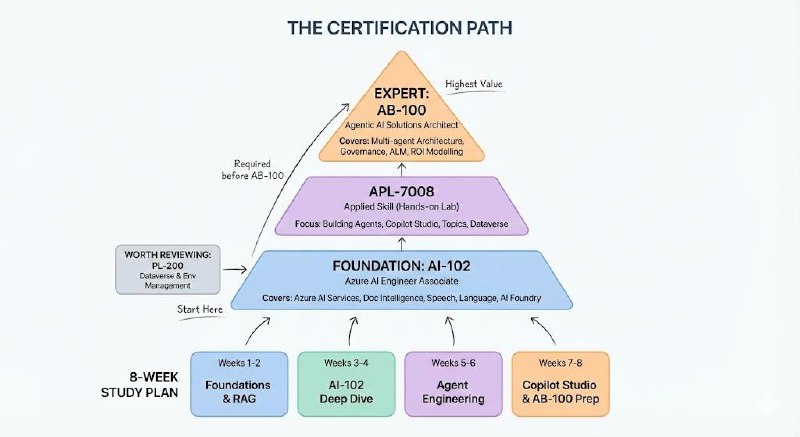
There are three credentials that matter for the Microsoft agentic platform. Here's the honest picture on each.
The Certification Path
AI-102 — Azure AI Engineer Associate
The foundation. Covers Azure AI Services including Document Intelligence, Speech (with diarisation), Language (including PII recognition), and Azure AI Foundry. Required before you sit the AB-100.
APL-7008 — Creating Agents in Microsoft Copilot Studio (Applied Skill)
Not a traditional exam — it's a free, hands-on lab you complete at your own pace. No proctor. Tests practical skills: building agents, configuring generative AI, managing topics and entities, deploying to channels, and running Dataverse queries. If you're hands-on with Copilot Studio, this is the fastest credential to earn.
AB-100 — Agentic AI Business Solutions Architect (Expert)
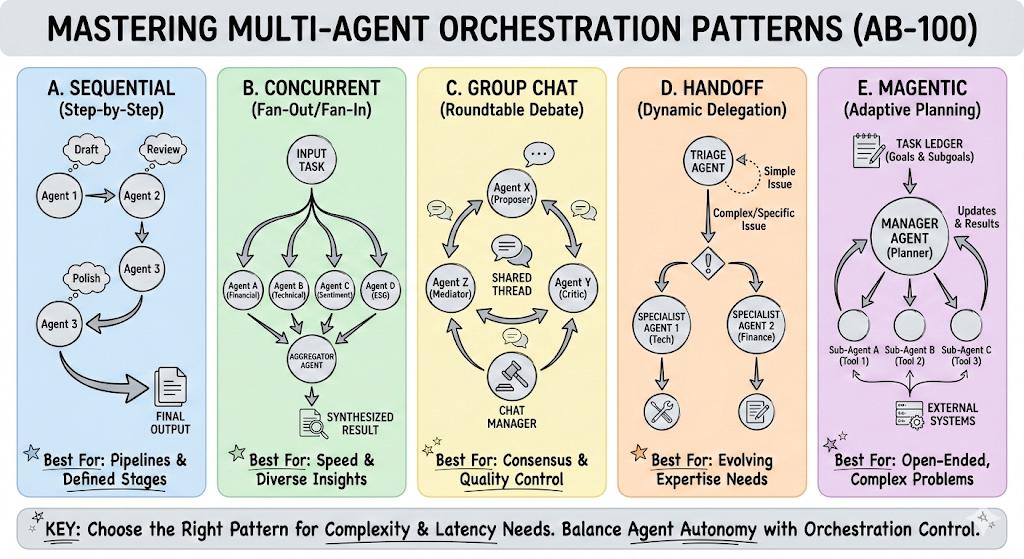
The senior credential. Covers multi-agent architecture design (Magentic, Sequential, Concurrent orchestration), enterprise governance, Application Lifecycle Management (ALM), ROI modelling, and Dynamics 365 integration. Requires AI-102 first.
Also worth reviewing: PL-200 (Power Platform Functional Consultant) — it covers Dataverse configuration and environment management that the AB-100 assumes you already know.
8-Week Study Plan
| Weeks | Focus | Key Topics |
|---|---|---|
| 1–2 | Azure AI Foundry & RAG Foundations | Model deployment, prompt flows, vector search in AI Search |
| 3–4 | AI Services Deep Dive (AI-102) | Document Intelligence, Speech diarisation, PII recognition in Language |
| 5–6 | Agent Engineering & Protocols | Agent Framework SDK, MCP auth paths, A2A Task and Artifact models |
| 7–8 | Copilot Studio, Governance & AB-100 Prep | Dynamics 365 integrations, ROI modelling, APL-7008 applied lab |
Quick Reference: Your Admin Checklist
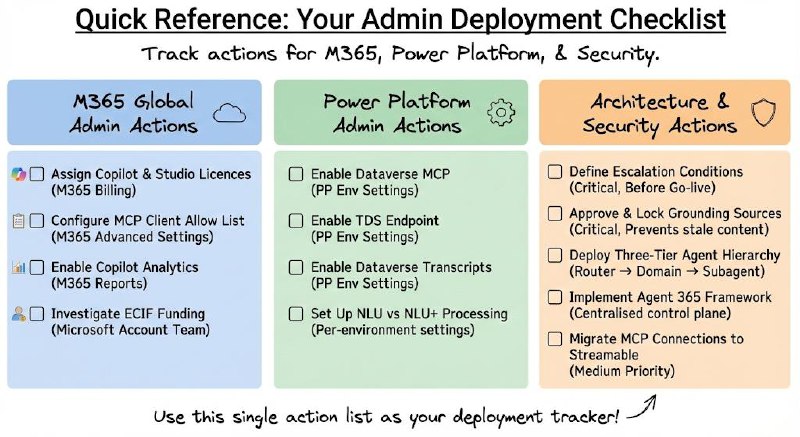
Everything above, compressed into a single action list. Use this as your deployment tracker.
M365 Global Administrator Actions
| What | Where | Why |
|---|---|---|
| Assign Copilot and Copilot Studio licences | M365 Admin Center → Billing → Licences | Enables access to build and use agentic tools |
| Configure MCP Client Allow List | M365 Admin Center → Advanced Settings | Authorises Copilot Studio and GitHub Copilot to access Dataverse |
| Enable Copilot Analytics | M365 Admin Center → Reports | Baseline telemetry for ROI tracking |
| Investigate ECIF co-investment funding | Via your Microsoft account team | Offset pilot costs for 50–200 user rollouts |
Power Platform Administrator Actions
| What | Where | Why |
|---|---|---|
| Enable Dataverse MCP | PP Admin Center → Env → Settings → Features | Activates the MCP server for agent-to-Dataverse connectivity |
| Enable TDS Endpoint | PP Admin Center → Env → Settings → Features | Allows agents to run SQL-backed read/write queries |
| Enable Dataverse Transcripts | PP Admin Center → Environment → Settings | Full audit trail of all agent interactions |
| Set up NLU vs NLU+ processing | Per-environment agent settings | Controls where language processing runs (data sovereignty) |
Architecture and Security Actions
| What | Priority | Why |
|---|---|---|
| Define escalation conditions before go-live | Critical | Sets the boundaries of autonomous agent behaviour |
| Approve and lock grounding knowledge sources | Critical | Prevents agents from grounding on stale or unvetted content |
| Deploy three-tier agent hierarchy (Router → Domain → Subagent) | High | Prevents context fragmentation and maintains auditability |
| Implement Agent 365 Framework for control plane | High | Centralised policy enforcement across all agents |
| Migrate MCP connections from SSE to Streamable transport | Medium | SSE deprecated post-August 2025 |
The Bottom Line
Microsoft's agentic platform is genuinely different from what came before. The move from copilots that answer questions to agents that take actions is not incremental — it changes the architecture, the governance requirements, and the cost model entirely.
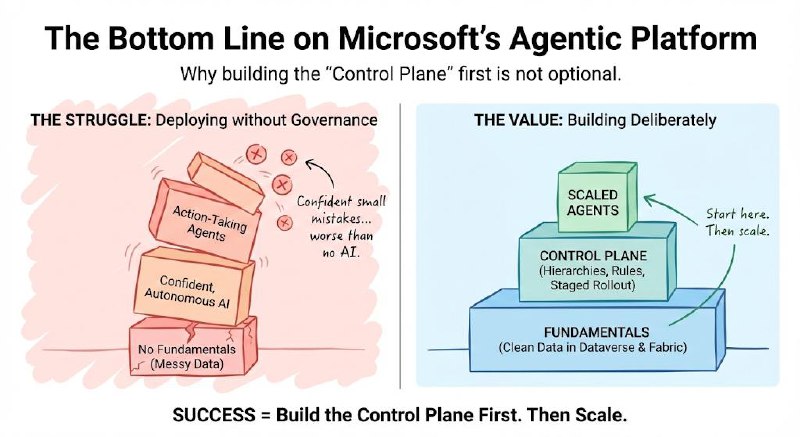
The organisations that will get value from this are the ones that build deliberately: clean data in Dataverse and Fabric, clear agent hierarchies, well-defined escalation rules, and a staged rollout that lets them learn before scaling.
The ones that struggle will be the ones that deploy agents to production without governance — and discover at scale that confident, autonomous AI making small mistakes is worse than no AI at all.
Start with the fundamentals. Build the control plane first. Then scale.
No comments yet — be the first to add to the discussion. Comments appear after they’re reviewed.
Want more insights?
Subscribe to get the latest articles delivered straight to your inbox.