How to implement Microsoft Copilot Studio in your company — the technology, the organisation, and the governance loop that holds it all together
Eight stories from organisations that got it right — and two from organisations that didn't. Every step of the way, from the first person asking 'can we build an AI agent?' to the kill switch that sto
Eight stories from organisations that got it right — and two from organisations that didn't. Every step of the way, from the first person asking "can we build an AI agent?" to the kill switch that stops a rogue one.
The call came on a Tuesday morning. A CTO at a 4,000-person financial services firm had just discovered that three of her departments had each independently built an HR onboarding agent in Microsoft Copilot Studio. All three were in production. None had gone through a security review. One of them was pulling data from a SharePoint site shared with the entire company — including salary grades, performance ratings, and medical leave records. The agents had been live for six weeks.
Nobody had meant for this to happen. A motivated HR analyst had stumbled onto Copilot Studio, found it genuinely useful, built something, shared it with her team, and word spread. Three departments followed. Each team was trying to solve a real problem. None of them knew they had created a data exposure incident.
This is the story of how Microsoft Copilot Studio scales — and what has to be true inside an organisation before it can scale safely.
The platform itself is remarkable. Copilot Studio lets business users build conversational and autonomous AI agents connected to your own data, your own systems, and your own workflows — without writing code. As of 2026, 64% of Fortune 500 companies have active deployments. Knowledge workers are saving 30 to 60 minutes a day on routine tasks. The technology is real, and it works.
But the technology is not the hard part. The hard part is the governance architecture that has to exist before anyone builds anything — and the organisational model that separates a company that scales to 50 production agents safely from one that gets a call on a Tuesday morning.
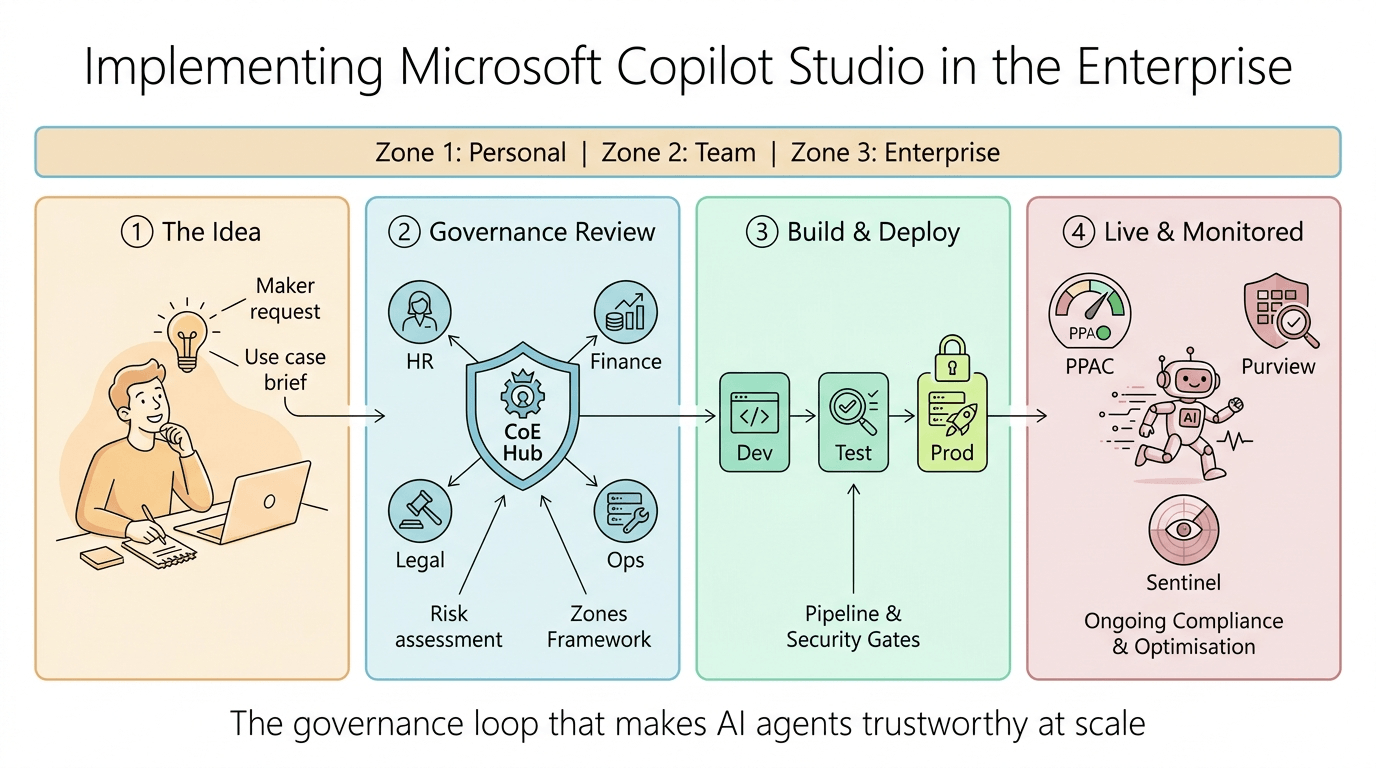
The governance pyramid that everything else stands on
Marcus is the newly appointed Head of AI at a 6,000-person manufacturer. His brief is to "enable Copilot Studio across the organisation." His instinct is to open it up immediately — get people building, learn fast. He books a 30-minute call with Microsoft.
The Microsoft architect he speaks with opens with a question: "What does your governance pyramid look like?" Marcus has never heard the term.
Microsoft's enterprise AI governance is built on a four-layer pyramid: People, Process, Policy, and System. These are not sequential steps. They are simultaneous layers. Remove any one of them, and the structure above it collapses.
The pyramid sits inside a framework called the Zones Framework — the model that determines who can build what, where, and under what level of scrutiny.
Zone 1: Personal Productivity. Every employee with a Copilot Studio licence can experiment here. They are automatically routed into an isolated, personal developer environment — not the shared company default. Their experiments are governed by a strict data policy that blocks all premium connectors and external APIs. Nobody else sees what they build. Nothing they create can be shared without approval. This is the sandpit.
Zone 2: Team Collaboration. Approved business unit makers work here. Each department — HR, Finance, Legal, Operations — gets its own dedicated set of managed environments. Sharing is strictly limited. Connectors to specific business systems are permitted under centralised data rules. An HR maker can connect to the HR SharePoint site. They cannot connect to Finance's Dataverse tables. The boundaries are technical, not just policy.
Zone 3: Enterprise Managed. High-value, business-critical, or organisation-wide agents live here. Central IT controls these environments entirely. Nothing reaches Zone 3 without passing through a formal review by Risk, Legal, Architecture, Security, and Data owners. These agents may run autonomously on triggers — a new employee joins, a contract is signed, a support ticket is raised — not just when someone types a message.
Governing these three zones is the Centre of Excellence (CoE), operating as the Hub in a Hub and Spoke model. The CoE does not build agents. That is the critical distinction. The business units build the agents. The CoE governs the fences around them.
A minimum viable CoE for Copilot Studio requires exactly three people: a CoE/Adoption Lead who handles intake, triage, and business validation; a Power Platform Administrator who controls the infrastructure, provisions environments, and executes deployments; and an M365/Security Administrator who manages identities, reviews compliance, and formally approves agents before they reach end-users.
Before Marcus enables Copilot Studio for a single user, this structure has to be in place. The governance pyramid comes before the agents.
The teaching: "The most expensive mistake in enterprise AI is enabling the technology before enabling the governance. The technology enables people to act. The governance determines what they are allowed to do."
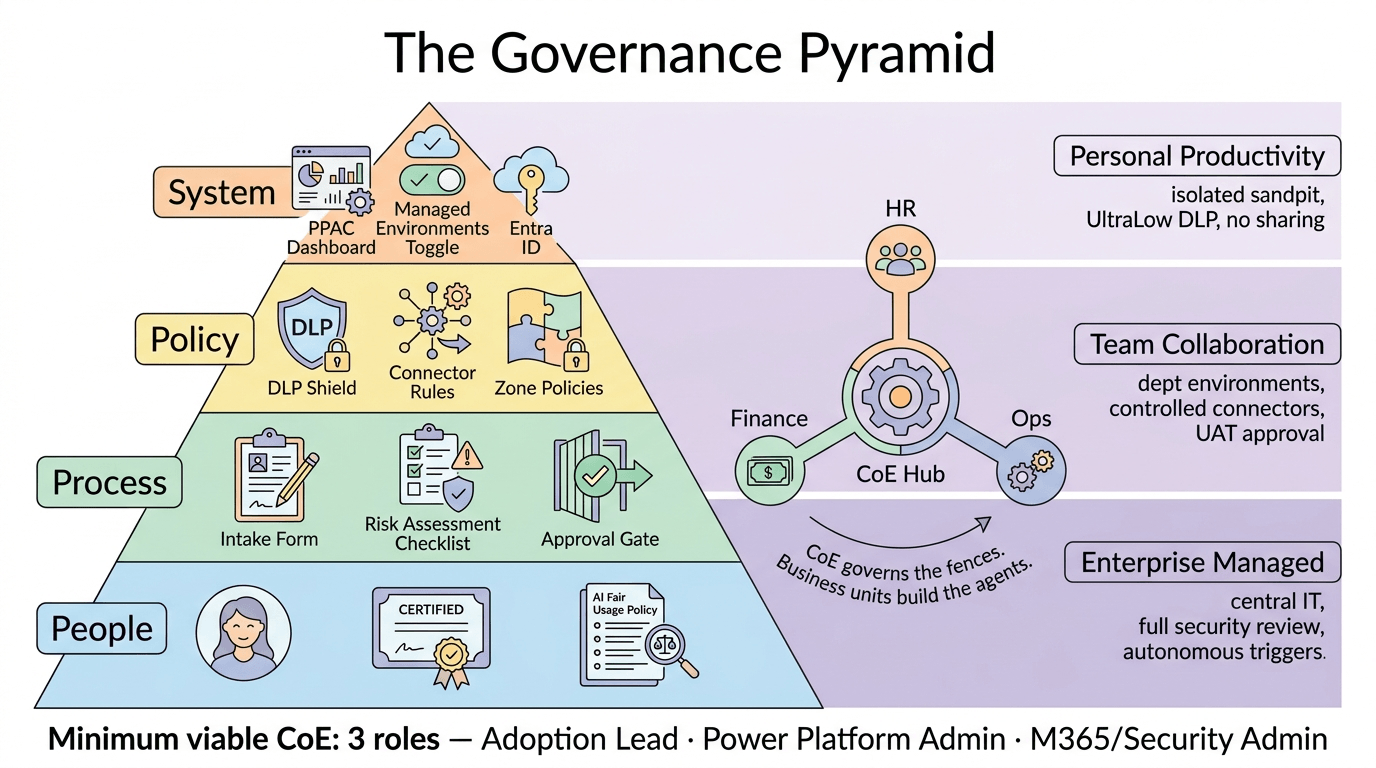
The agent demand-to-deployment lifecycle — what happens when someone has an idea
It is a Wednesday afternoon. Priya, a senior operations analyst at a logistics company, has an idea: an AI agent that answers employee questions about shift scheduling, leave requests, and payroll queries. It would save her HR team approximately 15 calls a day. She knows her company has Copilot Studio licences. She sends an email to IT: "Can I build something?"
What happens next — or rather, what should happen next — is a carefully choreographed sequence that Microsoft calls the PILOT methodology: Prepare, Investigate, Lay out, Operate, Transition.
Prepare. Priya's email arrives at the CoE Adoption Lead, not at a generic IT helpdesk. She fills in a use case brief: what the agent does, what data it needs to ground its answers (the HR SharePoint site, a leave management system), what external connectors it requires, who the target audience is (employees in the UK operations division), and a rough estimate of how many interactions it will handle per day. She also completes a half-day mandatory training course covering Copilot Studio capabilities, the company's AI Fair Usage Policy, and data handling rules. At the end of the training, she signs an acknowledgment form.
Only after the form is signed does the Security Administrator add Priya to the company's master Entra ID group: CS-Makers-All, and the departmental group CS-Makers-Operations. This is the access gate. The technology refuses entry to anyone not in the group.
Investigate. The Security Administrator performs a structured risk assessment across four dimensions. What data will the agent access, and how sensitive is it? Will it use Entra ID delegated authentication — meaning it acts as Priya's identity, and can only see what Priya can see — or will it use a shared service account, which bypasses individual permissions? Will it read data, or write to external systems? And does the underlying data sit inside company-controlled infrastructure, or in an external SaaS product that requires a Data Processing Agreement?
Priya's use case scores as Zone 2: Team Collaboration. It reads but does not write. It uses delegated Entra authentication. The knowledge sources are internal SharePoint. No external SaaS connectors are needed.
If the agent had scored as Zone 3 — say, because it needed to write to the payroll system, or because it was targeting the entire company rather than one division — it would have been escalated to a formal architecture review panel before any development began.
Lay out. Priya builds her agent in the Operations Dev environment, which the Power Platform Administrator provisions specifically for her team. She configures the agent's instructions, connects it to the approved SharePoint knowledge source, and maps the topics. She cannot directly publish anything from this environment. The technical guardrails prevent it.
Operate. When Priya declares the agent ready, the Power Platform Administrator uses Power Platform Pipelines to package it as a managed solution and deploy it to the Operations Test environment. Stakeholders test it. The HR team validates the answers. Priya's manager signs the UAT acceptance form.
Then the pipeline deploys to Production. But the agent is still not visible to anyone. The M365/Security Administrator reviews it in the Microsoft 365 Admin Centre's Integrated Apps portal and explicitly hits Approve. That single click is the final gate before an end-user ever sees the agent.
Transition. Once live, the agent enters the Operate and Transition phases: monitored continuously, reviewed quarterly, decommissioned when no longer needed.
The teaching: "An agent request is not a software ticket. It is the beginning of a governance conversation. The intake process is not a barrier to innovation — it is the structure that makes innovation trustworthy."
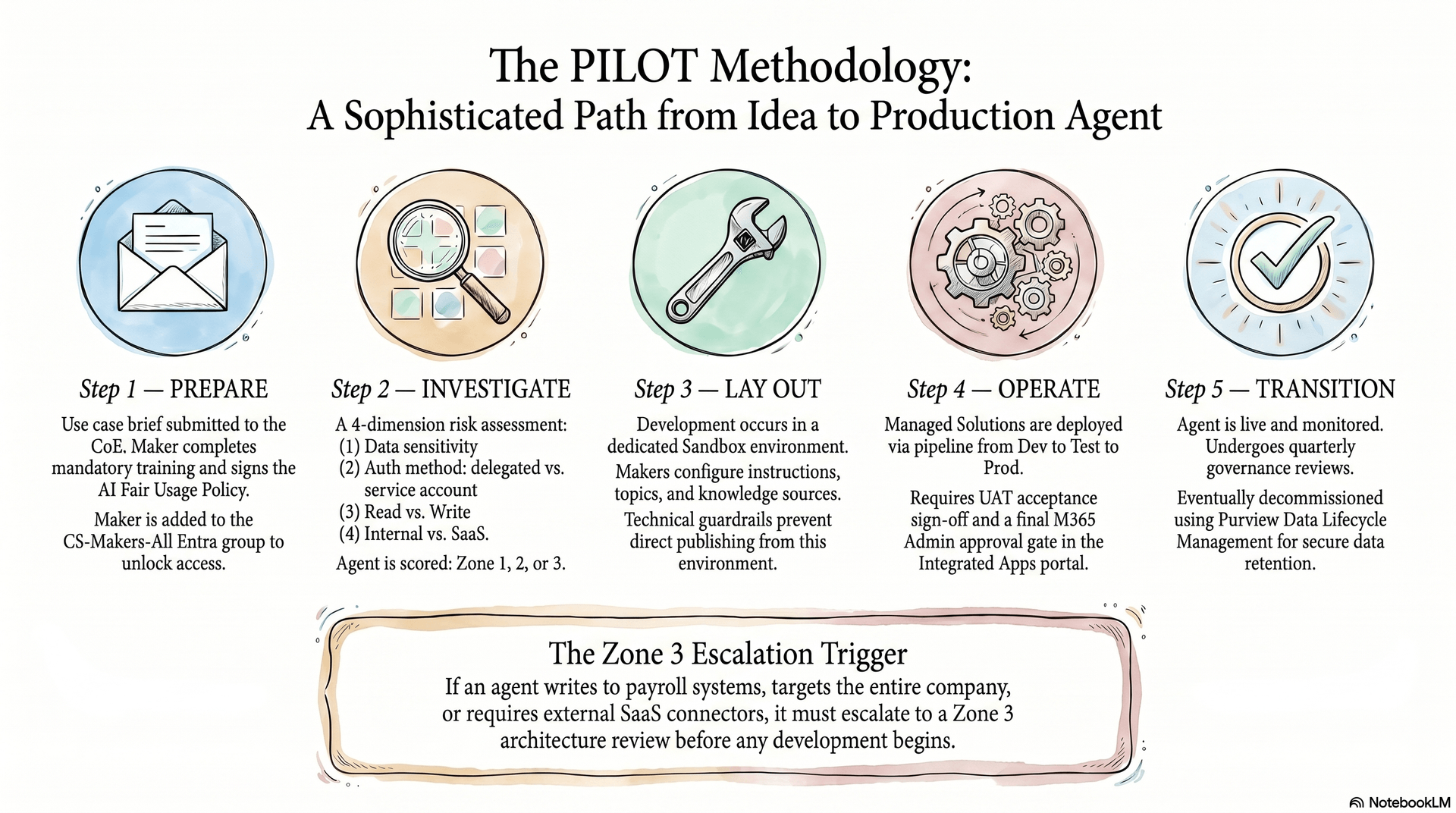
The Power Platform environment strategy — zones, isolation, and the default environment nobody talks about
David is the new Power Platform Administrator at a mid-sized professional services firm. His first week in the job, he runs a report of all agents currently in the company's default Power Platform environment. He finds 47. Nobody in the IT team knew they existed.
Every Microsoft 365 tenant has a default Power Platform environment. Every licensed user automatically has maker rights inside it. This is the single greatest source of Shadow AI in enterprise Copilot Studio deployments. It is also the first thing any Power Platform Administrator must fix.
The remediation is three steps. First, rename the default environment to "Personal Productivity" — this signals to users what it is for. Second, apply a maximum-restriction DLP policy to it: block all premium connectors, all external APIs, all authentication methods except Entra. Call it the "UltraLow" policy. Anything built in the default environment can only talk to a very small set of safe connectors. Third, enable Environment Routing in PPAC Tenant Settings. This is the technical intervention that stops Shadow AI at its source: when any user tries to start building a new agent, the platform automatically intercepts them and provisions an isolated Personal Developer Environment instead of depositing them in the shared default. They never reach the uncontrolled space.
With the default locked down, the real environment architecture can be built. Each department gets a hub-and-spoke set of three environments: Dev, Test, and Production. The Dev environment is a Sandbox — makers build freely here. The Test environment is where managed solutions are deployed for UAT. The Production environment is tightly locked: only managed solutions can run here, the "Block unmanaged customizations" switch is on, and no maker has direct write access.
Every one of these environments must have Managed Environments enabled. This is a premium Power Platform feature that unlocks sharing limits, deep DLP analytics, usage telemetry, and budget tracking. Without it, the governance tooling is blind.
Every environment also needs a Dataverse database provisioned. Copilot Studio uses Dataverse to store agent configurations, conversation transcripts, and telemetry. Dataverse has hard storage limits: your tenant starts with 15 GB of database capacity, 40 GB of file storage, and 2 GB of log capacity. In a scaled deployment, conversation transcripts alone will exhaust this. Add Dataverse capacity add-ons proactively, or configure Pay-As-You-Go billing before storage limits become an outage.
The teaching: "The default environment is not a starting point. It is a liability. Locking it is the first technical act of any serious Copilot Studio deployment."
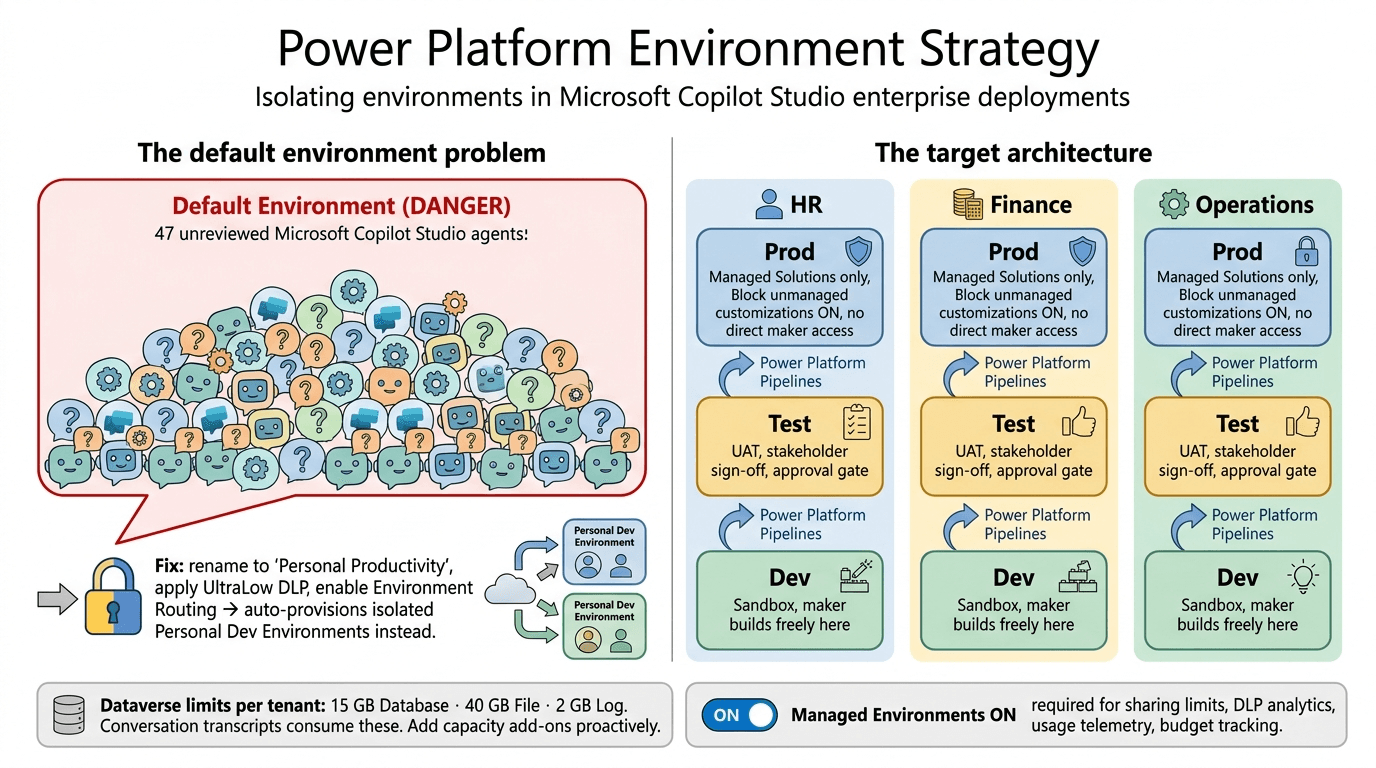
Technology layer: DLP policies, connector governance, and the identity stack
A maker in the Finance department has built an agent that answers questions about budget forecasts. It works beautifully in the Dev environment. But when the Power Platform Administrator reviews the connector configuration before approving the Test deployment, she notices something: the agent is using the HTTP connector with a hard-coded endpoint pointing to an external financial data API. No one reviewed whether this API has a Data Processing Agreement. The agent would have gone live with a raw, unauthenticated outbound call to a third-party service.
DLP policies in Copilot Studio are not the same as DLP policies in Microsoft Purview. They are Power Platform-level data policies that control which connectors agents are allowed to use — and what those connectors are allowed to do.
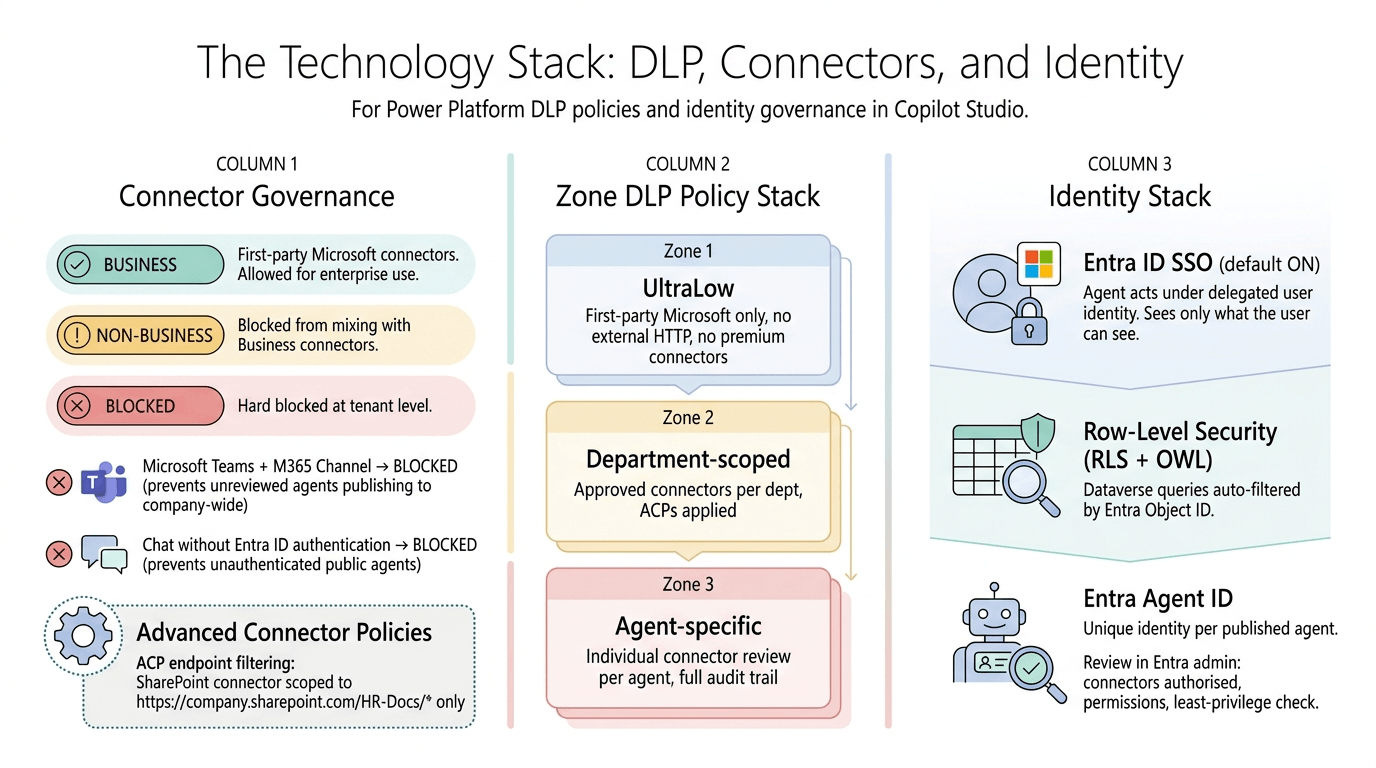
Every connector in Power Platform is classified into one of three buckets: Business (allowed for enterprise use), Non-Business (blocked from mixing with Business connectors), or Blocked entirely. The work of the Power Platform Administrator is to build environment-specific DLP policies that enforce these classifications at each zone level.
Zone 1 environments get the most restrictive policy: only first-party Microsoft connectors in the Business bucket. No Salesforce, no Jira, no external HTTP calls. Zone 2 environments permit additional connectors on a per-department basis, with Advanced Connector Policies (ACPs) applied to limit which specific actions within a connector can be called. A SharePoint connector might be allowed, but scoped via endpoint filtering to read only from https://company.sharepoint.com/HR-Docs/* — not from any other SharePoint site. Zone 3 environments go through individual connector review for each agent.
Two specific connectors must be blocked at the tenant level for all non-approved environments: "Microsoft Teams + M365 Channel" (which, if unblocked, allows any maker to publish an unfinished agent to the entire company) and "Chat without Microsoft Entra ID authentication" (which, if unblocked, allows anyone to create unauthenticated, public-facing agents that bypass identity controls entirely).
The identity layer sits underneath all of this. Every Copilot Studio agent should use Entra ID Single Sign-On as its default authentication method — Microsoft enables this by default when you create a new agent. When a user talks to the agent, they are silently authenticated, and the agent executes every data retrieval under their specific delegated identity. It can only surface data they already have permission to see. This is how you prevent the HR analyst scenario from the opening of this post.
For agents accessing Dataverse directly, Row-Level Security (RLS) with Object Ownership (OWL) ensures that database queries are automatically filtered by the querying user's Entra Object ID. An agent asking "show me the team's performance data" returns only the records the user is permitted to see — without any additional coding. The filter is structural.
And for each agent that reaches production, the M365 Administrator reviews its Entra Agent ID — the unique identity assigned by Entra to every published agent. From the Entra admin centre, you can see exactly which connectors each agent is authorised to call, which permissions it holds, and whether those permissions comply with least-privilege principles.
The teaching: "DLP policies are not optional configuration. They are the fence between a controlled enterprise and a platform where anyone can build anything that calls anywhere."
ALM pipelines — why agents must never go directly to production
A developer at a retail company spent three days building a customer service agent. Testing in Dev looked perfect. His manager asked him to push it live for the Monday morning shift. He exported the agent, imported it directly into the Production environment, and made it available to 2,000 customer service agents at 7am. By 8am, it was returning promotional offers that had expired six months earlier. By 9am, the legal team was calling.
The problem was not the agent. The problem was that the agent bypassed every quality gate on the way to production — and nobody had built those gates yet.
Application Lifecycle Management (ALM) in Copilot Studio works through Dataverse Solutions. An agent is not a standalone object. It is a collection of components packaged inside a Solution: the agent configuration, the topics, the knowledge source references, the environment variable values, the connection references. This Solution is the deployable unit.
In the Dev environment, the agent lives inside an Unmanaged Solution. The maker can edit it freely. When ready for Test, the Power Platform Administrator exports the Solution as a Managed Solution — a locked, read-only package — and deploys it to the Test environment using Power Platform Pipelines. In Test, nobody can modify the agent directly. If a bug is found, the fix goes back to the Dev environment, and a new Managed Solution is deployed through the pipeline again.
In Production, the "Block unmanaged customizations" setting is switched on at the environment level. This is a technical lock that makes it structurally impossible to bypass the pipeline. No hotfixes. No "I'll just change this one thing." Every change goes through Dev → Test → Prod, with a mandatory approval gate between Test and Prod.
For teams that want enterprise-grade version control, Power Platform's native Git integration with Azure DevOps or GitHub syncs agent Solutions directly into a repository. Every deployment becomes a commit. Every rollback is a revert to a previous commit. If a production agent begins hallucinating or returns incorrect data, the rollback procedure is: trigger the emergency stop in the Teams Admin Centre, revert to the last known-good managed solution in the pipeline, redeploy, validate in Test, push to Prod. Target window: under 15 minutes.
The teaching: "The pipeline is not bureaucracy. It is the structure that allows you to move fast without breaking things — because you always know exactly what is running in production and you can always go back."
The organisational shift — roles, the maker community, and the training gate nobody skips
Farrukh leads a 40-person operations team at a logistics company. He has been told his team will be part of the Copilot Studio pilot. He is excited. Then he receives an email: "To get access to Copilot Studio, you and any team members who want to build agents must complete mandatory training and sign the AI Fair Usage Policy."
He groans. He has seen these training requirements before — a tick-box exercise, a 20-minute video, a quiz. He books a half day.
Six hours later, he understands why the half day was necessary.
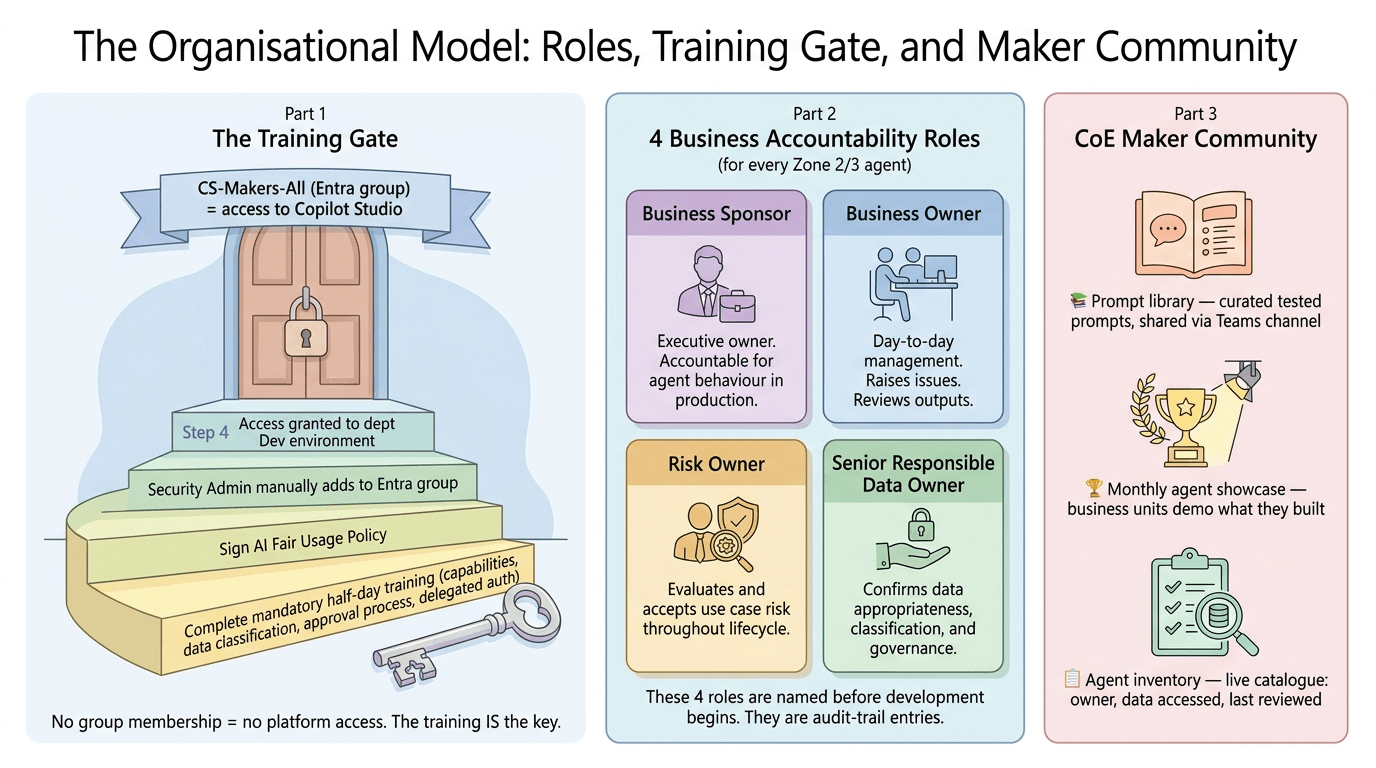
The training gate is the most important organisational control in a Copilot Studio deployment, and it is the one most commonly shortened or skipped in the name of speed. Here is what it must cover: how Copilot Studio agents actually work (and what they cannot do), how the company's data is classified and why some sources are off-limits, the specific approval process for building and publishing agents, what "delegated authentication" means and why using a shared service account is dangerous, the AI Fair Usage Policy — and what the consequences of breaching it are.
At the end of training, each maker signs an acknowledgment form. The Security Administrator then manually adds them to the Entra ID group that gates access to their department's Copilot Studio environments. The training is the key. The key is the group membership. The group membership is the door.
Beyond the maker community, an effective Copilot Studio organisation needs clearly defined accountability at the business level. For every agent that reaches Zone 2 or Zone 3, four roles must be named before development begins:
A Business Sponsor — the executive who owns the outcome and takes accountability for the agent's behaviour in production. A Business Owner — the person who manages the agent day-to-day, reviews its outputs, and raises issues. A Risk Owner — who evaluates and accepts the risk of the use case throughout its lifecycle. A Senior Responsible Data Owner — who confirms that the data the agent uses is appropriate, correctly classified, and governed.
These are not honorary titles. They are audit-trail entries. When something goes wrong — and eventually, something will go wrong — the incident response process starts with these four people.
The Centre of Excellence publishes a prompt library: a curated, tested set of example prompts for common use cases, shared across the maker community via a Teams channel. It runs a monthly "agent showcase" where business units demonstrate what they have built. It maintains an agent inventory — a live catalogue of every production agent in the enterprise, who owns it, what data it accesses, and when it was last reviewed.
The teaching: "An AI platform without trained makers is a chemistry lab without safety training. The half day of mandatory training is not a cost — it is the only thing standing between your enterprise and an agent that was built in good faith and causes serious harm."
The FinOps model — Copilot Credits, chargeback, and the noisy neighbour problem
A Power Platform Administrator at a media company checks the month-end Copilot Credit report. Three quarters of the entire company's credit allocation for the month has been consumed by a single agent — a document summarisation tool built by one enthusiastic team in the editorial department. The other eight departments have run out of credits ten days before month-end. Their agents are offline.
This is the noisy neighbour problem, and it is one of the most common operational failures in early Copilot Studio deployments. It happens because, by default, all Copilot Credits in a tenant sit in a shared pool. The team that builds the most active agent drains the pool for everyone else.
The fix is a FinOps model based on hard budget allocation. Copilot Studio is a consumption-based platform powered by Copilot Credits. Capacity Packs — the unit of purchase — cost $200 for 25,000 credits. Instead of leaving these packs in the shared tenant pool, the Power Platform Administrator hard-allocates specific credit packs directly to each department's Production environment inside PPAC. HR's agents consume HR's credits. Finance's agents consume Finance's credits. If the editorial team's agent over-consumes, it affects only the editorial department's allocation, not the entire company's.
For demand that exceeds pre-purchased capacity — or for new teams just beginning and not yet ready to commit to a full capacity pack — a Pay-As-You-Go billing policy can be configured and linked to a department's Azure subscription. The team's agent usage is metered and charged back to their cost centre automatically. No manual billing. No disputes about who used what.
Budget alert thresholds are set in the Microsoft 365 Admin Centre: an automated email to the departmental lead and the Power Platform Administrator when a department reaches 80%, 90%, and 100% of its allocated budget. At 80%, the team reviews usage. At 100%, the administrator evaluates whether to top up the pack or throttle the agent's usage.
This chargeback model creates a natural forcing function for business value. When a team's AI agent costs them money from their own budget, they build agents that solve real problems and retire the ones that nobody uses. The FinOps model is not just cost management — it is a quality filter for the entire AI programme.
The teaching: "Shared infrastructure creates shared chaos. When an AI platform has no financial boundaries, the team with the most enthusiasm becomes the team that breaks everyone else's tools."
Monitoring, the kill switch, and supervised autonomy
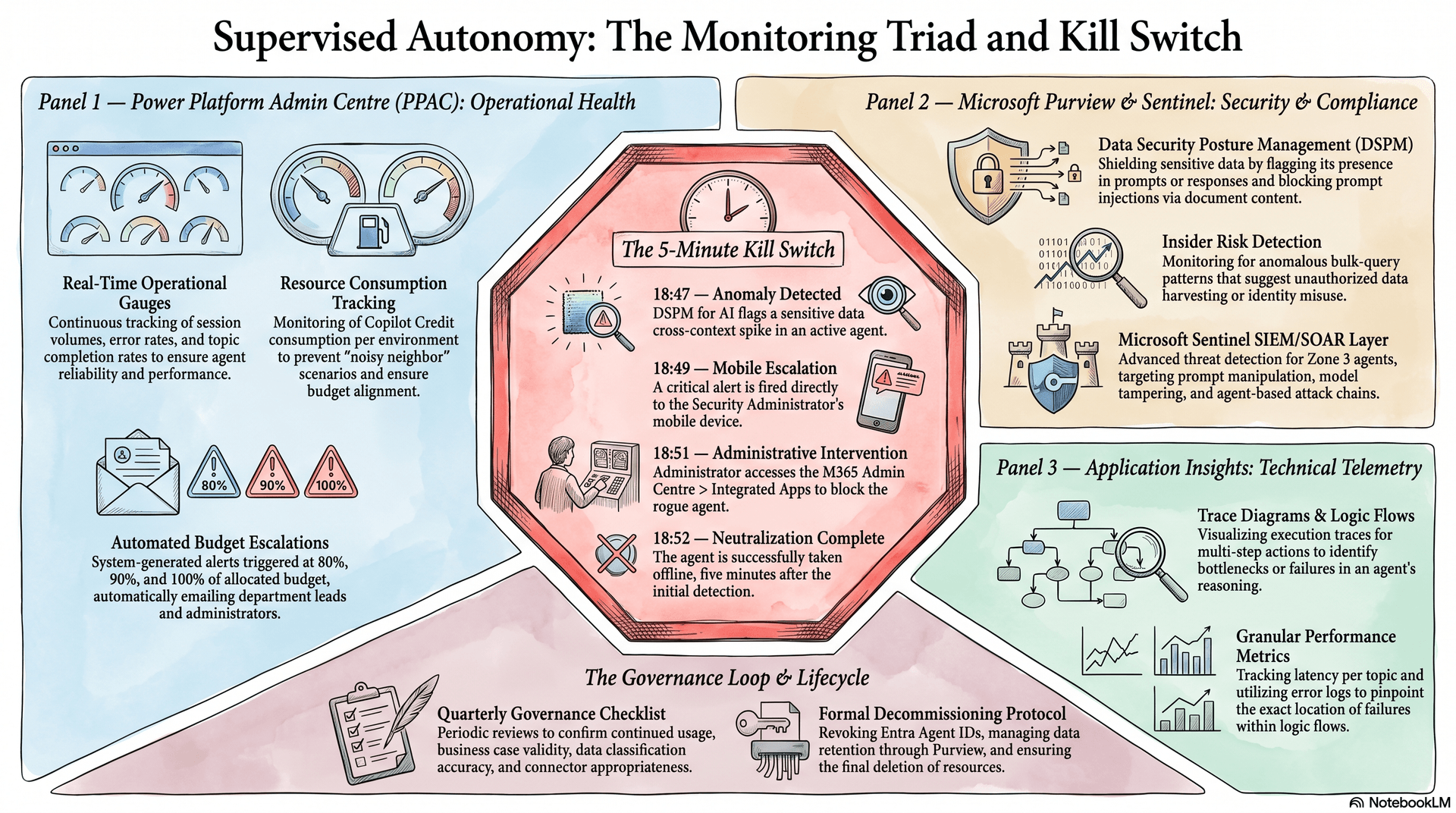
It is a Friday evening. A Zone 3 enterprise agent — a contract analysis tool deployed to the legal team — begins returning summaries that include a client's confidential arbitration details in responses to other clients' queries. The Purview Data Security Posture Management dashboard flags a spike in cross-context sensitive data references at 6:47pm.
The Security Administrator is not in the office. But the alert goes to their mobile phone. They open the Microsoft 365 Admin Centre from their phone, navigate to Integrated Apps, find the contract analysis agent, and block it in two taps. The agent is offline by 6:52pm — five minutes after the anomaly was first detected.
This is supervised autonomy: the condition where AI agents operate with genuine independence, but within a monitoring framework that catches problems before they become incidents — and enables instant, authoritative response when they don't.
The monitoring triad for Copilot Studio operates across three portals. The Power Platform Admin Centre (PPAC) tracks operational health: session volumes, error rates, topic completion rates, and Copilot Credit consumption per environment. Budget alerts fire here. The first sign of a runaway cost spike appears here.
Microsoft Purview provides security and compliance oversight: the Data Security Posture Management (DSPM) for AI dashboard watches for sensitive data appearing in prompts or responses. Insider Risk Management monitors for anomalous usage patterns — an employee bulk-querying an agent for data they do not normally access. Communication Compliance with Prompt Shields detects and blocks prompt injection attempts, where malicious content embedded in a document tries to hijack the agent's behaviour.
For Zone 3 agents, Microsoft Sentinel adds a SIEM/SOAR layer: active threat detection against prompt manipulation, model tampering, and agent-based attack chains. Sentinel analytics rules are deployed as part of the Zone 3 approval process — not after something goes wrong.
Application Insights provides granular technical telemetry: latency per topic, execution traces for multi-step actions, error logs that pinpoint exactly where in an agent's logic flow a failure occurred.
The CoE runs a formal quarterly governance review. Every production agent is assessed: is it still being used? Is the business case still valid? Has the data it accesses been reclassified? Have the connectors it uses been reviewed for continued appropriateness? Agents that score poorly on these dimensions are flagged for remediation or decommissioning.
When an agent is decommissioned, the process is: remove from Production environment, revoke its Entra Agent ID and all associated resource permissions, and invoke Microsoft Purview Data Lifecycle Management to ensure conversation transcripts and AI outputs are retained for the legally required period, then deleted. The agent does not simply disappear — it is offboarded with the same rigour it was onboarded with.
The teaching: "Governance does not end when an agent goes live. It begins. The launch is not the finish line — it is the start of the long-term accountability cycle that makes the difference between an AI programme and an AI incident."
No comments yet — be the first to add to the discussion. Comments appear after they’re reviewed.
Want more insights?
Subscribe to get the latest articles delivered straight to your inbox.