Building a Specialized Medical Assistant: A Guide to Fine-Tuning and Deploying Google's MedGemma
Building a Specialized Medical Assistant: A Guide to Fine-Tuning and Deploying Google's MedGemmaThe landscape of medical AI is shifting rapidly
Building a Specialized Medical Assistant: A Guide to Fine-Tuning and Deploying Google's MedGemma
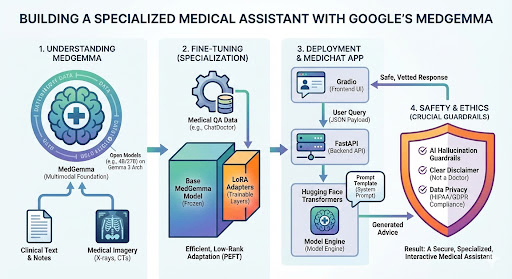
The landscape of medical AI is shifting rapidly. With Google's release of MedGemma—a suite of open models built on the powerful Gemma 3 architecture—developers now have access to tools that were previously the domain of massive research labs.
Whether you are building a clinical decision support tool, a patient triage bot, or a medical research assistant, MedGemma provides a robust, multimodal foundation.
In this guide, we will walk through:
- Understanding MedGemma: What makes it different?
- Fine-Tuning: specialized training on medical QA data using LoRA.
- Deployment: Building a secure, interactive web app to serve the model.
Part 1: What is MedGemma?
MedGemma is not just a standard LLM; it is a collection of models explicitly fine-tuned on medical text, radiology reports, and medical imagery. Built on the Gemma 3 architecture, it comes in two primary flavors:
- MedGemma 4B (Multimodal): Capable of understanding both text and images (like X-rays or CT scans). It uses a SigLIP image encoder.
- MedGemma 27B (Text & Multimodal): A larger, more reasoning-heavy model for complex clinical notes and diagnostic paths.
For this tutorial, we will focus on the 4B variant (or the lighter 2B if you are resource-constrained), as it offers an incredible balance of speed and medical accuracy, making it perfect for edge deployment or lower-cost cloud GPUs.
Part 2: The Fine-Tuning Workflow
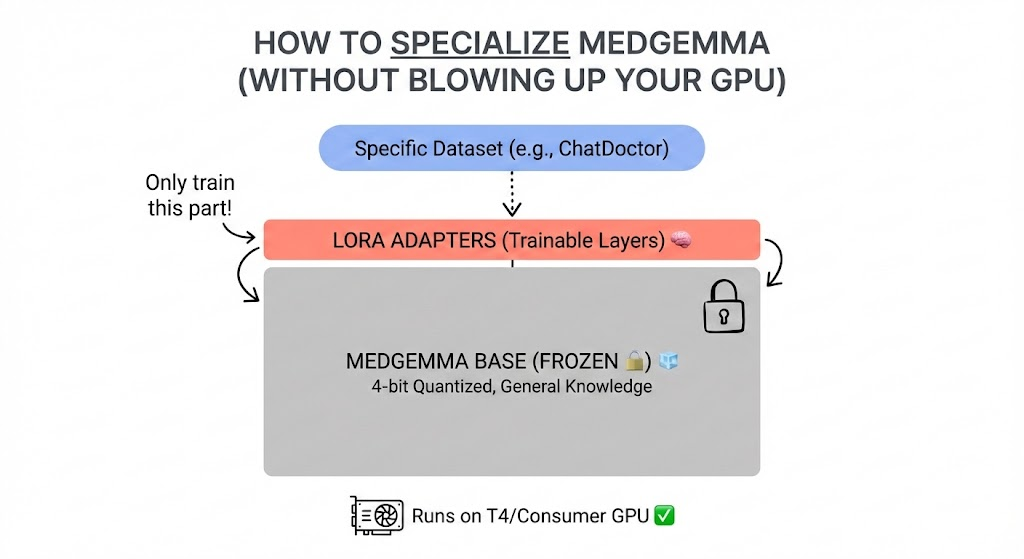
While MedGemma is smart out of the box, "general medical knowledge" isn't always enough. You might need it to specialize in Cardiology, Pediatrics, or Hospital-Specific Protocols.
To do this efficiently, we use LoRA (Low-Rank Adaptation). Instead of retraining the whole model (which requires massive compute), LoRA freezes the main model and trains tiny "adapter" layers.
Prerequisites
You will need a GPU (NVIDIA T4 or A100 recommended) and the following libraries:
pip install -q -U transformers datasets peft trl bitsandbytes
The Strategy
- Quantization: Load the model in 4-bit mode to fit it on consumer GPUs.
- Dataset: Use a medical QA dataset (like lavita/ChatDoctor-HealthCareMagic-100k).
- Training: Use the SFTTrainer (Supervised Fine-Tuning Trainer) from Hugging Face.
(See the finetune_medgemma.py file included with this post for the complete code!)
Part 3: Building the "MediChat" App
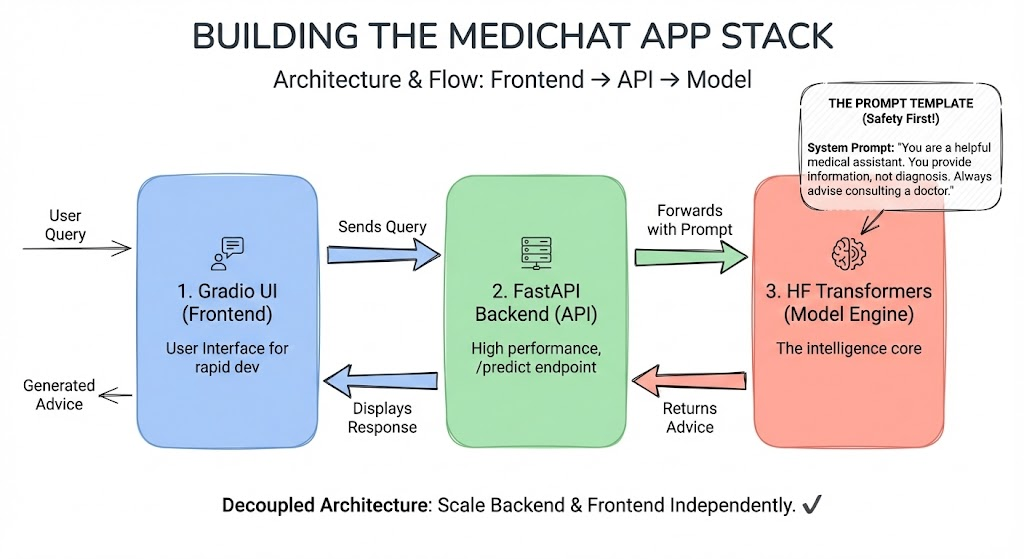
A model is only useful if people can interact with it. We will build a simple "MediChat" application.
The Stack
- Model Engine: Hugging Face Transformers
- Backend: FastAPI (High performance, easy documentation)
- Frontend: Gradio (For rapid UI development)
The Architecture
Instead of loading the model directly inside a monolithic app, we'll create an API. This allows you to scale the backend independently of the frontend.
1. The API Endpoint (/predict)
This endpoint receives a JSON payload containing the user's medical query and returns the generated advice.
2. The Prompt Template
Medical models are sensitive to prompt structure. We must ensure the system prompt enforces safety.
- System Prompt: "You are a helpful medical assistant. You provide information, not diagnosis. Always advise consulting a doctor."
Part 4: Safety & Ethics (Crucial!)
Before you deploy, remember: AI Hallucinations are dangerous in healthcare.
- Guardrails: Implement a secondary check (using a smaller model or regex) to filter out dangerous advice (e.g., "stop taking medication").
- Disclaimer: Your UI must explicitly state that the AI is not a doctor.
- Data Privacy: If you are fine-tuning on private patient data, ensure you are HIPAA/GDPR compliant. Local deployment (running the model on-premise) is often preferred over sending data to external APIs.
Conclusion
MedGemma represents a democratization of medical AI. By combining its pre-trained knowledge with domain-specific fine-tuning, you can build tools that genuinely assist healthcare professionals and empower patients.
Ready to build? Check out the full source code below.
No comments yet — be the first to add to the discussion. Comments appear after they’re reviewed.
Want more insights?
Subscribe to get the latest articles delivered straight to your inbox.