Before you turn on Copilot, you have a permissions problem
The security work that matters for a Microsoft 365 Copilot rollout happens before the feature is enabled — not after. Data oversharing, shadow AI already in use, misconfigured agents, and DLP policies that don't actually work: here's what practitioners are documenting.
Most organisations think about Copilot security backwards.
They enable the feature first, then look for governance controls. But Copilot doesn't create new access — it surfaces existing access, at scale, at the speed of a chat prompt. The permissions problem you haven't fixed is the Copilot security problem you will have.
This week's reading, drawn from practitioners and Microsoft's own governance teams, covers the five places where the security work actually happens.
1. The data readiness problem nobody audited
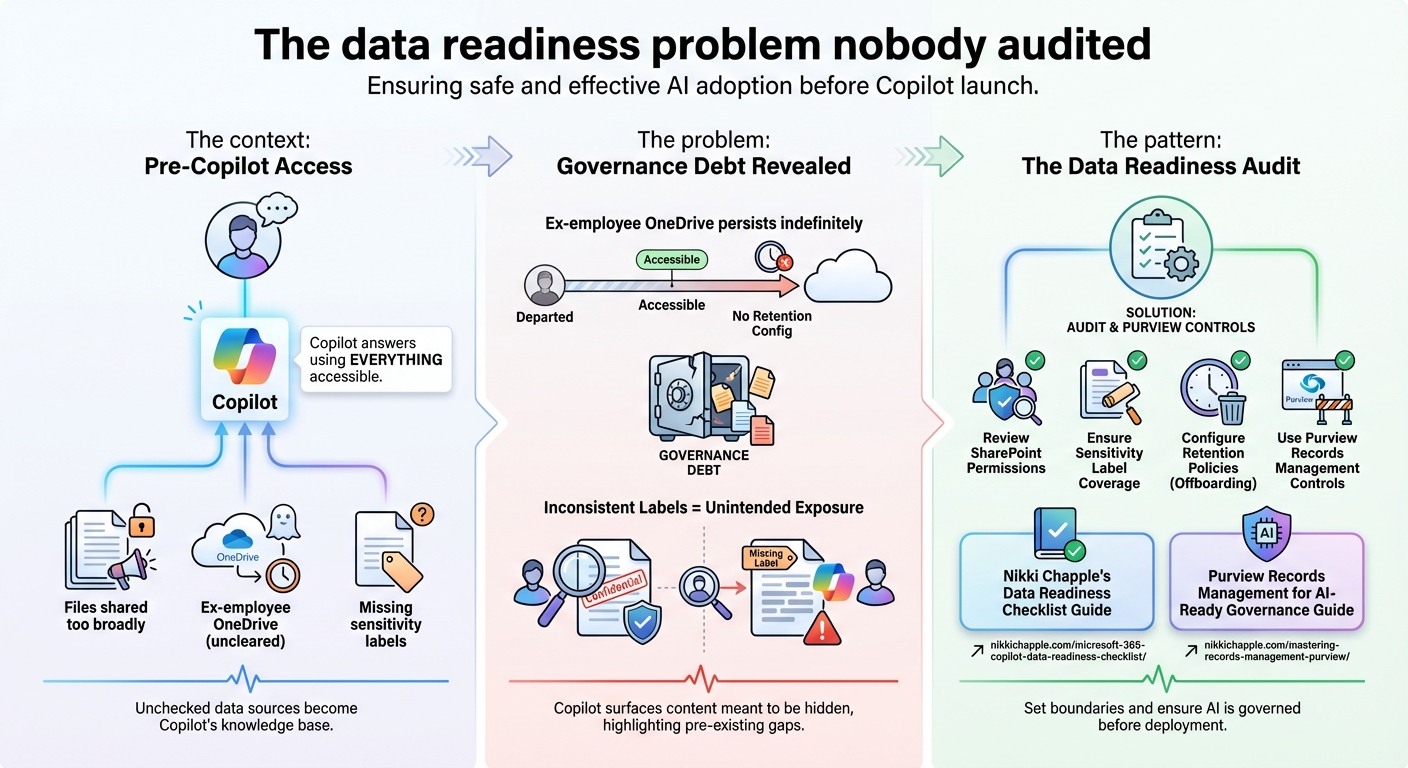
The context: Before Microsoft 365 Copilot goes live for your users, Copilot will answer questions using everything those users can already access. That includes files shared too broadly, ex-employee OneDrive accounts that were never cleaned up, and documents that should have sensitivity labels but don't.
The concept: Imagine hiring a brilliant new employee who can read every document in your office in seconds. The problem isn't the new employee — it's all the filing cabinets you forgot to lock. The old contracts left on the shared drive, the ex-colleague's files nobody archived, the sensitive strategy docs with no labels on them. Copilot doesn't create access problems. It makes the ones you already have impossible to ignore.
The problem: Nikki Chapple's documentation of the ex-employee OneDrive issue is the clearest example of a governance debt that predates Copilot but becomes visible the moment Copilot is enabled. OneDrive data for departed employees can persist indefinitely — and without deliberate retention configuration, it remains accessible. Add sensitivity labels that aren't consistently applied, and Copilot will surface content that was never meant to reach certain users.
The pattern: The answer isn't a Copilot setting. It's a data readiness audit: reviewing SharePoint permissions, ensuring sensitivity label coverage across your document library, configuring retention policies for offboarded users, and using Purview's records management controls to set boundaries on what Copilot can reach. Chapple's data readiness guide and the Purview records management guide for AI-ready governance make this concrete.
2. Shadow AI is already in your organisation
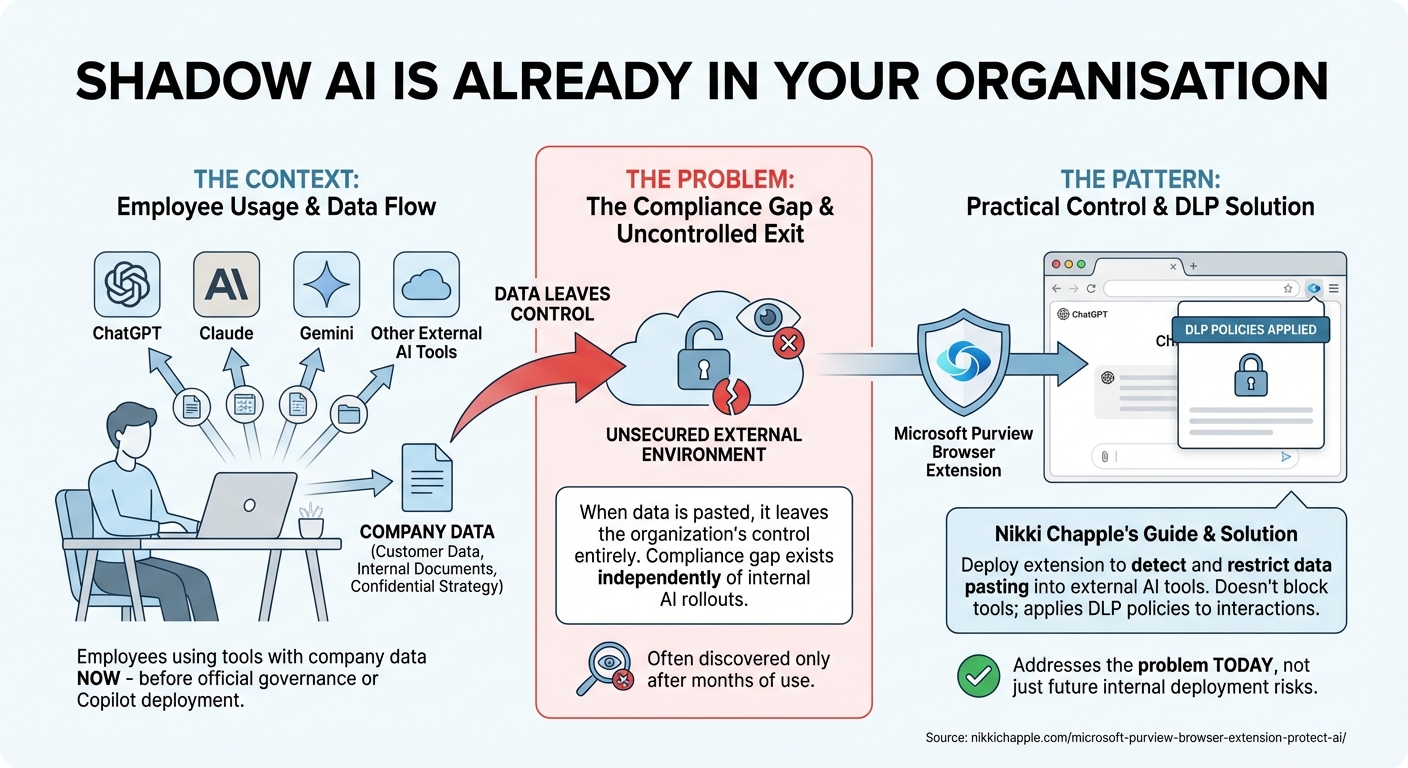
The context: Your employees are using ChatGPT, Claude, Gemini, and other external AI tools with company data right now — before you've deployed Copilot, before you've established governance, and before you've told them not to.
The concept: Before you even think about deploying Copilot, someone in your company is already pasting a client proposal into ChatGPT to get it polished. Maybe dozens of people. They're not being reckless — they're being efficient. But that data has now left your organisation entirely, and you probably don't know it happened. Shadow AI is the governance problem that doesn't wait for your deployment timeline.
The problem: This isn't speculation. Shadow AI in enterprise environments is the compliance gap that exists independently of any internal AI rollout. When employees paste customer data, internal documents, or confidential strategy into external AI tools, the data leaves the organisation's control entirely. Organisations focused on Copilot deployment often discover the shadow AI problem only after it's already been happening for months.
The pattern: Nikki Chapple's guide to governing AI shadow IT with the Purview browser extension covers the practical control: deploying the Microsoft Purview browser extension to detect and restrict data being pasted into external AI tools. This doesn't require blocking the tools — it applies DLP policies to browser-based AI interactions. The extension addresses the problem that exists today, not just the one that might emerge from internal Copilot deployment.
3. Agent misconfiguration is the new attack surface
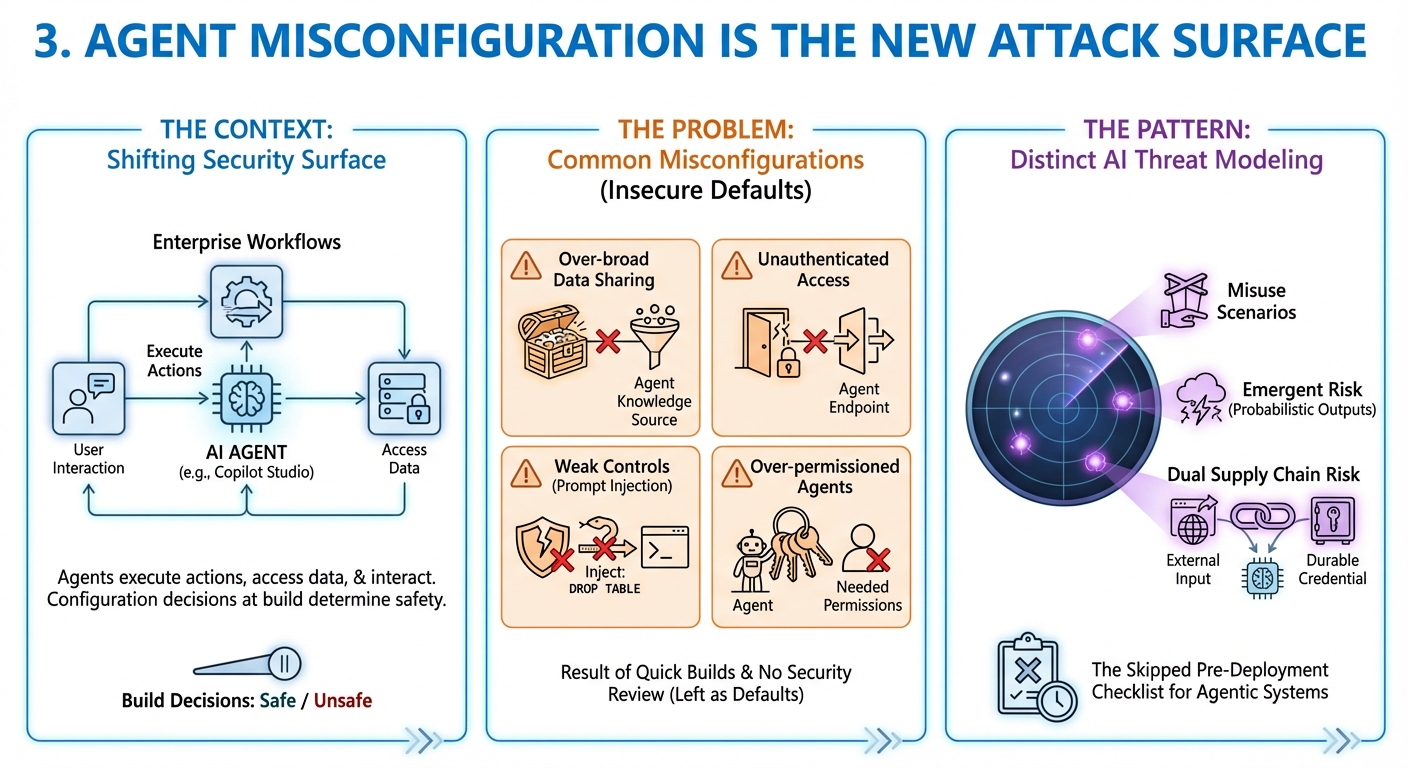
The context: As Copilot Studio agents become part of enterprise workflows, the security surface changes. Agents execute actions, access data, and interact with users — and the configuration decisions made during build determine whether that happens safely.
The concept: When you build a Copilot Studio agent, you're not writing a chatbot — you're creating a process that can read data, take actions, and interact with users on your behalf. Getting the configuration wrong isn't like a broken form on a website. It's like handing a new intern master keys to the building and telling them to use their judgment. The defaults that felt fine in a demo become real access problems in production.
The problem: Microsoft's documentation on detecting and mitigating common agent misconfigurations identifies the specific patterns that create exposure: over-broad data sharing in agent knowledge sources, unauthenticated access to agent endpoints, weak orchestration controls that allow prompt injection, and agents running with more permissions than they need. None of these are exotic attack scenarios — they're the defaults that teams leave in place when they build quickly and don't have a security review process.
The pattern: Threat modeling for AI agents is now a distinct discipline from traditional application security. Microsoft's AI threat modeling guide covers the specific failure modes for agentic systems: misuse scenarios, emergent risk from probabilistic outputs, and the dual supply chain risk when agents process external input with durable credentials. For teams building in Copilot Studio, this is the pre-deployment checklist that most builds skip.
4. DLP is not a switch you flip
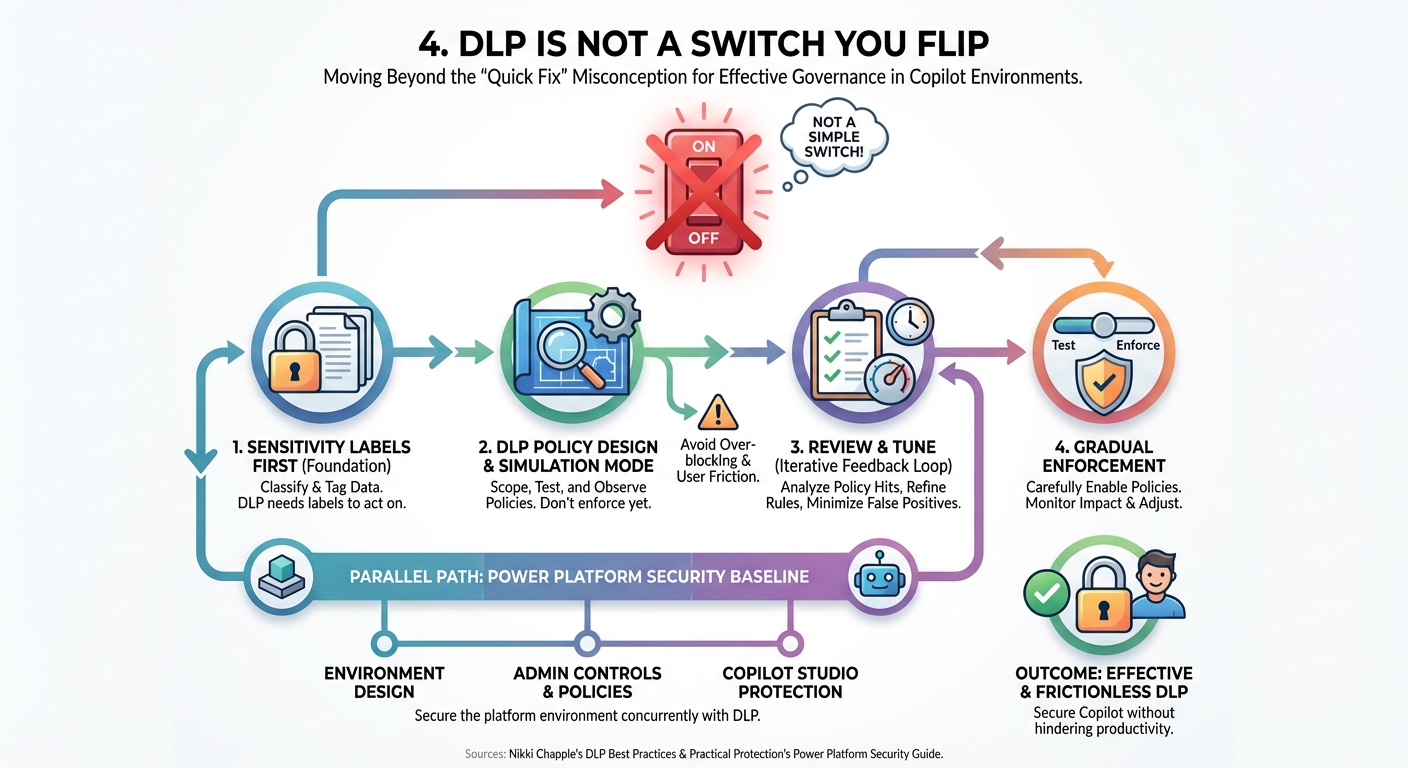
The context: Many organisations treat Purview Data Loss Prevention as a quick governance fix — enable the policies, mark the deployment as complete. In practice, DLP for Copilot environments requires design work that most teams haven't done.
The concept: Data Loss Prevention sounds like a feature you enable. In practice it's closer to a policy language you have to write, test, and tune — like setting traffic lights for data flows across your whole organisation. Turn them all red and nothing moves. Turn them all green and nothing's protected. Teams that skip the design phase find this out when Copilot either ignores their policies entirely or starts blocking people from doing their normal jobs.
The problem: Nikki Chapple's DLP best practices guide is direct about the misconception: DLP is not something you switch on. Policies need to be scoped correctly, tested in simulation mode before enforcement, integrated with sensitivity labels, and tuned to avoid blocking legitimate workflows. Teams that skip the design phase discover the gaps when Copilot either bypasses the policies or over-blocks in ways that create user friction.
The pattern: The practical sequence is: sensitivity labels first (so DLP has something to act on), then DLP policies in simulation mode, then review of what the policies are actually catching, then gradual enforcement. Power Platform has its own security baseline that should run in parallel — Practical Protection's guide to Power Platform security covers the environment design and admin controls that apply to Copilot Studio specifically.
5. What Microsoft actually shipped for Copilot governance
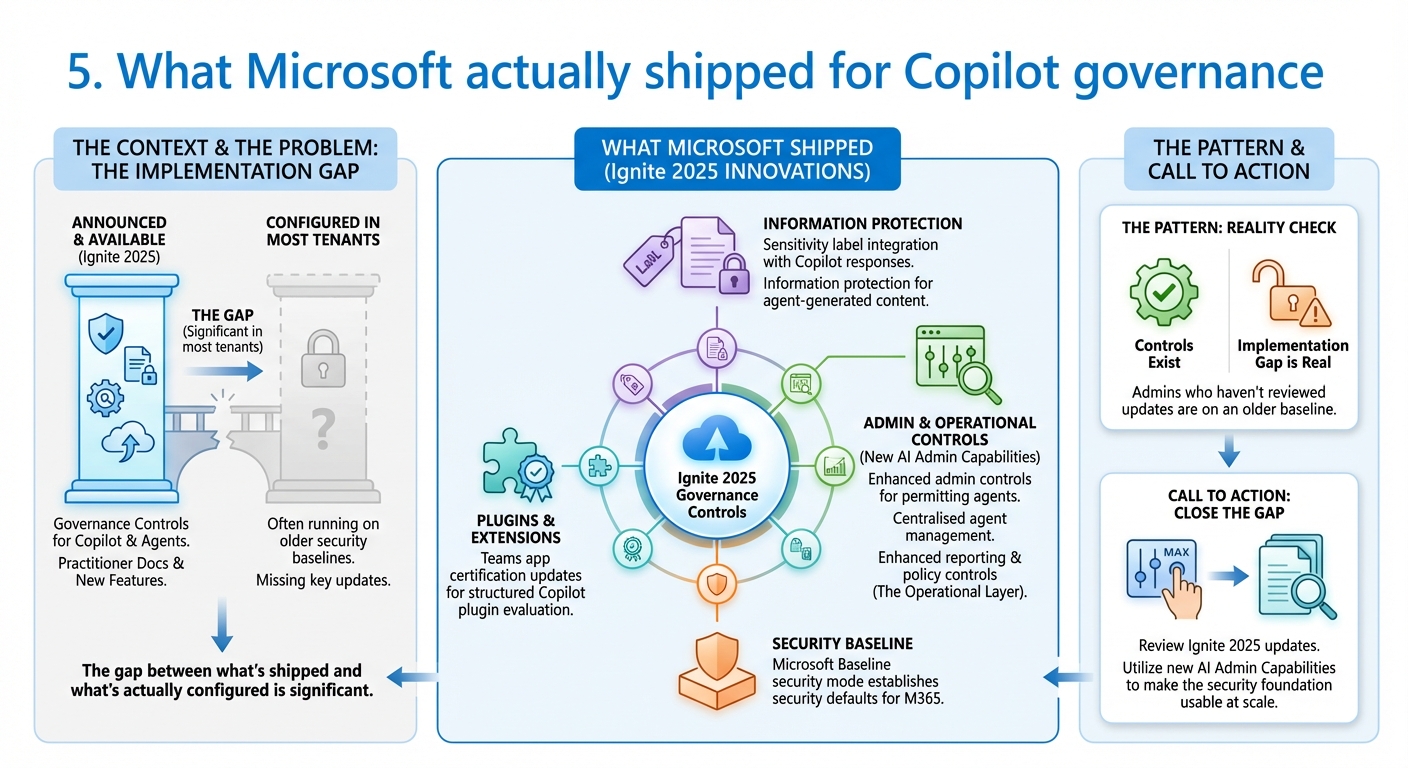
The context: Alongside the practitioner documentation of what's hard, Microsoft Ignite 2025 shipped a set of governance controls specifically designed for Copilot and agent deployments.
The concept: Think of it this way: Microsoft has been building safety features into a car that was already on the road. Ignite 2025 is the moment they added seatbelts, lane assist, and a proper dashboard. If you deployed Copilot earlier in the year, you may be running on defaults that are now considered the old baseline. These controls exist — but only if someone has actually gone in and turned them on.
The problem: The gap between what's announced and what's actually configured in most tenants is significant. The security and governance innovations from Ignite 2025 include sensitivity label integration with Copilot responses, information protection for agent-generated content, and enhanced admin controls for managing which agents are permitted in the environment. Microsoft Baseline security mode — announced at Ignite — establishes security defaults for M365 environments. The Teams app certification updates give admins a structured way to evaluate and govern Copilot plugins.
The pattern: The controls exist. The implementation gap is real. Admins who haven't reviewed the Ignite 2025 governance updates are running Copilot on an older security baseline than Microsoft now makes available. The new AI admin capabilities — centralised agent management, enhanced reporting, and policy controls — are the operational layer that makes the security foundation usable at scale.
The question that matters
The AI compliance landscape is changing fast enough that what counted as "configured" six months ago may not be sufficient now. Rafah Knight's interview on how AI is reshaping M365 compliance makes this concrete: the compliance framework itself is evolving as AI tools become standard in enterprise environments. Teams that treat Copilot governance as a one-time deployment task will find themselves revisiting it every quarter.
The pattern across all of this week's reading is consistent: the security work for Copilot is not about the Copilot settings. It's about the data estate, the shadow AI already in use, the agent configurations, and the DLP policies — all of which predate Copilot and all of which Copilot will make visible.
Sources this week: Nikki Chapple, Microsoft Security Blog, Microsoft 365 Copilot Blog, Practical365
No comments yet — be the first to add to the discussion. Comments appear after they’re reviewed.
Want more insights?
Subscribe to get the latest articles delivered straight to your inbox.