Claude Skills Comprehensive Guide 2026: Everything You Need to Know About Agent Skills
Last Updated: January 23, 2026 | Reading Time: 15 minutes
Claude Skills represent a fundamental shift in how enterprises and developers extend AI capabilities. With Anthropic's December 2025 release of Agent Skills as an open standard and the January 2026 Claude Code 2.1.0 update introducing hot-reloading, skills have become the primary mechanism for teaching Claude repeatable workflows. This guide covers everything from basic structure to enterprise deployment patterns.
Key Takeaway: Skills are modular "task packs" that make Claude faster, cheaper, and more consistent for repetitive workflows. Unlike prompts, skills can be versioned, reused, and shared across teams—and now work across multiple AI platforms thanks to the open standard.
What Are Claude Skills?
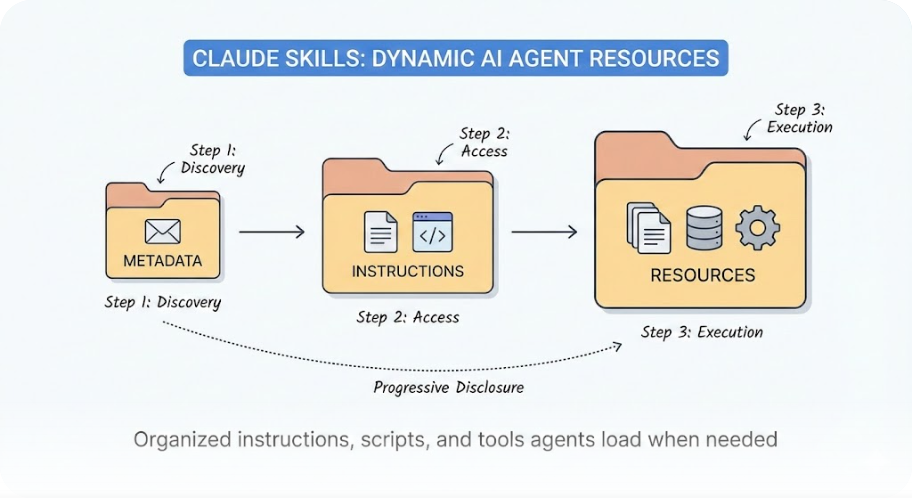
Claude Skills are organized folders of instructions, scripts, and resources that agents can discover and load dynamically to perform better at specific tasks. Think of them as executable knowledge packages that Claude loads only when needed, extending capabilities while keeping the main prompt lean.
At their core, skills solve a fundamental problem: how do you teach an AI to follow your organization's specific procedures without bloating every conversation with context?
The answer is progressive disclosure. Skills employ a three-tier loading architecture:
| Tier | Token Cost | What Loads |
|---|---|---|
| Metadata | ~100 tokens | Name + description scanned to identify relevance |
| Instructions | <5,000 tokens | Full SKILL.md body when Claude determines the skill applies |
| Resources | Variable | Bundled scripts, templates, data files—only as needed |
This architecture means a project with 50 skills doesn't consume 50x the tokens. Claude scans metadata, identifies the 1-2 relevant skills, and loads only what's necessary.
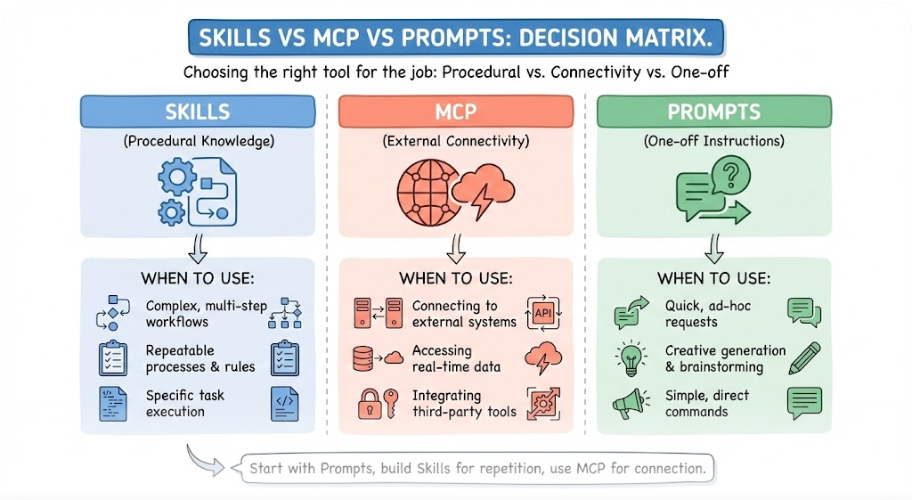
Key Insight: Skills teach Claude how to do things better. MCPs give Claude access to new things. The distinction matters for architecture decisions.
Skills vs. MCP vs. Prompts: The Decision Matrix
Before diving into skill creation, understanding when to use each extension mechanism prevents architectural missteps.
Comparison Table
| Aspect | Skills | MCP Servers | Custom Prompts |
|---|---|---|---|
| Purpose | Procedural knowledge & workflows | External connectivity & tool access | One-off instructions |
| Persistence | Versioned files, team-shareable | Server configuration | Session-only |
| Token Efficiency | High (progressive loading) | Variable (tool definitions) | Low (full context each time) |
| Cross-Platform | Yes (open standard) | Yes (open protocol) | No |
| Best For | Repeatable workflows, domain expertise | Real-time data, external integrations | Ad-hoc tasks |
When to Use Skills
Use skills when you're explaining how to use a tool or follow procedures:
- "When querying our database, always filter by date range first"
- "Format Excel reports with these specific formulas"
- "Follow our code review checklist before approving PRs"
- "Generate customer emails using our brand voice guidelines"
When to Use MCP
Use MCP when Claude needs to access something external:
- Reading from and writing to Google Drive
- Creating GitHub issues or updating project management tools
- Querying databases or calling APIs
- Connecting to services without native Claude support
The Power Combination
The real power emerges when you combine both. MCP handles connectivity—secure, standardized access to external systems. Skills handle expertise—the domain knowledge and workflow logic that turn raw tool access into reliable outcomes.
Example: A supply-chain agent might need:
- MCP servers for inventory database, logistics API, and ERP system
- Skills for "how to detect stockouts," "escalation procedures for delays," and "weekly reporting format"
SKILL.md Structure and Frontmatter
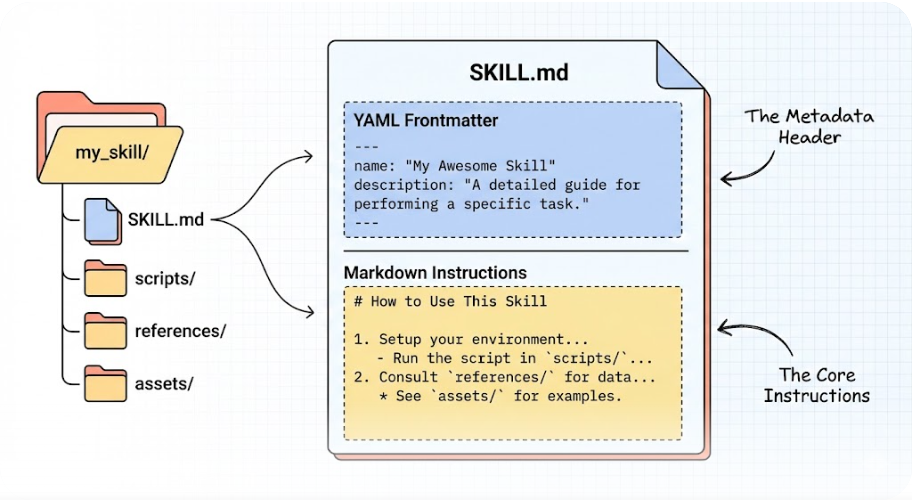
Every skill needs a SKILL.md file with two parts: YAML frontmatter and markdown content.
Basic Directory Structure
skill-name/
├── SKILL.md (required)
│   ├── YAML frontmatter (required)
│   │   ├── name: (required)
│   │   └── description: (required)
│   └── Markdown instructions (required)
└── Bundled Resources (optional)
    ├── scripts/     - Executable code (Python/Bash)
    ├── references/  - Documentation for context
    └── assets/      - Templates, icons, fonts
Frontmatter Requirements
The frontmatter contains only the fields Claude reads to determine when to use the skill:
---
name: my-skill-name
description: A clear description of what this skill does and when to use it.
---
Validation Rules:
- name: Maximum 64 characters, lowercase letters/numbers/hyphens only
- description: Maximum 1,024 characters, must be comprehensive
Example: Document Creation Skill
---
name: docx
description: Comprehensive document creation, editing, and analysis with
  support for tracked changes, comments, formatting preservation, and text
  extraction. Use when Claude needs to work with professional documents
  (.docx files) for: (1) Creating new documents, (2) Modifying or editing
  content, (3) Working with tracked changes, (4) Adding comments, or any
  other document tasks.
---

# Document Creation Skill
Core Capabilities
...
### Invocation Control Options

Two frontmatter fields let you restrict how skills are invoked:

| Field | Effect | Use Case |
|-------|--------|----------|
| `disable-model-invocation: true` | Only user can invoke | Workflows with side effects: `/commit`, `/deploy`, `/send-slack` |
| `user-invocable: false` | Only Claude can invoke | Background knowledge: `legacy-system-context` |
Claude Code 2.1.0: Key Skill Features (January 2026)
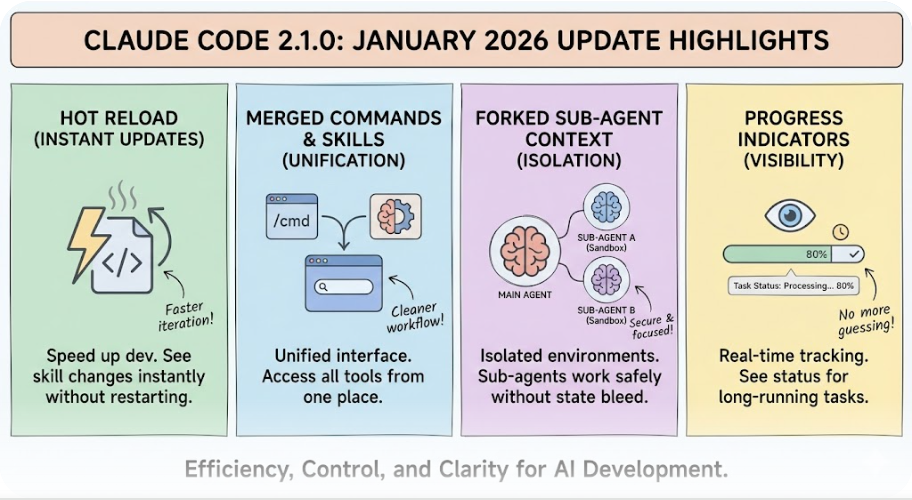
The January 7, 2026 release introduced significant improvements to the skills system:
Automatic Hot-Reload
Skills created or modified in ~/.claude/skills or .claude/skills now activate immediately without restarting the session. This eliminates the stop-start friction that previously slowed down skill development.
Before 2.1.0:
# Edit skill → Save → Restart Claude Code → Test
After 2.1.0:
# Edit skill → Save → Test immediately
Merged Slash Commands and Skills
Custom slash commands and skills have been unified. A file at .claude/commands/review.md and a skill at .claude/skills/review/SKILL.md both create /review and work the same way.
Your existing .claude/commands/ files keep working. Skills add optional features:
- A directory for supporting files
- Frontmatter to control invocation
- Ability for Claude to load them automatically when relevant
Forked Sub-Agent Context
Skills can now run in isolated sub-agent contexts using context: fork in frontmatter. This prevents unintended side effects and makes it safer to test new logic without polluting the main agent's state.
---
name: experimental-refactor
description: Experimental code refactoring with isolated context
context: fork
---
Progress Indicators
Skills progress indicators now show tool uses as they happen during execution. Developers get real-time feedback on what Claude is doing, reducing uncertainty during long-running operations.
Pricing and Availability
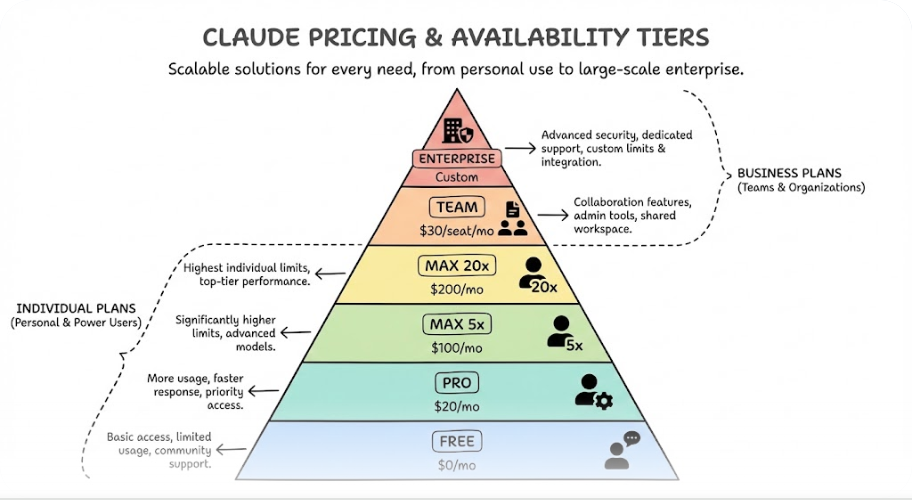
Claude Skills are available across different subscription tiers with varying capabilities:
Individual Plans
| Plan | Price | Claude Code Access | Skill Features |
|---|---|---|---|
| Free | $0 | No | N/A |
| Pro | $20/month | Yes | Full skill support |
| Max 5× | $100/month | Yes | Multi-agent orchestration |
| Max 20× | $200/month | Yes | All-day productivity |
Business Plans
| Plan | Price | Notes |
|---|---|---|
| Team | $30/seat/month | Minimum 5 users, basic features |
| Team Premium | $150/seat/month | Claude Code access, collaboration features |
| Enterprise | ~$60/seat (min 70 users) | SSO, 500K context, audit logging |
Usage Model: Claude Code operates on a 5-hour rolling window for token usage. When teams exceed included allowances, extra usage is charged at standard API token rates.
Agent Skills Open Standard
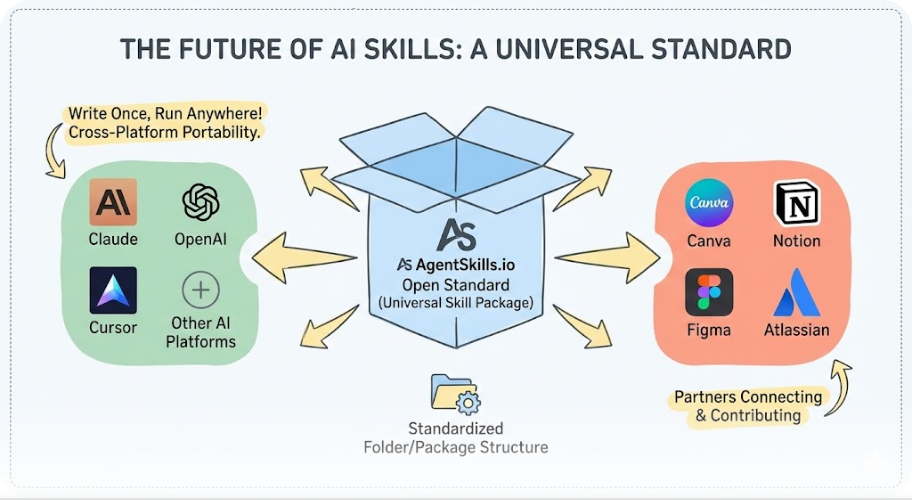
On December 18, 2025, Anthropic published Agent Skills as an open standard at agentskills.io. This represents a strategic shift toward interoperability.
Cross-Platform Portability
Skills created for Claude can work in other AI systems that adopt the standard. OpenAI has already adopted skills, and the standard is designed for IDE agents like Cursor as well.
Benefits:
- Build once, run anywhere (that supports the standard)
- Reduced vendor lock-in
- Faster governance reviews for enterprise
- Community skill sharing
Partner Integrations
Prebuilt skills from Anthropic partners are now available:
- Canva - Design workflow integration
- Notion - Documentation and project management
- Figma - Design system integration
- Atlassian - Jira and Confluence workflows
Enterprise Use Cases and Case Studies
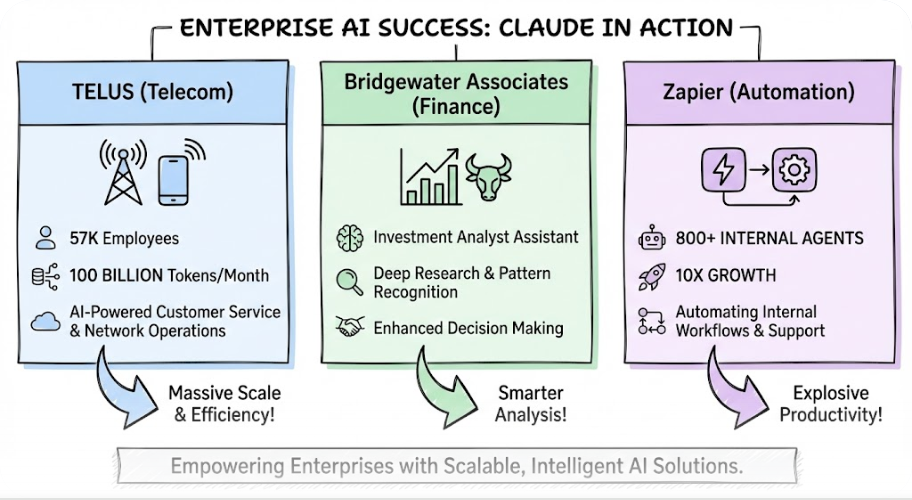
TELUS (Telecom)
TELUS, one of the world's largest telecom and healthcare providers, deployed Claude as the core engine for its internal Fuel iX platform.
- Scale: 57,000 employees with direct AI access
- Volume: 100+ billion tokens processed per month
- Application: Advanced AI workflows across customer service and operations
Bridgewater Associates (Finance)
The world's largest hedge fund uses Claude Opus 4 to power an Investment Analyst Assistant.
- Deployment: Amazon Bedrock
- Capabilities: Python scripts, scenario analysis, financial visualizations
- Result: 50-70% reduction in time-to-insight for complex reports
Zapier (Automation)
Zapier has deployed Claude Enterprise internally with impressive results:
- Scale: 800+ internal Claude-driven agents
- Growth: 10× year-over-year increase in tasks completed via Claude
- Integration: Native MCP connection to Slack channels and private codebase
Best Practices for Skill Development
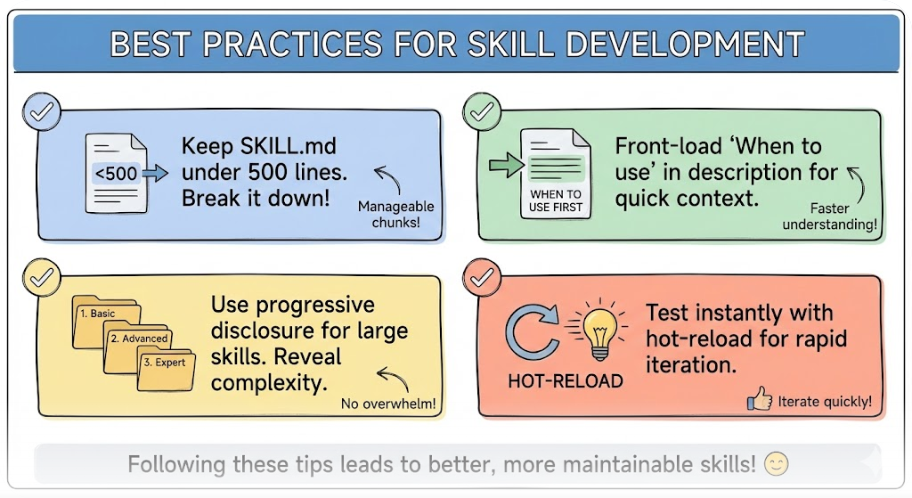
Keep SKILL.md Under 500 Lines
For optimal performance, keep the SKILL.md body under 500 lines. If your content exceeds this, split it into separate files using progressive disclosure patterns.
Front-Load "When to Use" in Description
Include all activation criteria in the description—not in the body. The body only loads after triggering, so "When to Use This Skill" sections in the body don't help Claude decide whether to use it.
# Good
description: Generate meeting summaries from transcripts. Use when user
  pastes meeting notes, shares a transcript file, or asks for action items
  from a call.

# Bad - trigger info buried in body
description: Meeting summary tool.
---
When to Use
Use when user pastes meeting notes... # Claude won't see this until AFTER triggering
### Use Progressive Disclosure for Large Skills

Structure complex skills with a main SKILL.md that references separate files:
code-review/
├── SKILL.md # Core instructions (~300 lines)
├── references/
│ ├── security.md # Security checklist
│ ├── performance.md # Performance patterns
│ └── style-guide.md # Team coding standards
└── scripts/
└── lint-check.sh # Automated linting
### Test with Hot-Reload

Take advantage of 2.1.0's hot-reload feature. Edit skills in real-time without restarting sessions:

```bash
# Terminal 1: Edit skill
vim ~/.claude/skills/my-skill/SKILL.md

# Terminal 2: Test immediately in Claude Code
/my-skill
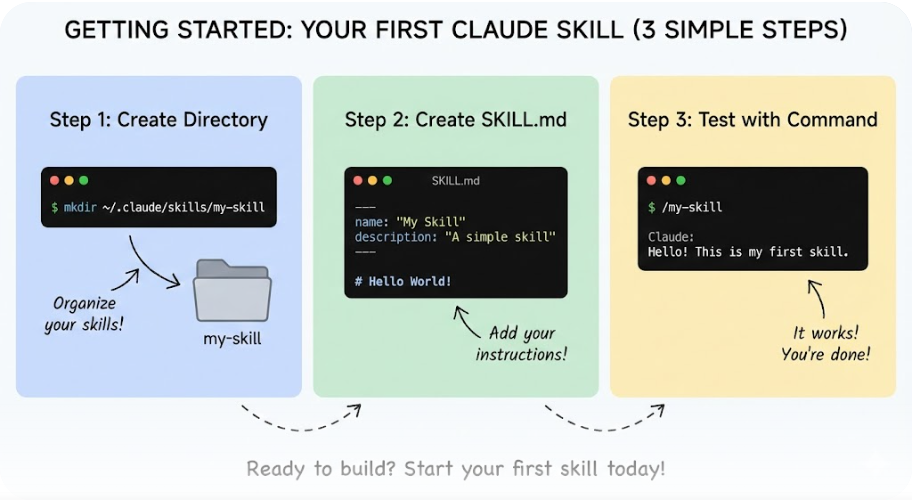
Getting Started: Your First Skill
Step 1: Create the Directory
mkdir -p ~/.claude/skills/my-first-skill
Step 2: Create SKILL.md
---
name: my-first-skill
description: Generates a daily standup update from my git commits and
  calendar. Use when I say "standup", "daily update", or "what did I do
  yesterday".
---

# Daily Standup Generator
Instructions
- Run
git log --since="yesterday" --author=$(git config user.email) - Summarize commits into bullet points
- Format as:
- Yesterday: [commit summaries]
- Today: [ask user for priorities]
- Blockers: [ask if any]
### Step 3: Test

In Claude Code, type `/my-first-skill` or just say "standup" and Claude will invoke it automatically.
Future Roadmap
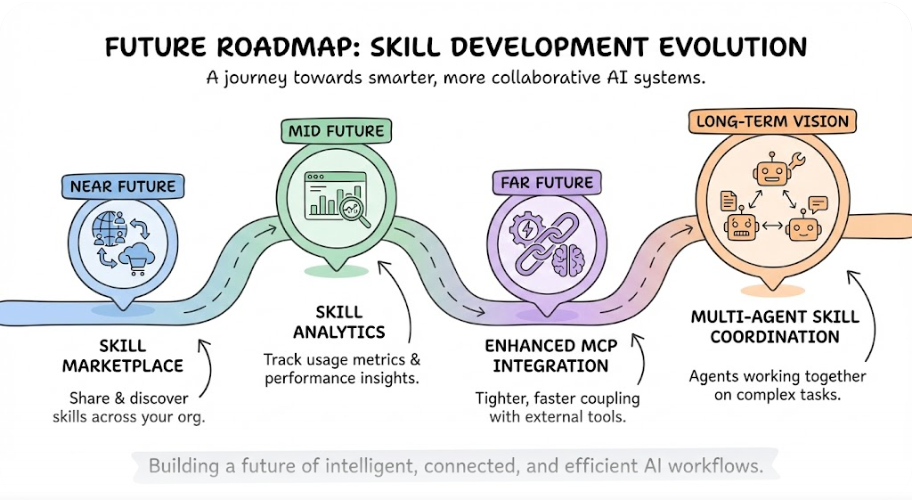
Based on Anthropic's December 2025 announcements and the January 2026 release patterns:
- Skill Marketplace: Organization-wide skill sharing and discovery
- Skill Analytics: Usage metrics and optimization recommendations
- Enhanced MCP Integration: Tighter coupling between skills and tool access
- Multi-Agent Skill Coordination: Skills that orchestrate sub-agents
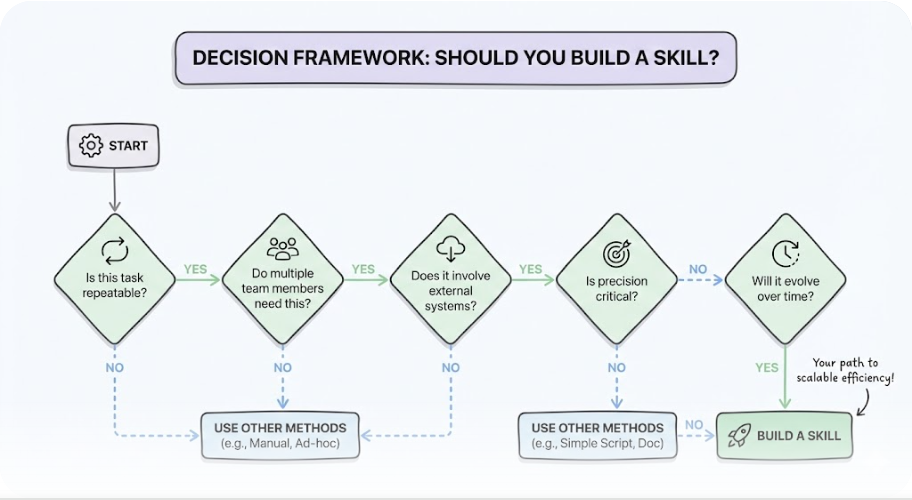
Decision Framework: Should You Build a Skill?
| Question | If Yes | If No |
|---|---|---|
| Is this task repeatable? | Consider a skill | Use one-off prompts |
| Do multiple team members need this? | Definitely a skill | Maybe personal notes |
| Does it involve external systems? | Skill + MCP combo | Skill alone may work |
| Is precision critical? | Skill with validation | Looser prompts okay |
| Will it evolve over time? | Skill (versioned) | Document in wiki |
Conclusion
Claude Skills represent the maturation of AI-assisted workflows from ad-hoc prompting to systematic, shareable, cross-platform automation. The December 2025 open standard and January 2026 hot-reload features have removed the last major friction points for enterprise adoption.
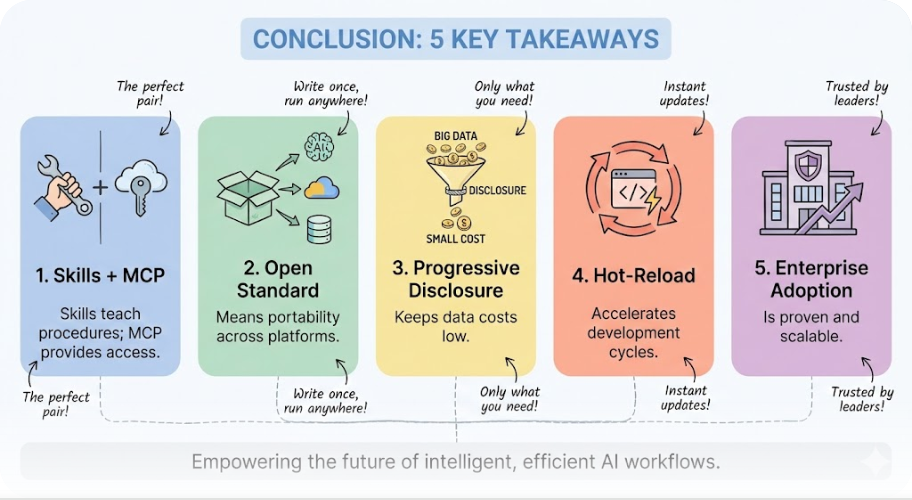
Key Takeaways:
- Skills teach Claude procedures; MCP provides access. Use both together for complex workflows.
- The open standard means portability. Skills you build today work across platforms tomorrow.
- Progressive disclosure keeps costs down. 50 skills don't mean 50× token costs.
- Hot-reload accelerates development. Iterate in real-time without restart friction.
- Enterprise adoption is proven. TELUS, Bridgewater, and Zapier demonstrate scale.
Start with one repetitive workflow—meeting summaries, code reviews, or report generation—and build your first skill. The learning curve is shallow, and the productivity gains compound.
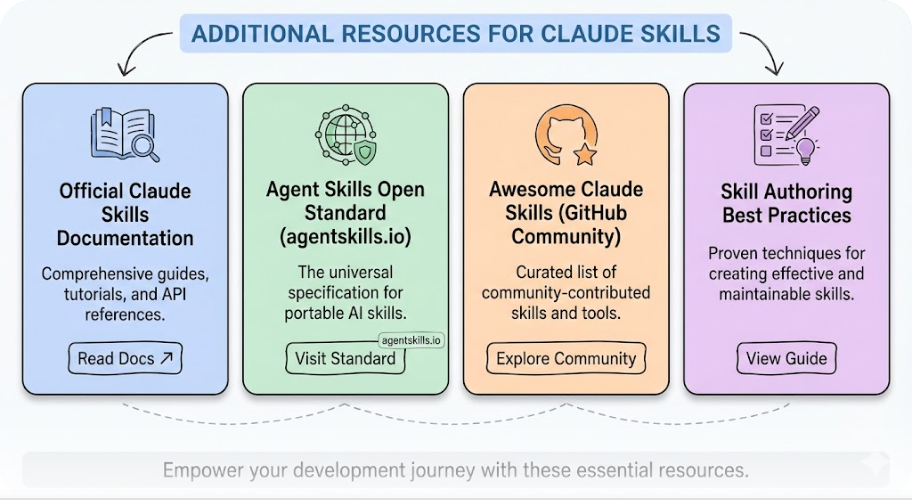
Additional Resources
- Official Claude Skills Documentation
- Agent Skills Open Standard
- Awesome Claude Skills (Community)
- Skill Authoring Best Practices
Keywords: Claude Skills, Agent Skills, Claude Code 2.1.0, MCP, Model Context Protocol, AI automation, enterprise AI, Anthropic, Claude Pro, Claude Max, skill development, AI workflows
No comments yet — be the first to add to the discussion. Comments appear after they’re reviewed.
Want more insights?
Subscribe to get the latest articles delivered straight to your inbox.